SAP PI/PO Directory transports need manual configuration after import, and nobody can see their impact before approval.
Figaf DevOps Suite handles the full transport process for SAP PI/PO, from the ticket to the configured object in the target system. It is used by integration developers who prepare transports, by architects who approve them, and by teams that want to keep developers out of production.
How it works
Figaf downloads the Repository and Directory objects from your SAP PI/PO systems and runs the transport through these steps:
Create a ticket that links to the business requirement or failure.
Add the objects you have changed. Figaf then knows which flows need to be tested and can test them.
Create the transport with all the objects, and configure how the channels should look on the other systems in the landscape.
An approver reviews and approves the transport.
Import the transport. Figaf configures the communication channels as part of the import, and you can create an Excel report of the change and upload it to Jira or ServiceNow.
On top of this process, Figaf gives you:
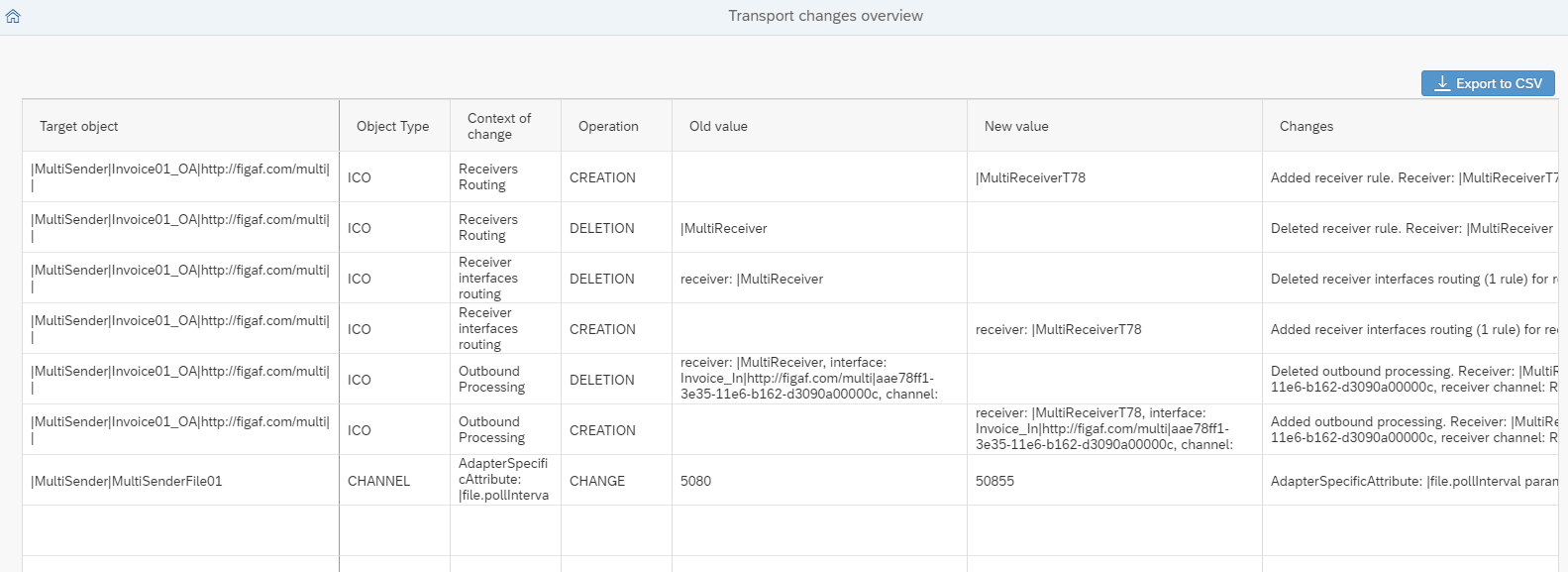
Change overview. The transport overview shows what is transported, including the mapping of receiver systems and all ICO conditions, so you can see the impact of a transport in one view (release 2210). It also covers parties, business systems and business components (release 2308).
Channel preconfiguration. Channels are configured in advance, so developers do not need access to configure the production system. For wildcard ICOs you can select where the ICO should be deployed (release 2305.1), and for channels you can select a decentral adapter engine.
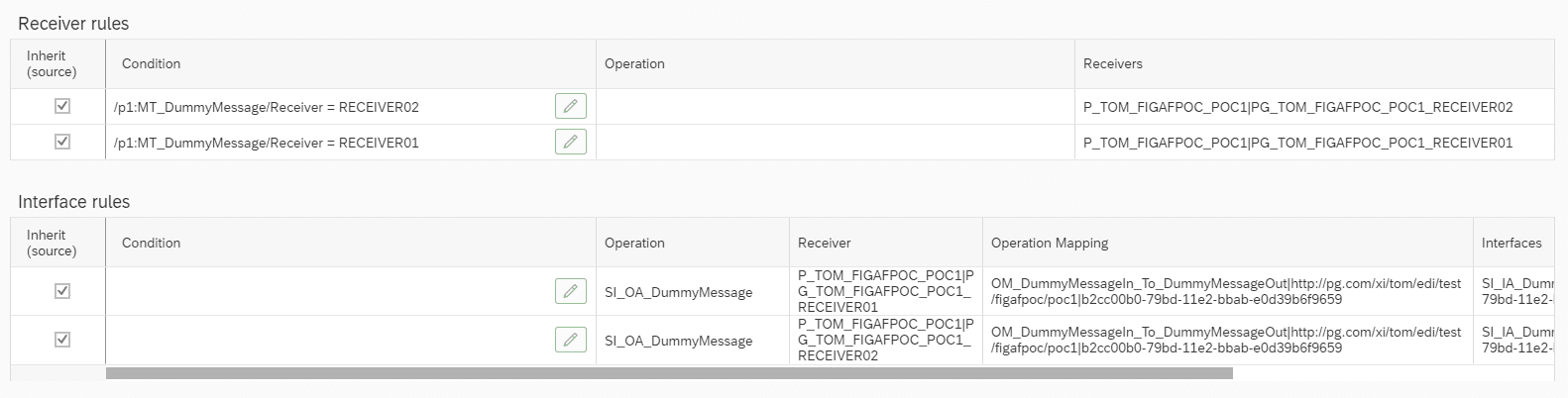
XPath condition editor. Conditions in ICO receiver rules and interface rules can be edited on XPath in a condition editor, and the changes are part of what is approved (release 2305). The ICO rules editor is also available when you reconfigure XPath rules outside a transport (release 2308).
Merge ICOs. You can merge one ICO into another and keep the combined conditions, which helps when two systems become one, for example in an S/4HANA migration (release 2202).
Check before activation. You can import a Directory transport without activating the change list, check what the transport created, and then approve the change list (release 2301).
CTS+. If you use CTS+, it can still run your transports while Figaf handles testing, configuration and documentation.
The transport overview shows the impact of a PI/PO transport in one view.Edit ICO routing conditions as part of the transport.
Business value
Faster delivery. The transport is documented, tested and configured in one process, which removes manual steps after each import.
Fewer errors in production. Channels are configured in one place and tested in QA with the same test cases, so fewer differences reach the productive system.
Better approvals. Architects see the impact of a transport, including conditions and receiver mapping, before they approve it.
Audit and compliance. Each transport is linked to a business reason, so you know who approved the change and why.
Less access to production. Developers do not need to configure the production system themselves.
Good to know
We recommend the on-premise installation of Figaf DevOps Suite for SAP PI/PO, because of limitations of some functionality through Cloud Connector.
Figaf can also test SAP PI/PO interfaces as part of the transport. See regression testing.
Transport SAP PI/PO changes with documentation, testing and configuration built in
Move ICOs, channels and other Directory objects through your landscape with a change overview for the approver, channels configured in advance, and an XPath editor for ICO routing rules.