Your integration content lives only in the tenant, with no versioned backup and no way to run your own code checks on it.
Git integration in Figaf DevOps Suite keeps a copy of your SAP Cloud Integration and SAP API Management content in your own Git repository. It is used by integration developers who want a versioned backup and a local development setup, and by architects who want automated checks such as CPILint as part of the transport process. Git is optional in Figaf: the tool has its own change management, and Git adds to it.
How it works
One switch to set up. On the agent you enable Git integration and enter the repository details. After that there is nothing else to remember: each synchronization commits and pushes all detected changes for you, across all objects, not one at a time.
Connecting the repository. Enter the repository URL, a branch name, a user name and a token. For GitHub, a fine-grained personal access token limited to your repository, with read and write access to Contents, is enough. Test the connection, then initialize the repository: Figaf uploads all the content to a new branch.
What goes into the repository. Packages, iFlows, value mappings, script collections and message mappings, with whole packages organized into their own folders, plus SAP API Management proxies. Objects with the same name, such as an iFlow and a script collection, are kept apart. You can use GitHub or SAP’s Git service.
Documentation in Git. When you switch it on in the Git repository settings, Figaf updates the iFlow documentation in the repository each time it detects a changed iFlow.
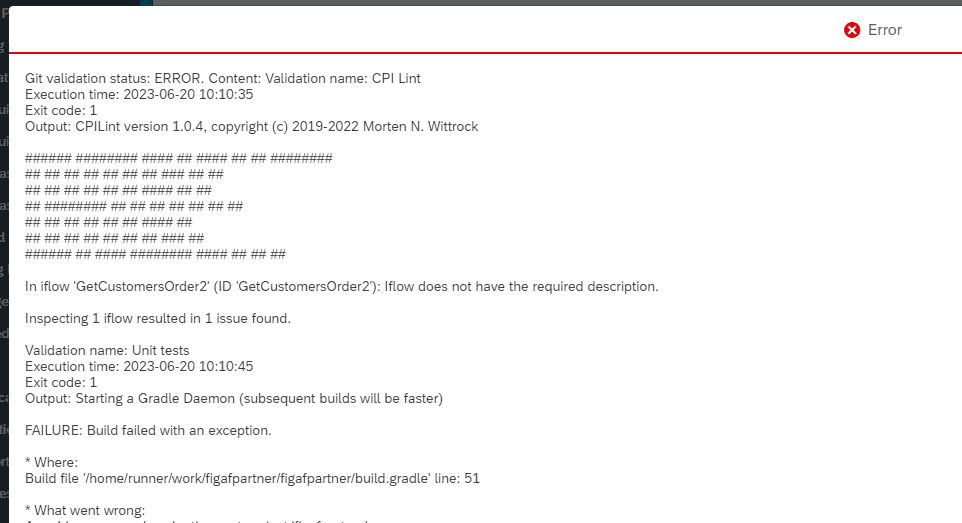
Validation pipeline. Figaf can trigger a pipeline in your repository each time it updates an iFlow, for example in GitHub Actions running CPILint rules, unit tests or static code analysis such as SonarQube. The result is written back to the tracked object and shown on the transport, so users do not need Git access. A transport with an iFlow that fails validation cannot be approved. Figaf provides a GitHub Actions template as a starting point.
Local development. You can develop Groovy and XSLT in a local IDE from the repository, and generate unit test data for your Groovy scripts from recorded test cases.
Connectivity test. You can test the Git connection for both your SAP Cloud Integration and API Management repositories.
Limits. The repository is designed as a backup and a basis for validation and development, not for normal Git branching workflows. The pipeline needs more effort to set up, since you build the validation steps in your own Git service.
Pipeline results are shown in Figaf when you work with the iFlowA failed validation blocks the transportWork on the repository content in your own IDE
Business value
A backup you control. Your integration content is versioned in your own repository, so you can recover objects that were changed or deleted on the tenant.
No manual Git chores. Commits happen automatically on synchronization, so the backup does not depend on developers remembering to push every object.
Quality checks in the release process. Your own rules, such as CPILint, run on every changed iFlow, and failing changes are stopped before approval rather than found in production.
Reuse of your existing toolchain. Teams that already work with Git, pipelines and code analysis can apply them to SAP integration content too.
Less lock in. The content sits in a standard Git repository that other platforms and tools can use.
Good to know
Git integration is part of Figaf DevOps Suite. Since release 2410, the Groovy and XSLT editor in Figaf also requires a Git license.
The pipeline status check came in release 2306, and iFlow documentation in Git in release 2303.1.
Release 2604 removed Figaf’s Gradle plugins from the public Git repository, since they are no longer maintained.
At Dürr, daily Git backups of iFlows and other artifacts were one of the capabilities used.
SAP Integration Suite now has its own GitHub integration with push, pull and import buttons for iFlows. Figaf works differently: it commits all changes automatically and covers more object types.
A versioned Git backup of all your integration content, without extra work
Figaf commits and pushes every detected change in your iFlows, packages and API Management proxies to your Git repository, and can run a validation pipeline on what changed.