You find out an integration failed when the business calls you.
SAP’s own monitoring has improved, and SAP markets it as solved. What it still does not do is tie an error back to the change that caused it, give you one view across tenants and landscapes, or express a failure in terms the business recognizes. Figaf DevOps Suite collects alerts from SAP PI/PO, SAP Cloud Integration and SAP API Management in one place, so support teams and integration developers handle them with rules instead of a full mailbox.
How it works
One inbox for all alerts. Figaf receives and orders alerts from SAP PI/PO, SAP Cloud Integration and SAP API Management, with an integrated action log of what needs to be processed. For SAP PI it uses the standard CBMA alerts enriched with the PI message payload. For SAP Cloud Integration you filter which messages to treat as alerts, such as Status = Failed. For SAP API Management, Figaf adds logging scripts that save alerts in the KVM store.
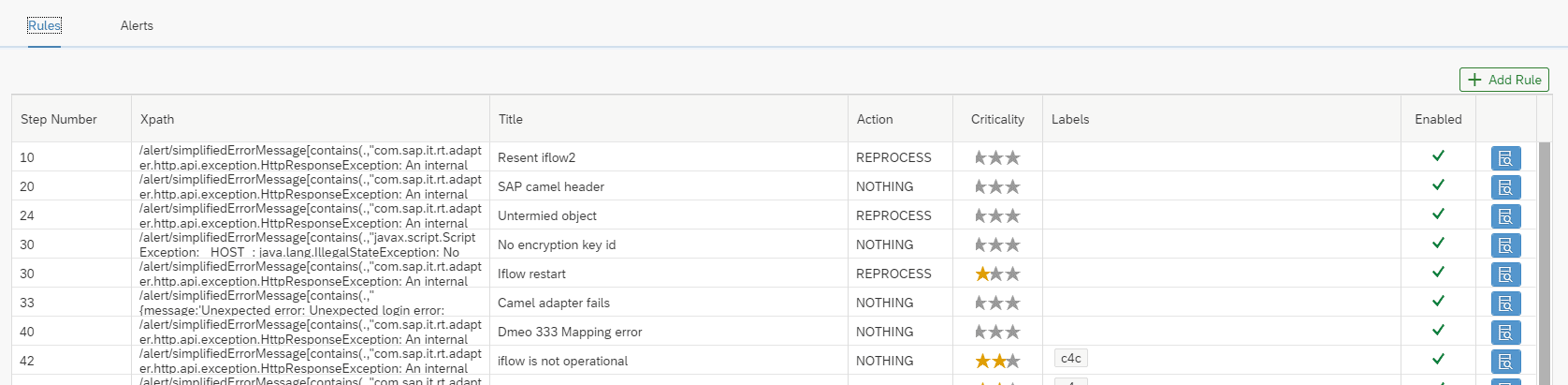
Rules you define. You set up simple rules for each kind of alert with XPath, including XPath 2.0 functions, for example to report an error only after a message has been retried for 2 days. Rules can use the message header, custom headers and custom status, and extract part of an MPL attachment payload, such as the line item number with an error, into the alert text.
Resolution notes on the rule. Write on a rule how to resolve the error. The next time the same error happens, the alert is marked with the rule, so whoever picks it up sees how to resolve it instead of researching it.
Delayed rules. For messages pulled through JMS, you set how long to wait for a successful retry before you are told about the problem.
Route alerts where work happens. Send an email, call a webhook to Jira, Slack or an SMS provider, or create a ticket directly to fix the issue. You can also resend or cancel messages, and mute alerts for some minutes.
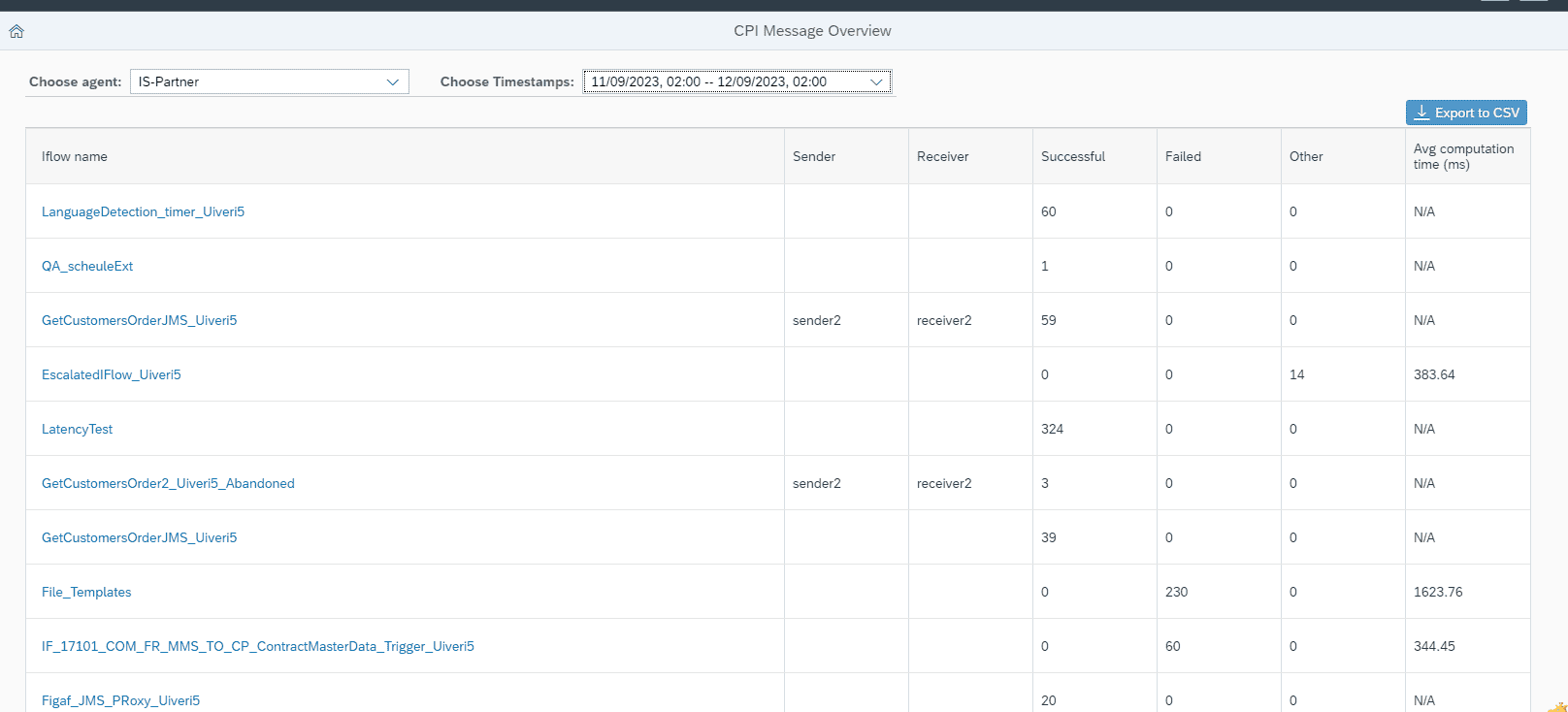
Message overview for Cloud Integration. Like the Message Status Overview in SAP PI, Figaf aggregates Cloud Integration messages per iFlow, sender and receiver into success, failed and other, with the average processing time, and you drill into the messages. You enable it with “Enable message processing logs statistics” on the agent. Figaf polls the Cloud Integration API every 5 minutes and shows any gaps.
Runtime monitor. See several iFlows in one monitor, with MPL attachments and persisted messages, and keep failed messages for more detail.
Edge Integration Cell. Monitoring and alerting also cover iFlows on Edge Integration Cell, including notifications when an iFlow fails there.
AI help. From an error you can open the Figaf Bot with the prompt filled in, to get help resolving it, using your own OpenAI or SAP AI key.
Storage limits. By default alerts use at most 1 GB of storage and the latest 200,000 alerts are kept, set with the parameters maxTotalAlertAttachmentsSize and maxAlertsCount.
Rules decide how each kind of alert is handledMessage statistics per iFlow for SAP Cloud IntegrationDelayed rules wait for a retry before alerting
Business value
Find failures before the business does. An alert reaches the team that can fix it while the error is still a technical issue, before it becomes a business incident.
Less noise, faster response. Rules sort out the alerts that matter, so support does not work through a full mailbox where nobody knows what has been handled.
One process for the whole landscape. SAP PI/PO, Cloud Integration, API Management and Edge Integration Cell alerts are handled the same way, which makes support easier to staff and to hand over.
Fits your incident process. Alerts go into the tools your team already uses, such as Jira or email, with the context needed to act.
Quick to start. It takes about 15 minutes to set up your first alert.
Good to know
Monitoring and alerting started as the standalone Figaf Support tool and is now part of Figaf DevOps Suite.
The Cloud Integration message overview came in release 2309, payload checks in alerts in release 2307, XPath 2.0 rules in release 2410, and delayed rules and Edge Integration Cell notifications in release 2501.
For B2B landscapes, the EDI Message Monitor downloads and persists messages from SAP PI/PO and SAP Cloud Integration, so you can keep payloads longer than 30 days.