Your scenario runs through several iFlows connected by ProcessDirect or JMS, but you can only test one iFlow at a time.
Many SAP Cloud Integration scenarios span several iFlows, where one iFlow calls the next through ProcessDirect or a JMS queue. Multi iFlow chain testing in Figaf DevOps Suite lets you create one test case that covers the full chain, so you can check that each step produces the correct result. It is used by integration developers and testers, and by teams migrating to the SAP pipeline concept.
How it works
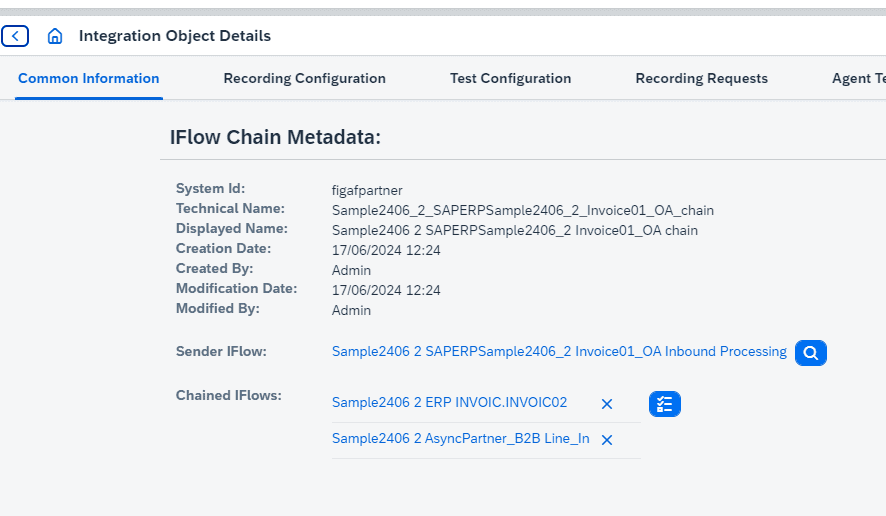
Define the chain. A chain has a sender iFlow and the chained iFlows that follow it. You define the child or subsequent iFlows for an iFlow, and then use the iFlow chain setup in the recording and test configuration.
Recording. To record, Figaf switches the iFlows into trace mode before it sends messages. Because of this, you may sometimes need to run the test case more than once.
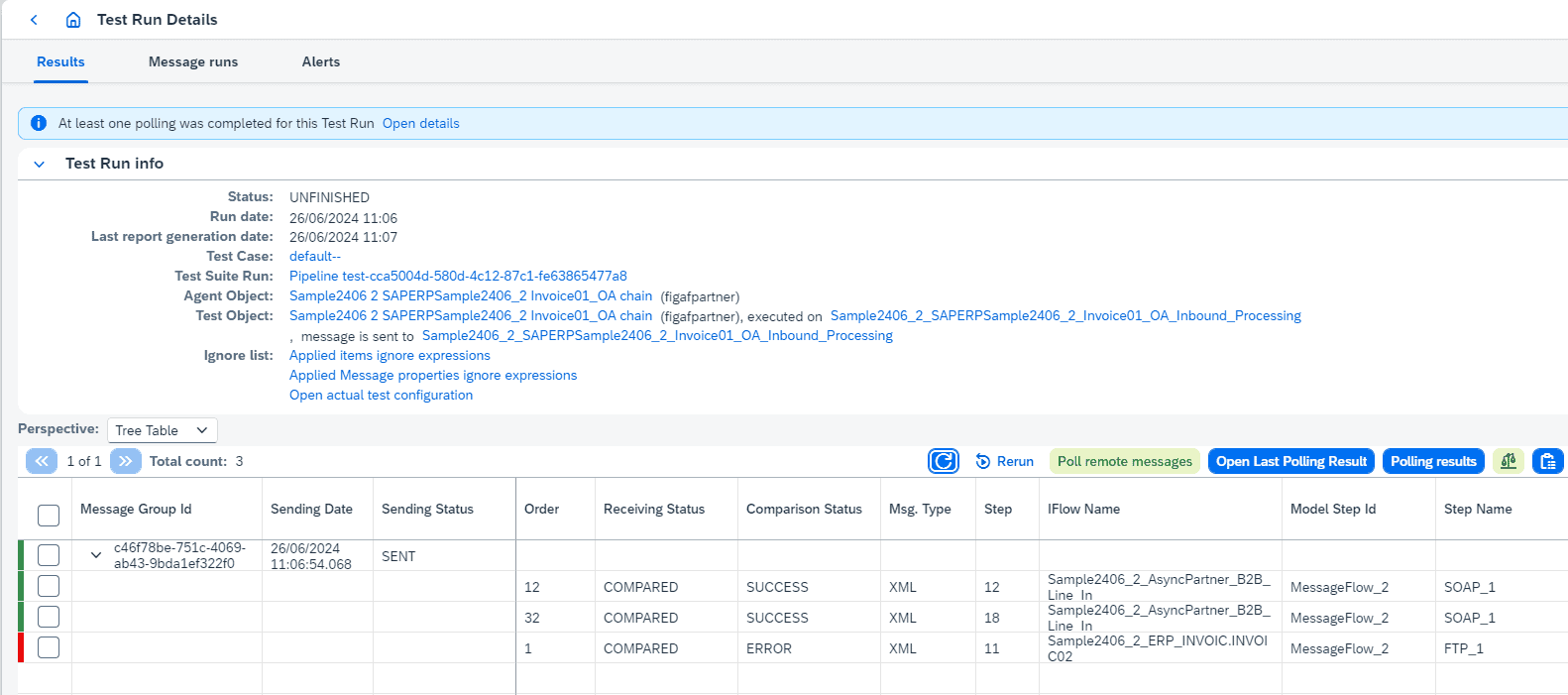
Where to fetch messages. You select where to fetch the messages across the landscape, and after a run you see where Figaf found them. This also works if you migrated the flows manually instead of with the Figaf Migration Tool.
Order expressions. If a run finds unexpected messages, or none, the cause is often a missing order expression. Add it to the test case configuration and to the recording configuration: it looks into the XML payload and uses the values it finds to pick the right message. Once Figaf has chosen the messages they are not easy to change, so you sometimes need to migrate the test case again.
From a PI scenario. For a scenario migrated from SAP PI/PO, link the migrated iFlows to the PI object with Link iFlows and select the chain. The recorded PI messages can then be migrated into a test case for the whole chain.
Long running processes. If some processes run for a long time, you can poll remote messages to make sure you get all the extra messages.
Results. The test result shows an iFlow view, so you see the outcome per iFlow in the chain.
Pipeline concept. Chains are built for scenarios that use the SAP pipeline concept, so you can test pipelines much more closely.
Multiple ProcessDirect calls in one iFlow. If one iFlow makes several ProcessDirect calls, you can run all the messages as one test case.
A chain: the sender and the chained iFlows tested in one go.After a run, see where Figaf found the messages for each iFlow.
Business value
Confidence in end to end behavior. Testing the full chain shows whether the scenario as a whole still produces the right output, not only whether the first iFlow runs.
Less mocking and manual checking. Before chains, such cases were tested by letting Figaf mock the external endpoints. Now the real subsequent iFlows are part of the test, so fewer steps have to be checked by hand.
Safer pipeline migrations. Teams moving SAP PI/PO interfaces to the pipeline concept can verify the migrated chain against recorded messages before it goes live.
Repeatable tests. Once the chain is defined, the same test case can be run again after each change, which lowers the risk of a change in one iFlow breaking the next.
Good to know
Testing across several iFlows was introduced in release 2401. In release 2406, the earlier concept of linked iFlows was replaced by chains, which made pipeline testing more scalable.
For B2B scenarios on Trading Partner Management, release 2504 added a testing approach based on TPM agreements, which supports MIGs and MAGs and iFlows with ProcessDirect, and does not require trace mode.
Define a chain of a sender iFlow and its subsequent iFlows, record messages across all of them and run them as one test case, including pipeline concept flows.