Last week SAP shipped native GitHub integration for Integration Suite and it’s a genuinely welcome update.
Open a package, and you’ll see new Git Push and Git Pull buttons, plus Git Import when adding an iFlow. Setup takes an admin about five minutes: paste a repo URL and a Personal Access Token, connect, and you’re syncing. Up to 50 repos per tenant.
It’s a first release, so a few things are still ahead: you’ll re-enter your token on every push or pull, there’s no “push all from package” option yet, and it currently covers iFlows only, mappings and script collections aren’t included yet. All fair territory for a v1.
We’ve been approaching the same problem from a different angle for a while. Turn on Git integration once in your agent, and every sync commits and pushes automatically, iFlows, whole packages, and API Management proxies included, organized without any manual steps. Set up the pipeline, and Figaf wires into GitHub Actions to validate what changed: CPILint rules, unit tests, results written back to the repo and surfaced on the tracked object. There’s even Groovy unit-test generation from recorded messages.
Really, these are two good paths on the same journey. What matters is that the conversation now is about which Git workflow fits your team, not whether Git belongs in the picture at all. That’s real progress.
Read the full breakdown from Alex here
He also recorded a walkthrough of the feature, which you can watch below.
Get control of your SAP integration landscape
Missed our live session on getting real ownership and control of your SAP PI/PO, CPI, or Integration Suite landscape? In a webinar this week, we covered how the Figaf DevOps Suite gives you automatic change logging and fast, reusable testing, so you can prove what’s running instead of just describing it. You can watch the recording here.
Watch on YouTube Owning your SAP Integration landscape
If what you see resonates and you want to experience what this looks like on your own SAP PI/PO, CPI, or Integration Suite landscape, book a quick call or start a free trial and we’ll walk through it together.
SAP Integration Suite Forum 2026 in Walldorf
If you’re an Integration Architect, Developer, Enterprise Architect, IT Leader, or Process Expert looking to stay ahead in the age of AI-driven integration, this event is for you.
This two-day event covers AI-enabled integration strategies, with a focus on:
Agentic and event-driven architectures
API-centric integration and MCP gateway
B2B integration and integration platform modernization journeys
Key topics can be experienced through hands-on sessions
Networking with SAP product experts and peers
Learn, connect, and shape the future of intelligent integration.
📅 10-11 November 2026
📍 SAP Walldorf, Germany
Let us know if you are joining, so we can meet up.
Context is the whole game when AI debugs your integration
When something breaks between systems, the questions always land on the integration team. Why did this message fail, why is this field mapped that way. The knowledge to answer that was known once, then it evaporates: a person leaves, a chat scrolls away, a mailbox gets closed.
Radosław Ruciński has written an article on LinkedIn, which walks through three levels of using AI to get that knowledge back, from a generic answer that’s technically correct and useless for your case, up to an assistant that actually knows your flow and can point at the parameter causing the problem. It’s a useful way to think about what “AI for integration support” actually means in practice.
My own takeaway: the more context you can get into the resolution, the better the answer. That’s the real lesson here, more than the AI part. And worth saying, Figaf already lets you search for similar past errors, so some of this is closer at hand than you’d think.
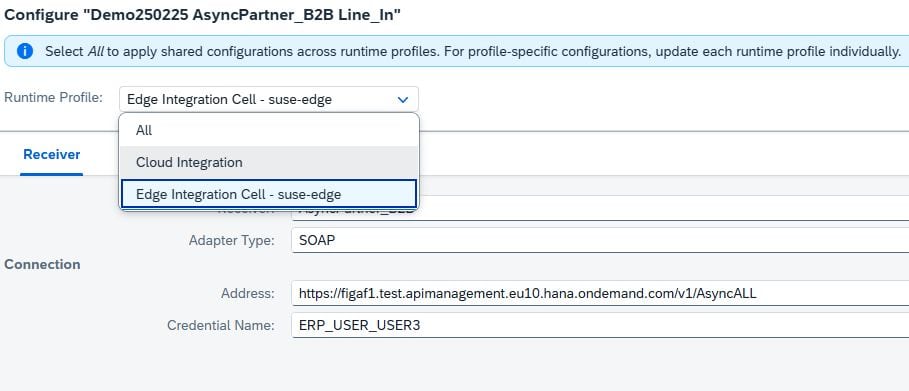
Did you see the last change with SAP Integration Suite in 4.11.4?
You can now configure Edge Integration Cells separately from the cloud runtime. Handy if you want the same iFlow running in multiple environments with different configurations.
From the UI, you can push changes to all environments at once, or edit individual elements one by one. Only wish, hoping SAP expands the API to support this too, not just the UI.