
Update to Java 21
We have upgraded the application to Java 21, to be the supported version.
We have seen customers using Java 21 already when running Figaf locally. But now it is a requirement that you update. For customers deploying in BTP or docker the Java version is automatically upgraded.
B2B component updates
This release introduces several optimizations and some brand new features, which will help accelerate your adoption of SAP Integration Suite TPM, and also help with the daily operations of managing a large complex B2B setup across multiple landscapes and tenants.
B2B: create agreement: new as well as migrated business
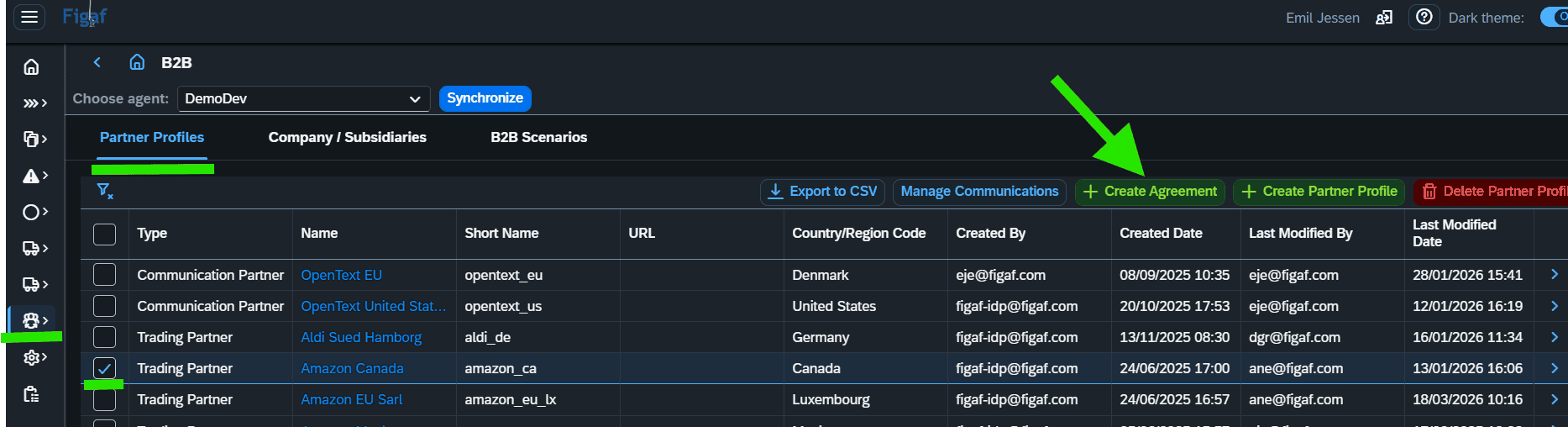
The process starts with a single screen.
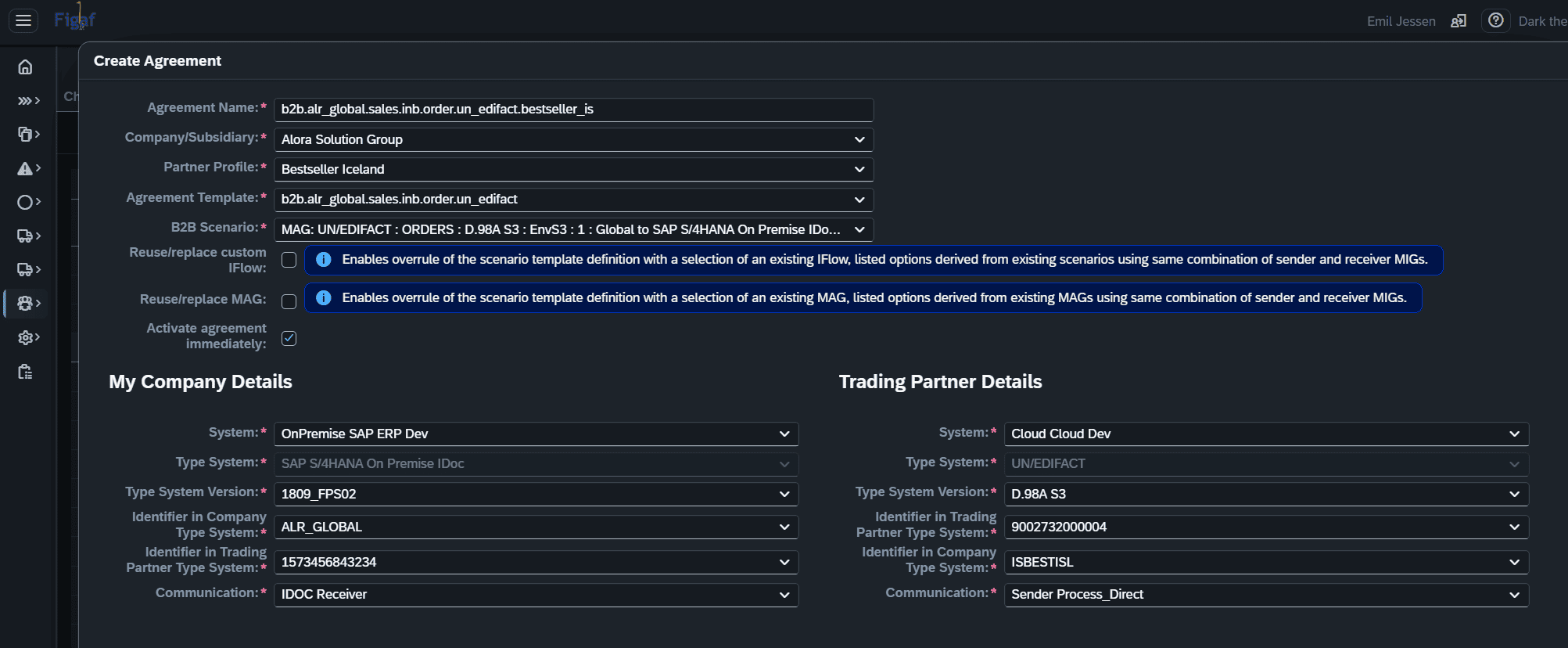
This feature will, likely, end up representing a core element in the governance processes in any agile and B2B-heavy organization. Ensuring that you can quickly and uniformly create new agreements, following some central and critical governance policies.
With Figaf, you can now go through a single screen create-process, which will ensure that all relevant objects are created and/or assigned correctly, making the agreement ready for transport in a single step. Needless to say, this new feature will be a key component in future planned mass-create functions.
Additionally, the process of creating a new agreement is now aligned across the two starting points:
- creating a new agreement “from scratch” for new business into an existing SAP Integration Suite TPM setup.
- migrate an existing B2B operation mapping from a SAP PI system into a SAP Integration Suite TPM setup.
Regardless of starting point, the process and the result will be identical. Making a migration project a good training ground for subsequent daily operations and management of the SAP Integration Suite TPM via the Figaf platform.
Create-as-new: You start by selecting the respective Trading Partner. Then click on “+ Create Agreement”
Some of the benefits from using this fast-track function:
- Agreement template selection is limited to templates only created for the selected company/subsidiary.
- Default selection of Purpose:Dev systems for company/subsidiary as well as for partner.
- After selecting scenario (with MAG/MIGs assigned), there is a validation check as to whether the TypeSystems (formats) represented by the MIGs are assigned to the respective Systems determined automatically or selected manually. Ensuring that the result will be a valid agreement matching the system configurations.
- Option to activate agreement immediately, saving another manual functional followup step.
- Re-use existing/alternative custom iFlow instead of original assigned MAG, in case your agreement templates are based on MAGs only or if you do not have all custom iFlows maintained in Agreement Templates, you have the option to select an alternative custom (main) iFlow from a list of all (main) iFlows used in existing TPM scenarios using same source MIG and target MIG combination.
- Re-use existing/alternative MAG: in case your agreement templates are not 100% up2date or cover all possible MAG versions, you have the option to select an alternative MAG from a list of all MAGs using the same source MIG and target MIG combination.
B2B: UI optimizations
Assuming that the Figaf B2B component is already providing you with much improved management of your B2B setup and landscapes, there are several optimizations implemented in this release that will help your daily operations. For new users, these will just become some new indispensable features to embrace.
MAG and MIGs status and version are now all visible from the B2B Scenarios overview.
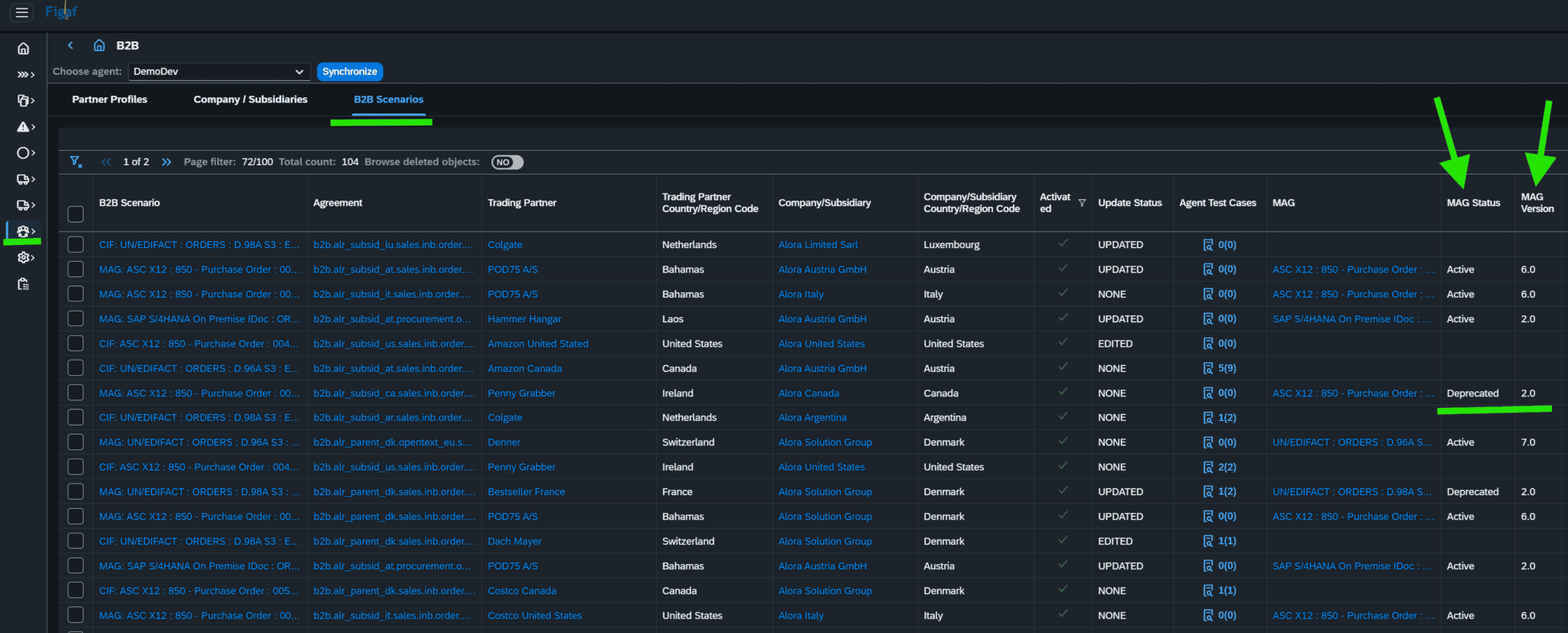
This provide you with the optimal basis for managing and tracking all your MAG and MIG, being able to quickly get an overview of what might not be up2date. Note, these columns are only available when the function “Show additional columns” is enabled.
Similar, you can now view the runtime status and various version properties of the main-, pre-, and post-iflows assigned scenarios.
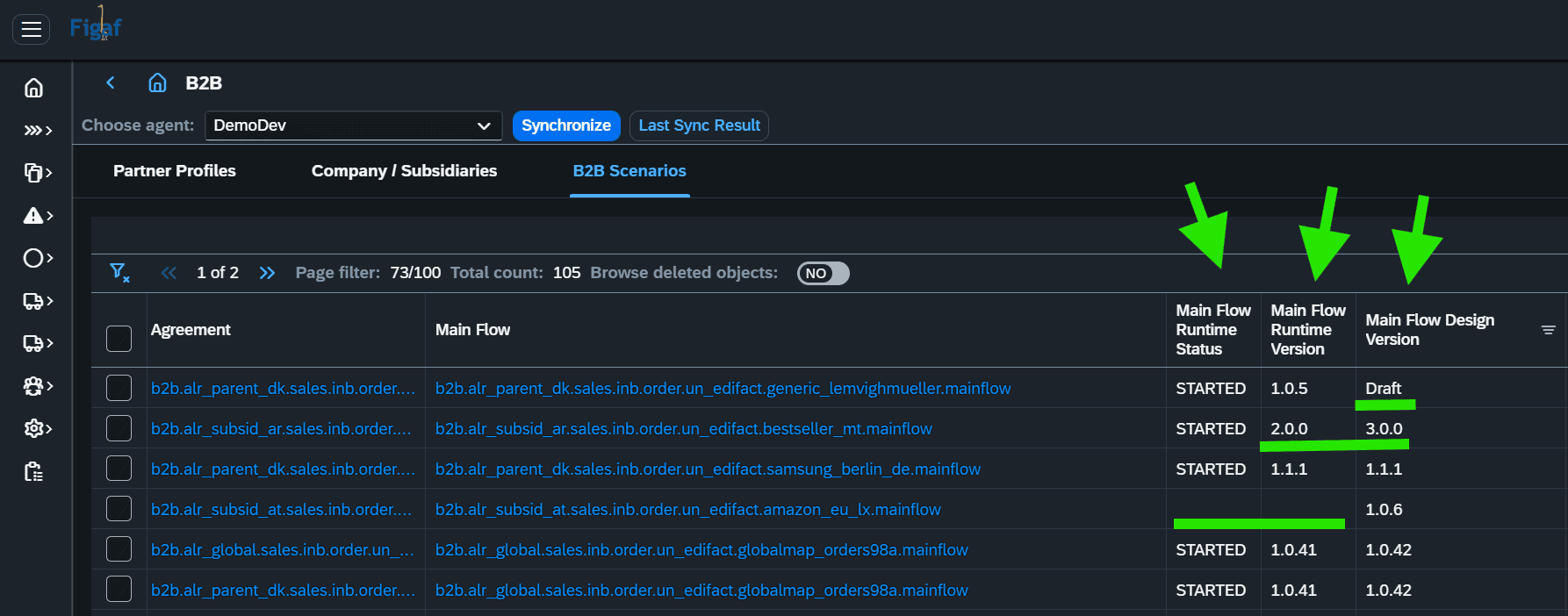
This can also provide optimal overview for an analysis of the impact of a given change to a specific iFlow. And provide you a method to verify and control for version alignment. Note, these columns are only available when the function “Show additional columns” is enabled.
Archiving settings are displayed for both sender and receiver payloads also now.
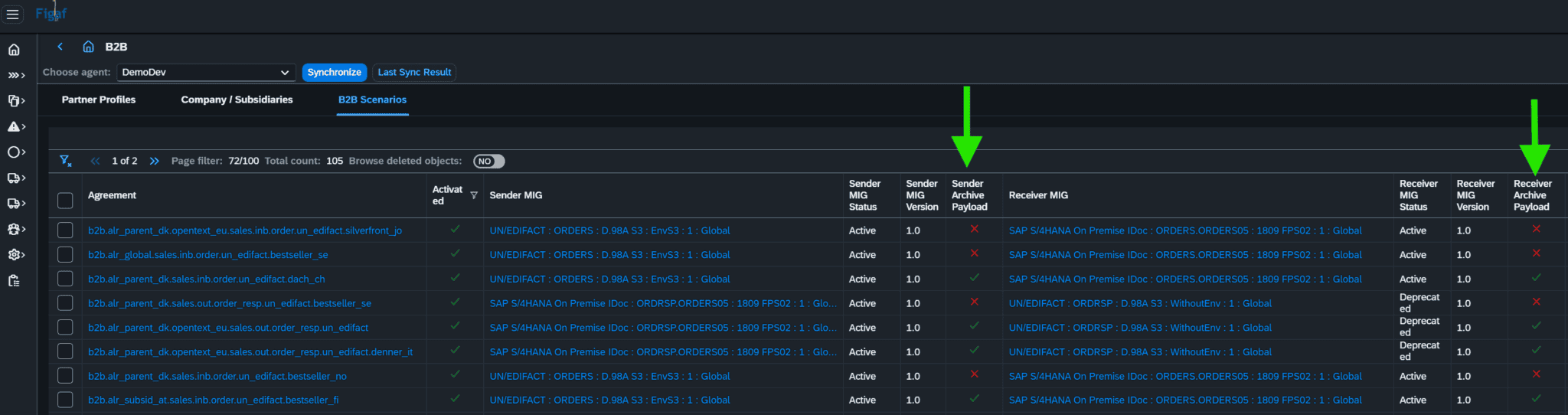
This provides a simple method to quickly verify whether archiving settings are aligned with your governance and legal/audit requirements and responsibilities. Note, these columns are only available when the function “Show additional columns” is enabled.
TypeSystem and TypeSystemVersion is now being automatically determined in the PI-2-CPI B2B migration process.
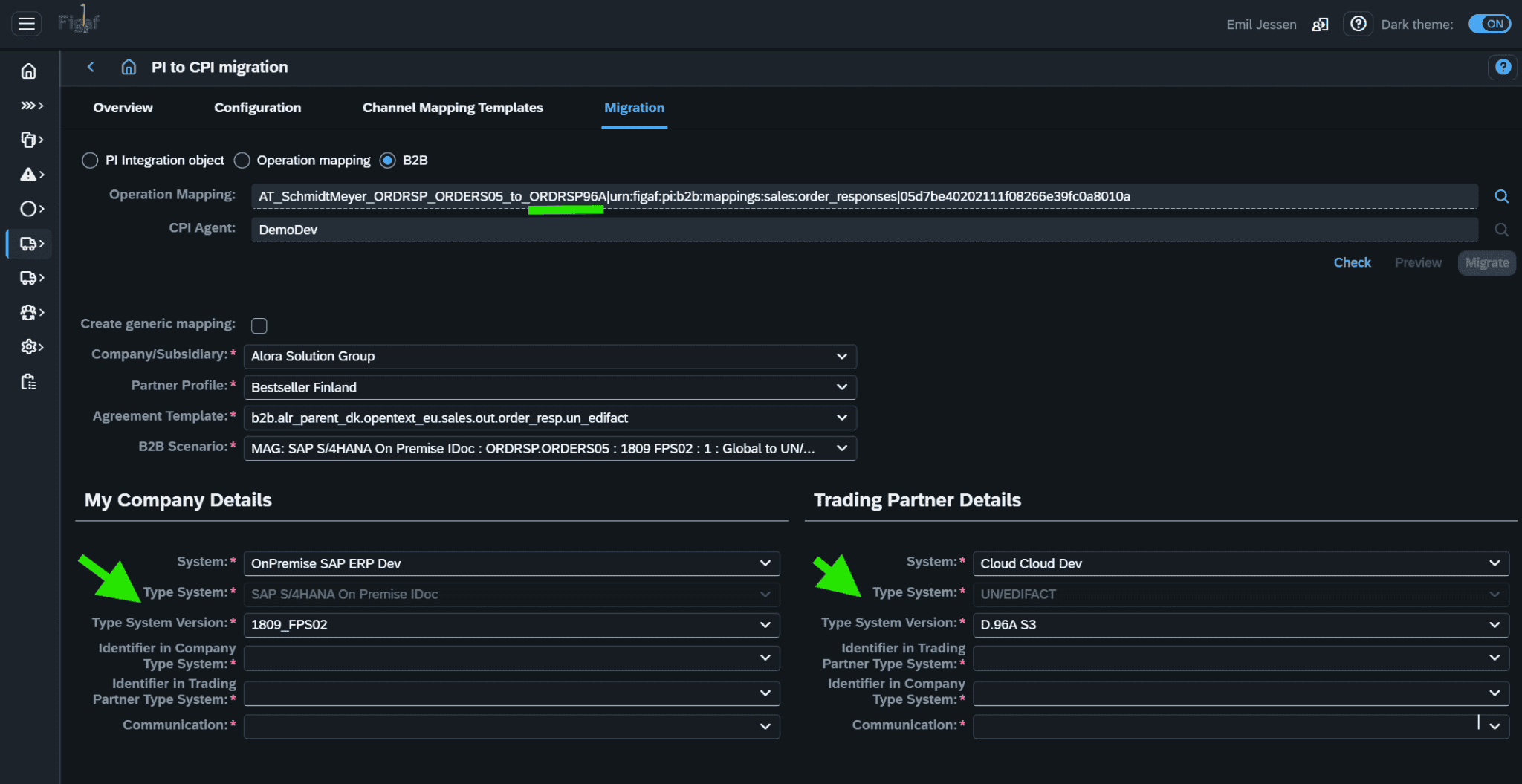
By avoiding a manual selection of these, you can eliminate any risk of inconsistencies in your newly migrated or created agreements, when it comes to TypeSystem and TypeSystemVersion assignments. In order to avoid human-error selections, the TypeSystem is no longer selectable, but will only be determined by scenario assignment. TypeSystemVersion is also determined automatically, but is still subject to manual user selection/change. Small change at first glance, but this will ensure better quality in your implementations/migrations, due to the elimination of human errors. The Same feature applies to the normal create-agreement function as well, of course.
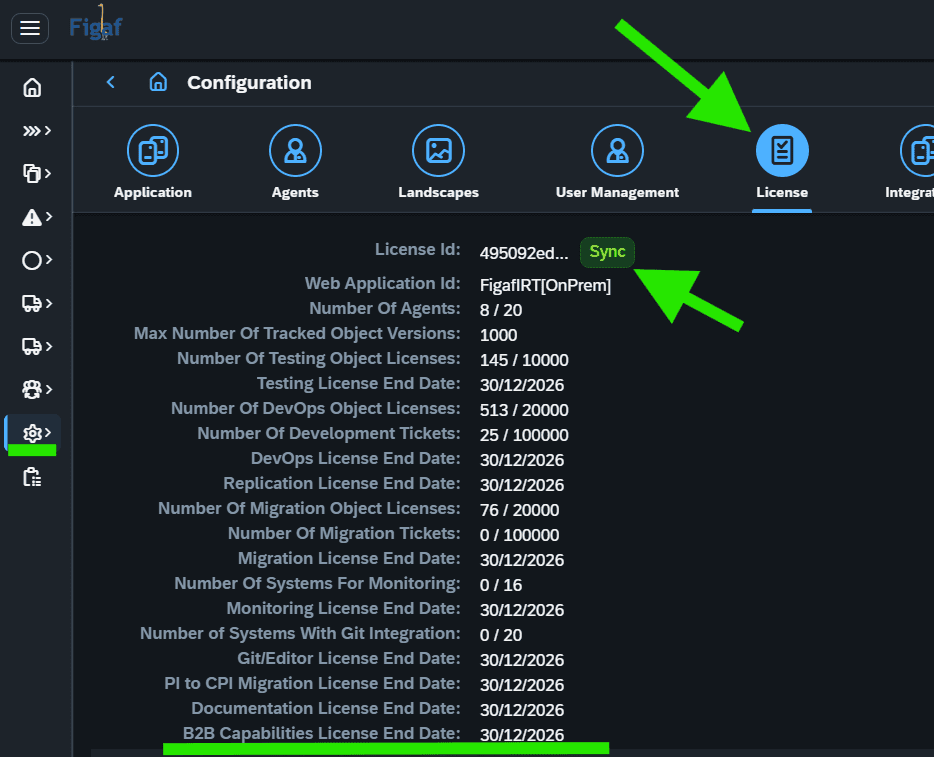
B2B: license control of capabilities
Using the Figaf B2B component is still included within the DevOps license, but you will need to sync your license after upgrade, since the B2B capabilities are now license controlled.
Minor improvements
- Improved usage of External parameters with default value
- File type encoding of uploaded messages
- Improved transport warnings on tagging rules
- Poll larger 1000+ messages test cases
