SAP updates your Cloud Integration tenants, and you find out late, without knowing which tenants changed or from which version.
SAP updates SAP Cloud Integration on its own schedule, and the notice you get does not always say whether it was a big or a small change. Figaf DevOps Suite tracks the Cloud Integration version on each of your tenants, emails your team when it changes and keeps a history of the versions. It is used by integration support teams and administrators who need to know what changed in the platform when an iFlow starts behaving differently.
How it works
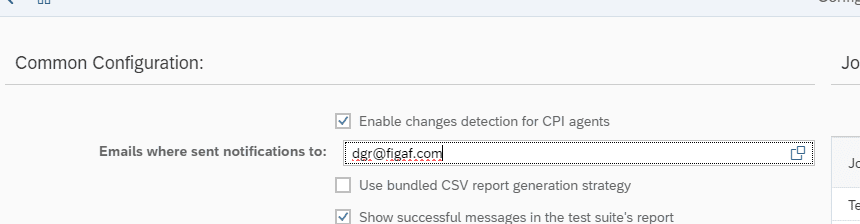
Who gets the email. In the application settings, you add the email addresses of the people who should get the update.
Version check. Every 8 hours, Figaf checks the version of SAP Cloud Integration on each connected tenant. If the version has changed, the change is registered.
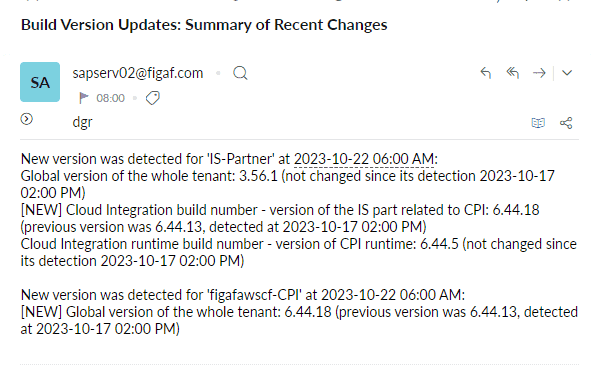
Notification. The email tells you which tenants have been updated, and, if there was an earlier version, what the old version was.
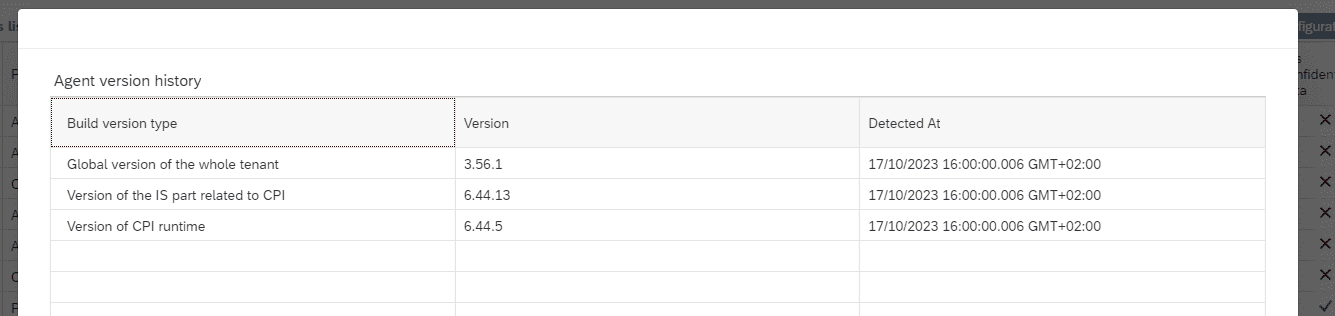
Version history. On each agent, open Show version history to see the versions of Cloud Integration on that tenant over time, including the old version.
Add the people who should be told when the version changes.The version history per tenant.The email shows the updated tenants and their previous version.
Business value
Faster root cause analysis. When an interface fails after a weekend, support can see straight away whether the platform was updated, instead of searching for external sources.
Clear view of the landscape. You know which version each tenant runs, so you can tell whether development, QA and production are on the same version.
No manual tracking. The check runs by itself every 8 hours, so nobody has to follow SAP announcements or community trackers to keep up.
Better audit trail. The version history records when the platform changed, next to the record of your own changes in Figaf.