Many SAP PI file channels rely on content conversion, and Cloud Integration converts files differently, so the mappings behind them break.
SAP PI file channels could convert CSV and text files into a predictable XML structure, and many integrations depend on it. SAP Cloud Integration converts files differently, based on an XSD, so a migrated file often has a different structure and the mappings would need to change. Figaf Migration Tool migrates the content conversion itself, so integration teams can move these channels without a Groovy developer on every scenario.
How it works
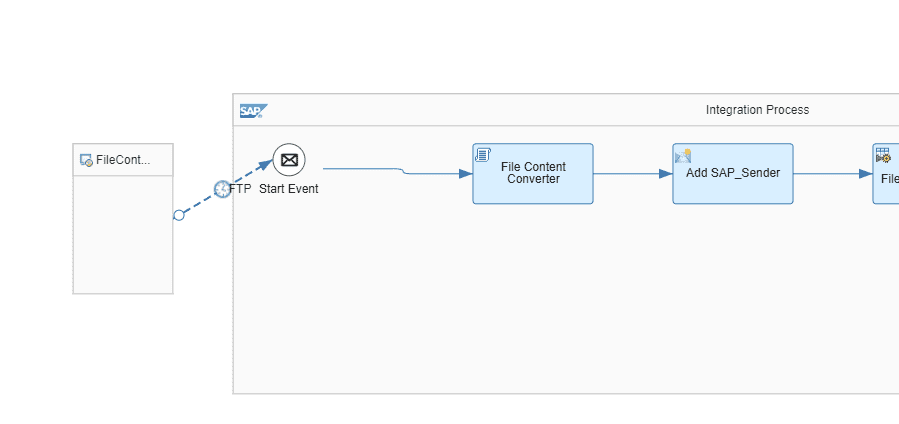
Automatic in the migration. When you migrate an ICO with a file channel, the Figaf Migration Tool adds a file content converter to the flow and generates the Groovy script with the channel parameters. You still select the template that converts the file channel to SFTP or FTPS.
Open-source converter. Figaf built its own converter, made to be as close to the PI behavior as possible. It is saved as a JAR file in the iFlow and called from a Groovy script with a ConversionConfig that the migration tool generates. The content-converter project is open source on GitHub and can be used without Figaf.
Both directions. The first version (release 2310) converted CSV and text to XML. Release 2401 added the other direction, from XML to CSV or text, for receiver channels.
SAP standard module. Since release 2412, the migration also supports the standard content converter module from SAP, for both File Content Conversion and the MessageTransformationBean. There are some differences between PI and the Groovy script, which you can fix manually or ask the Figaf team to fix.
Pipeline concept. When you migrate to the pipeline concept, Figaf generates the inbound conversion flow with the file content conversion (release 2406).
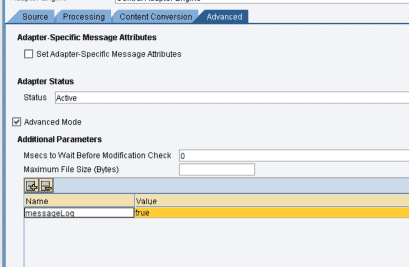
Testing. Set the additional parameter messageLog=true on the PI file channel, sender or receiver, and enable recording of the original payloads on the test case recording. Figaf can then fetch the original message from the monitor and test the migrated iFlow with it (release 2401). Figaf can also test messages that start from SFTP or FTPS by creating a new iFlow with the same settings.
Limits. Not every case is covered yet. Conversions done in an adapter module have not been analyzed. Figaf customers can submit a new case at the cost of one ICO migration, with an input file, the channel XML and the expected output XML and no sensitive data, since it becomes part of the unit tests.
The content converter is added to the migrated iFlow automatically.Set messageLog on the PI channel so Figaf can record the original payload.
Business value
Shorter migrations. File channels with content conversion do not need to be rebuilt by hand, which removes a common source of rework in PI/PO migrations.
Mappings stay as they are. Because the converter produces the same XML structure as PI, existing message mappings can be reused.
Less specialist work. Teams can migrate these scenarios without a Groovy developer writing a parser for each file format.
Lower risk. Migrated channels can be tested with the original payloads, so you can show that the new iFlow produces the same result.
No lock-in. The converter is open source and can be used outside Figaf.
Good to know
Available since release 2310 and included in the Figaf Migration Tool. The Migration Edition gives you 10 free migrations to try it.
Release 2609 improved the content conversion Groovy script to handle key fields that are not in the first position.
Migrate file channels with content conversion, without rewriting your mappings
Figaf adds the content conversion to the migrated iFlow and generates its configuration from the PI channel, so the existing message mappings keep the input structure they expect.
See file content conversion migration on your landscape