Everything you built over fifteen years has to move, and rebuilding it by hand is the default plan.
The expensive part of leaving SAP PI/PO is not the platform. It is that a decade and a half of mappings, partner configuration and accumulated edge cases lives inside it, and almost none of that is written down anywhere else. The Figaf Migration Tool converts SAP PI ICOs and receiver determinations into SAP Cloud Integration iFlows in a few clicks, converts what can be converted, and tells you plainly what cannot.
How it works
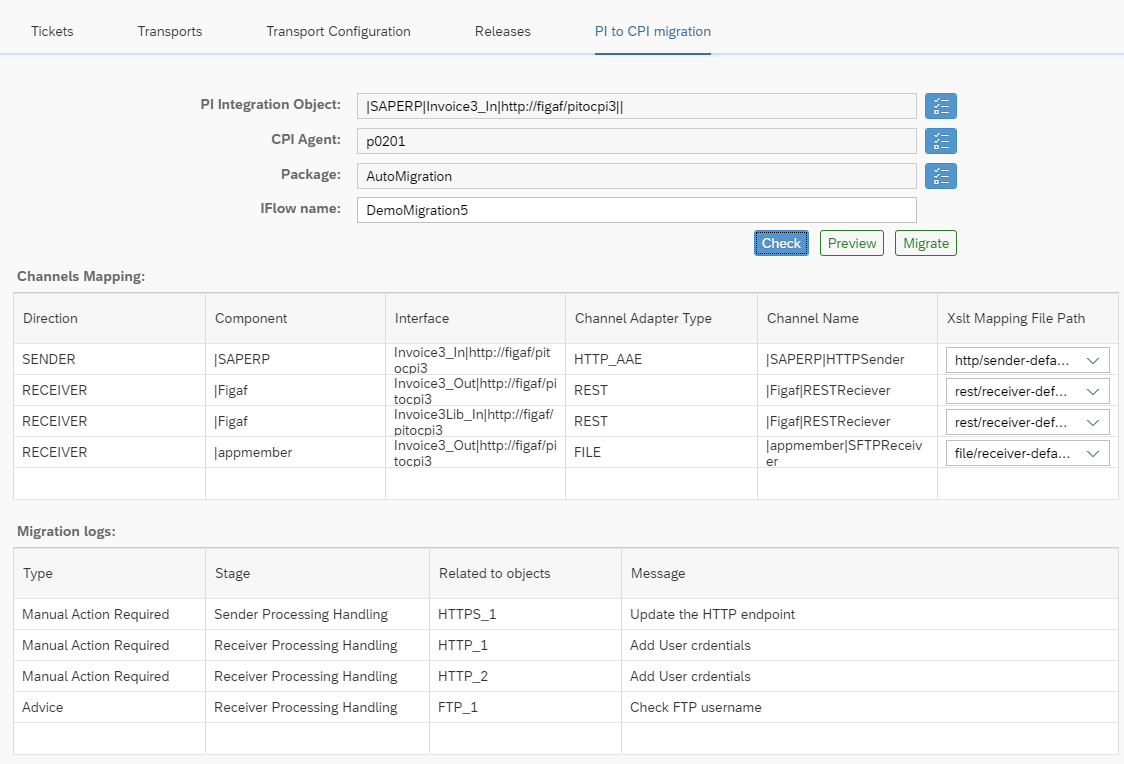
You select the ICO or receiver determination to migrate, the Cloud Integration agent and package, and how to map the channels. Figaf then builds the iFlow and shows a preview before anything is deployed.
Source objects. ICOs and receiver determinations on SAP PI 7.1 and later, asynchronous and synchronous. Branches in receiver and interface determinations are split with the same conditions, and ICOs with extended receiver determination are supported (release 2309.1). For older systems such as 7.1, operation mappings can also be migrated directly (release 2502).
Message mappings. Mappings with IDoc, RFC, external definitions, message and data types, and multi mappings are migrated. RFC lookups get mock functions. Function libraries can be converted to Groovy scripts in a shared artifact, imported as SAP function library objects (release 2308), or mixed per UDF (release 2503). Mapping parameters are supported (release 2503).
Java mappings and modules. A Java mapping used in an operation mapping can be migrated with a Groovy wrapper that calls it (release 2410, improved in 2510). Named modules and Java mappings can also be mapped to scripts in a script collection (release 2401). Rewriting Java code to Groovy is the more sustainable option.
Channels. Channels are converted with XSLT templates, from a public set that you adjust and turn into your own templates. The templates can add notifications for the manual actions that remain, which appear as a task list after the migration. Polling adapters such as REST polling and JDBC are supported (release 2410).
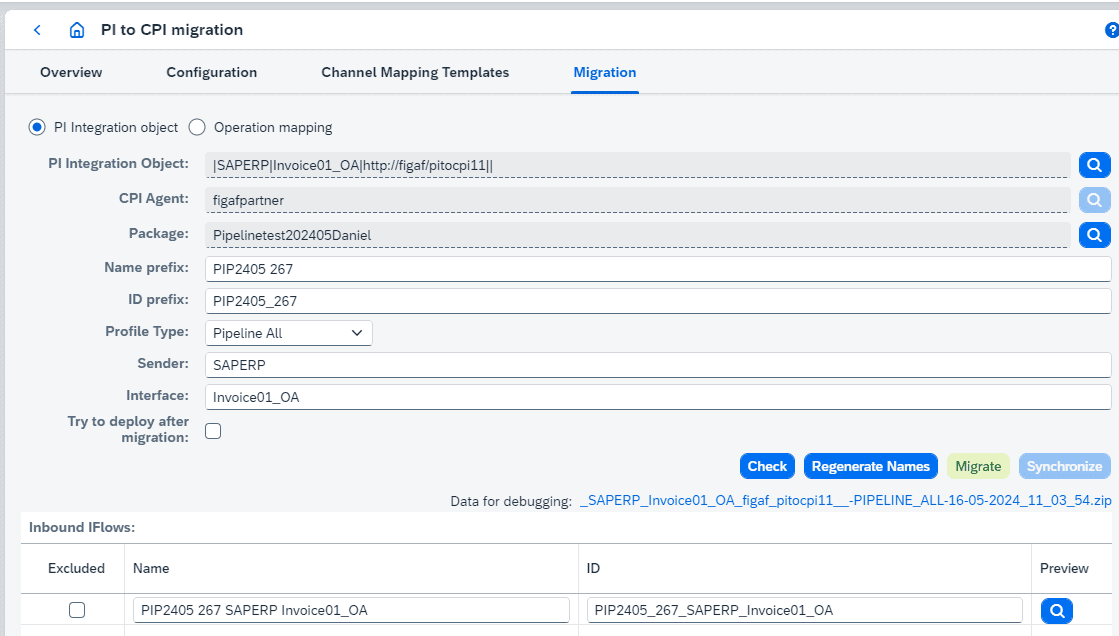
Pipeline concept. Since release 2405, one ICO can be migrated into all the iFlows and Partner Directory entries the SAP pipeline concept needs, with the XSLT for receiver and interface determination generated from the ICO.
Test cases. Messages recorded on SAP PI become Cloud Integration test cases in a few clicks, so you can test the migrated iFlow with the same data. Multi-mapping payloads are split automatically for testing (release 2510).
Deployment and overview. Figaf can trigger the deployment, and the migration overview shows which iFlows each ICO was migrated into, with links to versions, test cases and monitoring.
Select the ICO, the target package and the channel mapping, then migrate.Migrating an ICO into the SAP pipeline concept.
Business value
Less time per interface. In customer projects the tool saves at least 2/3 of the time needed to convert ICOs and receiver determinations.
Existing work is reused. Message mappings and function libraries carry over, so the value built into them over the years is kept instead of rebuilt.
Lower risk at go-live. The migrated iFlow is tested with messages recorded on SAP PI, so you can show it behaves like the original.
Predictable effort. As a rule of thumb, 70% of interfaces can be migrated as they are, 15% should be redesigned, and 15% are outdated or can be replaced with standard content. The task list after each migration makes the remaining manual work visible.
Less dependency on specialists. The conversion follows templates and rules, so it does not rely on one developer knowing every interface.
Good to know
The migration tool came out of SAP’s Hack2Build competition in 2021, which Figaf won. The first release was 2107.
The Migration Edition gives you 10 free migrations and a 2-month trial of Figaf DevOps Suite.
Convert what you already have, rather than rebuilding it
ICOs, mappings and configuration are converted to Integration Suite artifacts automatically, together with the test messages that prove they still work.
In practice: Medela moved to Integration Suite in roughly two months, migrating its existing B2B mappings to the TPM structure in a common way with one mapping per day, with no defects reported.