Onboarding a trading partner is tribal knowledge held by one or two people.
In most SAP B2B landscapes, onboarding a partner is a checklist that lives in somebody’s head. It works until that person is on holiday, and it does not scale past the number of partners one person can hold in memory. Figaf turns the checklist into the interface: B2B teams create partners and agreements in SAP Integration Suite Trading Partner Management through guided screens that apply the same naming, identifiers and templates every time.
How it works
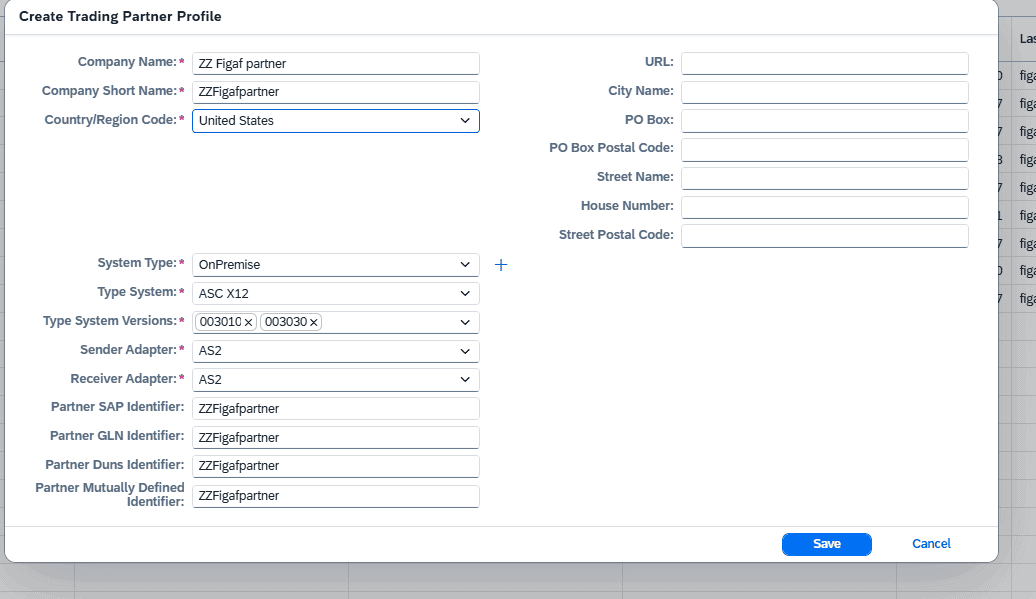
Create the partner. A screen creates a partner profile from some simple information. The partner gets the correct values, such as identifiers, and three systems with predictable names are created for development, test and production. You fill in the details of the communication channels on the three systems yourself. Figaf proposes a short name for the partner or subsidiary to support your naming convention, which you can adjust.
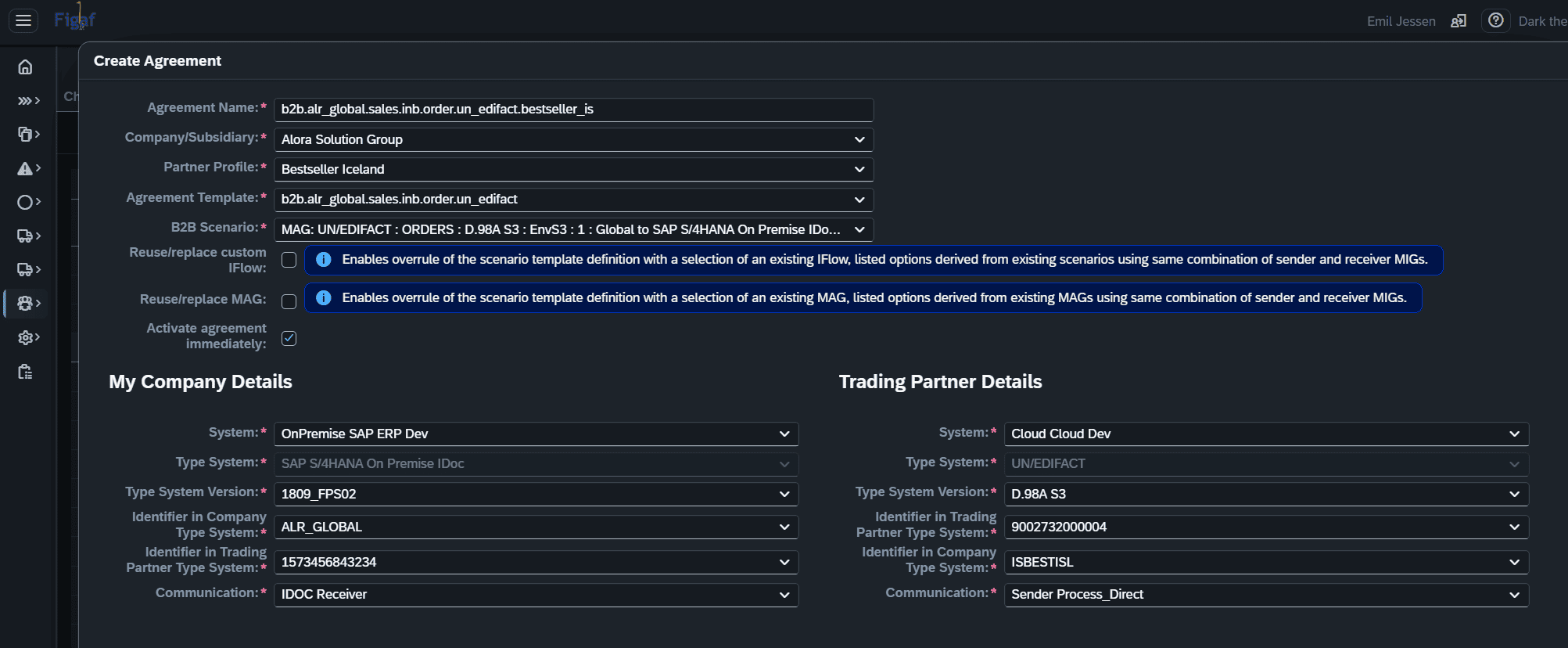
Create the agreement on a single screen. Select the trading partner and click Create Agreement. Agreement template selection is limited to templates created for the selected company or subsidiary, and the development systems are selected by default for both sides.
Validation while you build. After you select the scenario, with its MIGs and MAGs, Figaf checks that the type systems represented by the MIGs are assigned to the systems, so the result is a valid agreement that matches the system configuration.
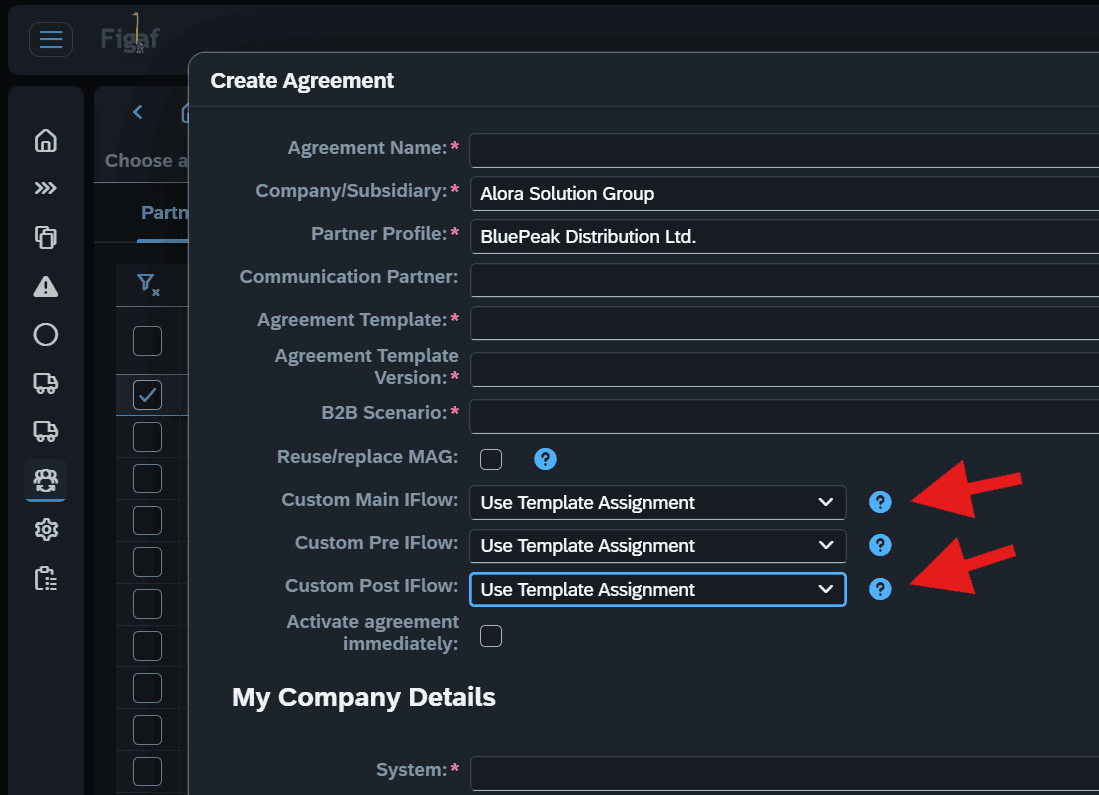
Reuse what exists. You can select an existing custom main iFlow, and existing pre and post iFlows, used in other scenarios with the same source and target MIG, or an alternative MAG with the same MIG combination. You can also copy an existing iFlow into a new partner specific artifact.
Communication partners. Agreement creation supports communication partners, such as VAN providers.
Ready for transport. All relevant objects are created or assigned in one step, and you can activate the agreement immediately, so it is ready for transport.
Same process for new and migrated business. Creating an agreement from scratch and migrating a B2B operation mapping from SAP PI follow the same process and give the same result.
Standard SAP objects. Everything is written into standard SAP partners, agreements and templates.
Create a partner profile with a few fieldsCreate an agreement on a single screenReuse existing iFlows when creating an agreement
Business value
Less dependence on specialists. Each step shows what is set, so a new team member can onboard a partner without the B2B lead remembering every convention.
Fewer human errors. Naming, identifiers, systems and type system assignments are set by the process and validated, not typed in by hand for each partner.
Faster onboarding at scale. Partners and agreements are created in a few steps, so the hundredth partner should take no more effort than the tenth.
Consistent landscape. Every partner gets the same structure across development, test and production, which makes transports and later changes predictable.
Migration builds the habit. Because new and migrated agreements follow the same process, a migration project trains the team for daily operations.
Good to know
Guided onboarding is part of Figaf B2B Management for SAP Integration Suite TPM.
Partner profile creation was introduced in release 2506. Single screen agreement creation came in release 2603, support for communication partners in 2604, and reuse of pre and post iFlows in 2605.