SAP's pipeline concept needs many iFlows and Partner Directory entries per interface, and building them by hand is slow and easy to get wrong.
SAP’s pipeline concept gives SAP Integration Suite a standard way to process asynchronous messages, with reliable messaging and one way of handling errors. It is complex to set up: one interface is spread over several iFlows and depends on the Partner Directory. The Figaf Migration Tool migrates an SAP PI/PO ICO to all the iFlows and Partner Directory entries the pipeline concept needs, in the same process as other migrations.
How it works
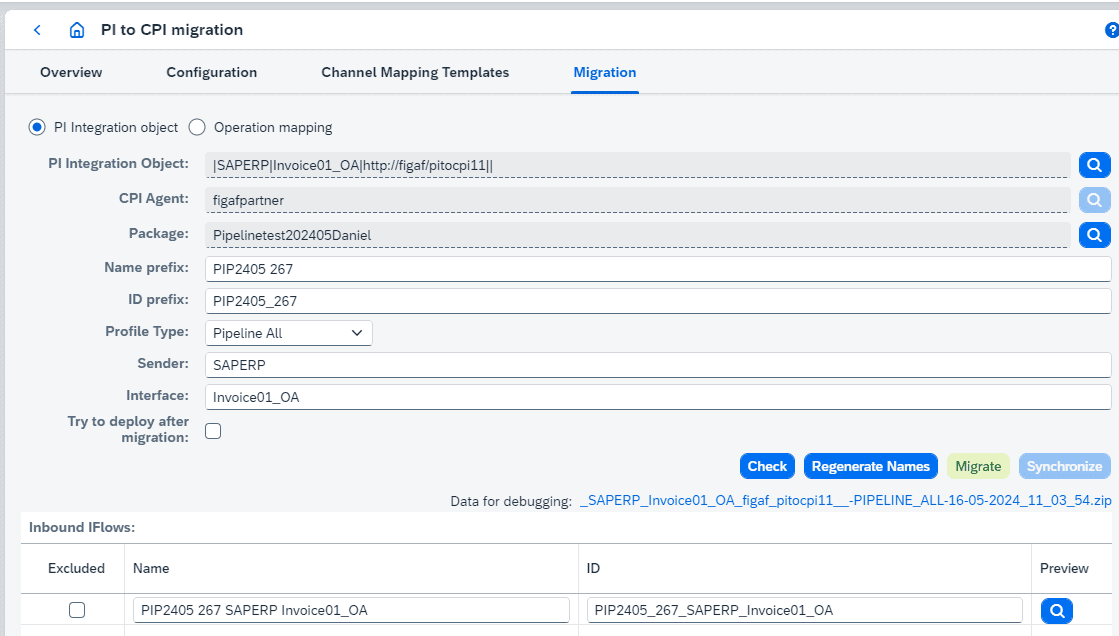
Names from the ICO. You define the sender system and interface name for the messages. Figaf uses them to generate the iFlow names, and regenerates the names if you change them.
Inbound flow. Figaf generates the inbound flow, where these values are defined. You can skip the inbound flow if one of the generic IDoc flows will work, and choose the queue for the inbound flow with the queues introduced in pipeline version 1.0.9.
Outbound flows. The outbound flows are generated with ProcessDirect, and you set the ProcessDirect address for each iFlow in the overview. You define the system names of the target applications and can exclude cases you do not want to migrate.
Partner Directory entries. Figaf generates the XSLT for receiver and interface determination from the ICO and adds it to the Partner Directory when you press migrate. With pipeline version 1.0.8, you can generate all receivers and interfaces in one XSLT. You see whether an XSLT already exists and what the change would be.
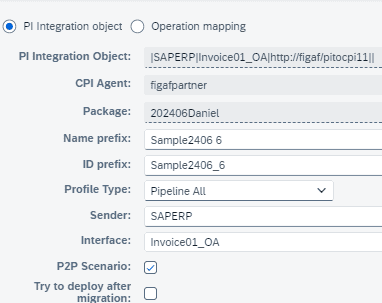
Point to point. For a message that goes to one receiver interface only, you set the P2P check mark. Figaf creates two Partner Directory entries, for the system and the ProcessDirect URL, and the message skips directly to outbound processing without the determination XSLTs.
Alternative partners. Since release 2505, Figaf creates the alternative partner translation for the scenarios, which is how the pipeline concept handles partner IDs going forward.
Preview and overview. You preview all iFlows before migrating. Afterwards, the migration overview shows that the ICO became several iFlows, and you see the Partner Directory entries created, so you can adjust them. Figaf can also trigger deployment.
Limits. Extended receiver determination is not migrated as a message mapping. You add those rules manually, for example in XSLT.
Set the sender system and interface name used to name the pipeline iFlowsPoint to point scenarios with one check markThe migration overview shows each ICO and the iFlows it became
Business value
Faster migration. One ICO becomes all its pipeline iFlows and Partner Directory entries in one step, instead of building each flow and entry by hand.
Fewer errors. Names, routing XSLTs and Partner Directory values come from the ICO, so they match the source interface.
A standard architecture. The pipeline concept gives one way of handling errors and reprocessing, and changes made once apply everywhere it is used. New developers have one pattern to learn.
Managed after go-live. In Figaf DevOps Suite you edit, test and transport Partner Directory entries like iFlows, including virtual tenants, so the pipeline setup stays governed in operation.
Good to know
The first pipeline artifacts came in release 2404, and full pipeline migration in release 2405. Point to point came with support for pipeline version 1.0.6 in patch 2408.2, and pipeline version 1.0.8 support in release 2412.
You can try it with the free Migration Edition, which includes 10 free migrations and a 2-month trial of Figaf DevOps Suite.
Migrate an ICO to the pipeline concept in one step
Generate the inbound and outbound iFlows and all Partner Directory entries an ICO needs for SAP's pipeline concept, including point to point scenarios.