Credentials have to be changed by someone with admin access, separately from the iFlows that need them, and nobody knows who changed what.
Security artifact management lets you handle SAP Cloud Integration security artifacts, such as passwords, in Figaf. Integration developers and release managers use it to create and edit artifacts without admin access to the tenant, and to take them live together with the transports that depend on them.
How it works
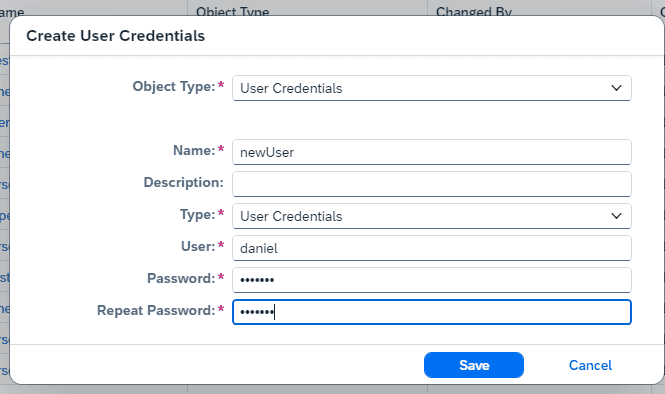
Editor for security artifacts. Figaf has an editor to create and edit security artifacts, so you do not need admin access to the system to change them.
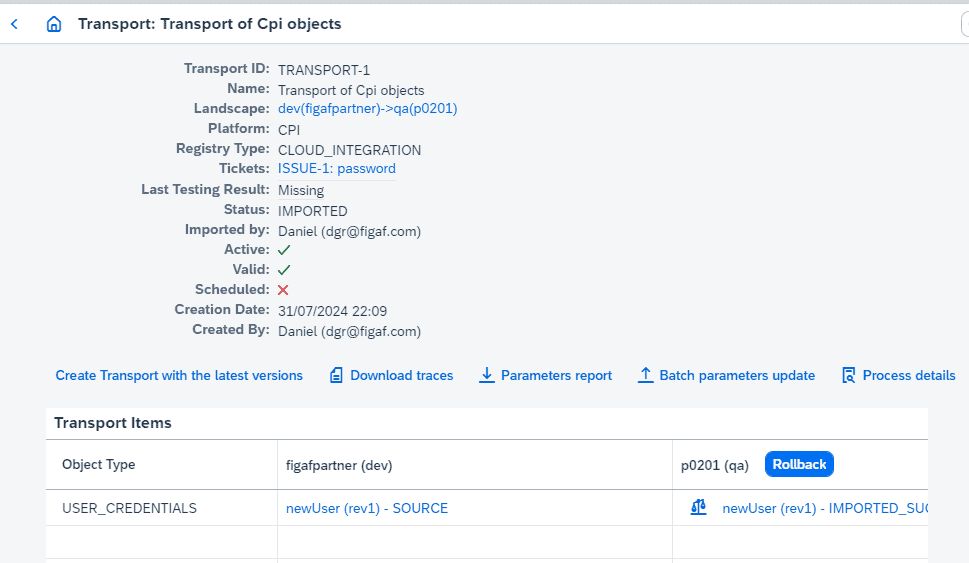
Part of the transport. You can add a password to a transport together with other objects, such as the iFlow, so the item is updated correctly in the target tenant.
Change history. Because the artifacts are handled in Figaf, you can see who made changes to an artifact and why, like other tracked objects.
B2B company and subsidiaries. Security artifacts for Company and Subsidiaries can be transported too, so you can consolidate system configuration in one source tenant and move it through the landscape to production. This makes managing AS2 for your partners easier.
Replication. Handling security artifacts in Figaf is also a requirement for replicating content to a failover production tenant.
Storage. The security artifacts are saved in Figaf. Users cannot get access to the password, but someone with access to the database could extract the data.
Create and edit security artifacts in FigafAdd the credential to the transport of the iFlow
Business value
Fewer people with admin rights. Developers can maintain the credentials they need without being given admin access to the tenant, which reduces access risk.
Fewer failed go-lives. When the credential moves in the same transport as the iFlow, the iFlow does not arrive in production without the security artifact it depends on.
Audit trail. Changes to security artifacts are tied to the ticket and transport behind them, so you can show why a credential changed.
Consistent B2B configuration. Company and subsidiary security artifacts are maintained in one source tenant and transported, instead of being set up by hand on each tenant.
Good to know
Part of the Figaf DevOps Suite. Available since release 2408. Transport of security artifacts for B2B Company and Subsidiaries was improved in release 2609.