You can see that an iFlow changed, but not which business request asked for it or where that change is now.
In Figaf DevOps Suite, every change is made in a ticket, and every transport belongs to a ticket. Ticket and ITSM integration connects that ticket to the record in the tool your business already uses, such as Jira, Azure DevOps, ServiceNow, SAP Solution Manager ChaRM or Cloud ALM. Integration developers, release managers and auditors use it to go from any object version back to the request behind it.
How it works
External ID on the ticket. A Figaf ticket registers all the changes a developer makes to solve one problem. You add the external ID and URL of the Jira, ServiceNow or other record, so from any object, such as a mapping or an iFlow, you can see which ticket it was changed in and who asked for the change. The ticket overview and export show the Jira or ServiceNow number, and you can search on the external IDs.
Transport information in version history. For imported SAP Cloud Integration iFlows and value mappings, the version history shows why the artifact was imported, so you can trace a change from Cloud Integration to the Jira or ServiceNow ticket.
Landscapes. A ticket is linked to one landscape: SAP API Management, SAP Cloud Integration or SAP PI/PO.
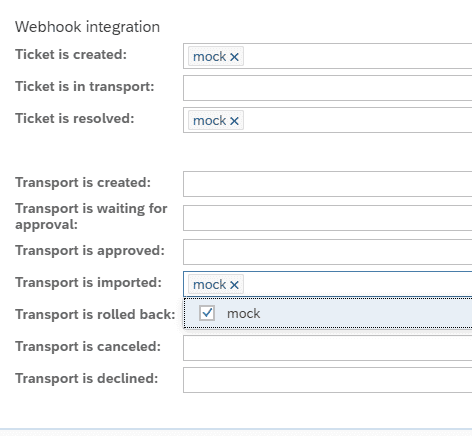
Webhooks. Figaf sends a request each time a ticket or a transport changes state, for example when it is ready for approval or its import is completed. You define which webhooks to send for each event, per landscape. You can send the events to SAP Cloud Integration and update your Jira there according to your process.
Transport API. The public API lets an external tool search tickets by external ID, see which stage an object is in, and approve and import a transport into a target landscape such as QA or production. If the transport is not ready for import, the API returns an error. Access uses an OAuth token with the roles ticket:read and ticket:import, and the APIs are documented in Swagger on your Figaf instance.
Prebuilt ITSM content. Three prebuilt packages, for Jira, ServiceNow and Azure DevOps, are available in the SAP Business Accelerator Hub on api.sap.com. You apply them to your tenant, then configure and modify them. They contain iFlows to look up issues so the Figaf ticket gets the right title and description, to update the ITSM ticket from the Figaf ticket, and to act on the Figaf transport based on actions in the ITSM tool. You can add flows for other platforms.
What each package does. Every package has three iFlows: one that searches the ticket system for issues or tasks, one that receives the Figaf webhooks and updates the ticket, and one that lets the ticket system trigger the import of a transport in Figaf. In the update iFlow a JSON configuration decides, for each Figaf event, whether to only add a comment or also move the issue to another status, and the text of the comment is built from values in the webhook. You change that configuration to match your process.
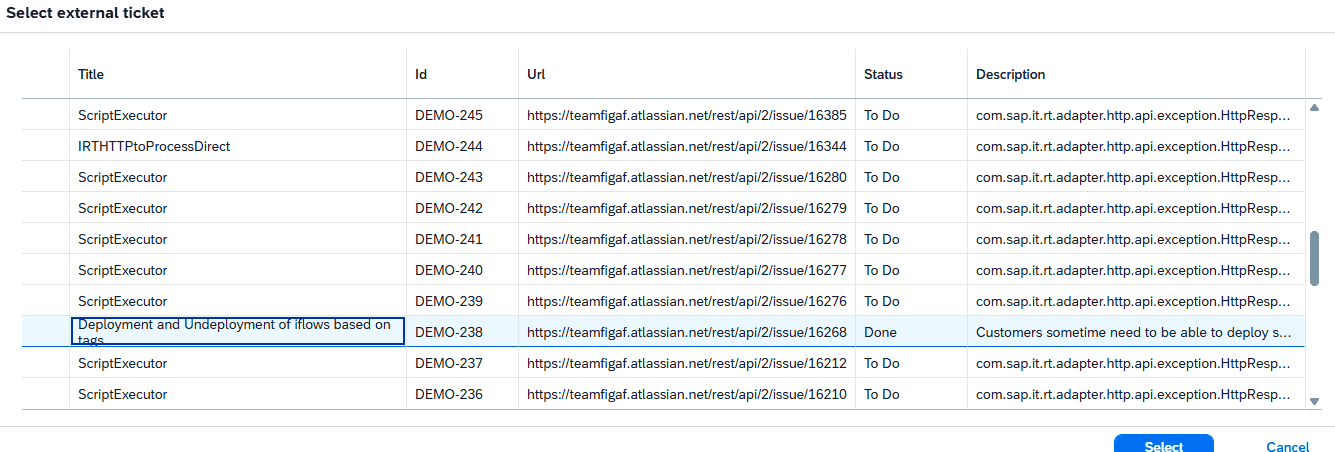
Ticket lookup. To use the lookup, you configure your external ticket system on the landscape. When you create a new ticket, you select from existing external tickets, and the title and description are filled in.
Choose which webhooks to send for each ticket and transport event.Select an existing Jira or Azure DevOps ticket when you create a Figaf ticket.
Working with SAP Solution Manager ChaRM and Cloud ALM
The Change Management System decides whether a change may go to production. Figaf supplies the transport engine and the content level detail: one change document maps to one Figaf ticket and two transports, Dev to QA and Dev to production. The release calendar, change document types and approval procedure stay as they are. Figaf has described three levels of integration, from a simple reference to a full two-way link:
Level 0, reference only. The change document number is a mandatory field on the Figaf ticket, and approvals stay in the Change Management System. Nothing has to be built.
Level 1, one way. Figaf posts ready, imported or failed into the ServiceNow record, and your existing ServiceNow link to the Change Management System carries it onward.
Level 2, two way. A PPF action and custom ABAP call the Figaf API to release the import, and Figaf writes the status back to the change document.
Business value
A reason for every change. Every version of every object points to the business request behind it, so questions like “why was this changed” take a search instead of an investigation.
Audit trail that closes on its own. When both systems record each other’s number, the chain from request to transport to production is complete, without a separate document to maintain.
Your release process stays in charge. ChaRM, Cloud ALM, Jira or ServiceNow keep their role as the gate and the system of record. Figaf adds the content detail they cannot see.
Less manual follow up. Webhooks and the prebuilt content keep the ITSM ticket updated with the status of approvals and imports, so people do not have to remember to update it.
Freedom to fit your process. Because the logic runs in your own SAP Integration Suite tenant, you configure it to your workflow instead of waiting for a native adapter for each tool.
Good to know
Webhooks for ticket and transport events came with release 2209. The prebuilt Jira and Azure DevOps packages and the ticket lookup came with release 2507. Release 2411 improved the transport APIs for searching and approving.
Ticket and ITSM integration is part of Figaf DevOps Suite and works with the change and transport process.
Every change linked to the ticket that asked for it
Link each Figaf ticket to its Jira, Azure DevOps, ServiceNow, ChaRM or Cloud ALM record, and keep both systems updated through webhooks, the transport API and prebuilt integration content.