
How much will your SAP PI/PO migration really cost?
We have built three free tools. The first one gives you a quick answer, and the other two help you plan the whole project.
Figaf Migration Tool
Discover your SAP PI/PO landscape, identify migration candidates, estimate migration effort and automate the move to SAP Integration Suite with one platform.
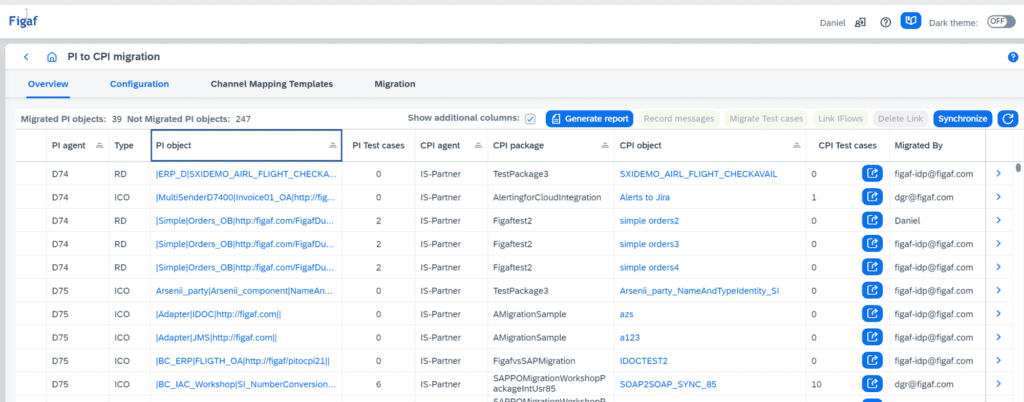
Every organization asks the same questions before starting a migration.
The answers rarely exist in one place. Instead, organizations spend weeks documenting interfaces, analyzing dependencies and estimating migration effort before the first integration is even migrated. Without complete visibility, planning is based on assumptions rather than facts.
Instead of manually analyzing hundreds or thousands of integrations, Figaf automatically discovers your SAP integration landscape, identifies migration candidates and provides the information you need to plan, prioritize and execute the migration. The result is a migration project based on facts rather than assumptions, with less risk before the first interface is migrated.
| Without complete visibility | With Figaf |
|---|---|
| Nobody has a complete overview of the integration landscape. | Automatic discovery creates a complete inventory of interfaces, dependencies and documentation. |
| Migration effort is difficult to estimate. | Complexity analysis provides a realistic basis for planning and prioritization. |
| Unused integrations are migrated unnecessarily. | Usage analysis identifies candidates for retirement before the migration begins. |
| Migration relies on manual analysis and repetitive work. | Automation accelerates the migration while experts focus on the integrations that require their expertise. |
| Validation is time-consuming and inconsistent. | Automated validation helps ensure migrated integrations behave as expected. |
The Migration Edition is the full Figaf DevOps Tool. It differs only in licensing and support. Together with SAP, we have created a free version of Figaf for your migration project: it includes 10 free migrations, so you can see the result on your own interfaces, and a 2-month trial of Figaf DevOps Suite, so you can see how Figaf helps you run SAP Integration Suite after the move.
The migration to SAP Cloud Integration is well worth it, but it takes time and resources. In 2021, SAP started the Hack2Build competition to find a way to automate the time-consuming migration. Figaf took on the challenge, built a tool that converts PI ICOs to iFlows on top of its SAP automation framework, and won. The tool is now part of the Figaf DevOps Suite, and in customer projects it saves at least 2/3 of the time a migration needs, while the transport and testing capabilities help you run the project and raise the quality.
As a rule of thumb, 70% of the interfaces can be migrated as they are, 15% should be redesigned, and 15% are outdated or can be replaced with standard content. Figaf saves about 2/3 of the time for converting ICOs and Receiver Determinations, and the included testing validates the result, so you get better migrations done faster.
Calculate your migration savings
Have Seeburger message mappings to move to SAP’s B2B add-on? See the Figaf Seeburger Migration Tool.
Open a topic to see how it works and what it looks like in a real landscape.
Analyse your SAP PI/PO landscape up front and get a per-interface report of what converts cleanly, what needs work, and what has to be rebuilt.
In practice: Turning "we have about 400 interfaces" into a plan with an effort estimate attached to each one. Read more →
In practice: Foodstuffs South Island had spent days building their own assessment. Figaf’s report gave them more detail and saved days of the project.
Teams using SAP PI have invested a lot of effort in their message mappings over the last decade, and many of them use function libraries. Figaf automates the migration of your mappings and keeps their value, including the function libraries they depend on.
In practice: Medela moved to Integration Suite in roughly two months, migrating its existing B2B mappings to the TPM structure in a common way with one mapping per day, with no defects reported. Read more →
Converting SAP PI channels to Cloud Integration channels is easy: use the pre-delivered templates, and adjust them to fit your flows. Once a channel works, turning it into your own template takes minutes.
Once the migration is done, you want to know that everything that matters was migrated correctly. Record messages from your SAP PI system as a test case, convert it to a Cloud Integration test case in a few clicks, and test that everything works as expected.
In practice: Foodstuffs South Island retrieved test cases from their SAP PI/PO production environment to test their migrated iFlows, so the test data was like for like.
Run the same message through SAP PI/PO and through Integration Suite, then compare the output field by field.
In practice: Signing off an interface because the output is identical, not because it did not throw an error. Read more →
Test the migrated interface against mocked endpoints while connectivity to the target systems is still being set up.
The migration produces a current record of every interface it moves.
In practice: Teams that migrate with Figaf often end up better documented after the move than they were before it. Read more →
The Migration Edition is a good add-on to your SAP PI/PO migration project. It automates your migration, testing and documentation, and it can also work together with SAP’s own migration tool: Figaf automates the regression testing, so you save time on the migration.
SAP’s tool supports SAP PI/PO 7.31, 7.4 and 7.5. If you run an older release, the Migration Edition can create the assessment and the tests, and for an additional fee automate the migration too.
Upgrade at any time and keep your test cases. See the prices.
We recommend deploying it on SAP BTP Cloud Foundry, where you can use SAP’s user management to simplify onboarding and sharing in your team, and run the app as a Docker image; see the deployment guide. To connect to your SAP PI/PO system you need a Cloud Connector that gives Figaf access to it.
You can also run Figaf as a standalone application on your laptop, though you cannot share your test results with your team that way. It is a good way to evaluate the tool. Or run it on any server, on-premise or at a hyperscaler, with Java 21 and PostgreSQL or MSSQL.
We have focused on making it easy to use, so everybody can get started fast. Our free online training takes you from installation to configuration and daily use.
Since it is a free edition, you do not get everything in our paid edition. Support is limited to our forum: we try to help with your challenges, but paying customers come first. Testing is limited to test cases created from your SAP PI/PO system, run on your migrated iFlows for 30 days; you can always create new test cases and use them for another 30 days. The full tool is a trial for the first 2 months, with limits on the number of objects.
A migration takes a lot of hours, and a tool that automates even 10-20% of the work pays for itself. With the full version you improve how you deliver on SAP Integration Suite after the migration, reuse your test cases for regression testing, transport with governance, and get our support.
See the pricing page for the full version.
30 minutes with someone who has done this before.

We have built three free tools. The first one gives you a quick answer, and the other two help you plan the whole project.
“Export the iFlow” sounds like two minutes. The iFlow is the easy part. What travels with it is harder.
How a decompiled SAP PI Java mapping became a Groovy script in twenty minutes, and how to prove the result matches the original byte for byte.