Hundreds of B2B mappings and partners live in SAP PI/PO, and rebuilding each one in TPM by hand would take years.
Figaf migrates existing SAP PI/PO B2B scenarios to SAP Integration Suite with Trading Partner Management (TPM). Partner data, operation mappings and test messages move into partner profiles, agreements and custom iFlows, so the migration is a gradual transition rather than a rebuild from scratch. It is used by B2B teams and integration developers who need to move many partners in a uniform way.
How it works
The migration follows a set of preparation steps and then migrates one operation mapping at a time:
Prepare the company. Create your own company and, if needed, the subsidiaries in TPM.
Create partner profiles. A one-step screen creates the partner with its identifiers and three systems with predictable names for development, test and production (release 2506). You fill in the communication details yourself.
Prepare MIGs, MAGs and agreement templates, using naming conventions.
Plan per operation mapping. Since release 2508, the B2B migration is based on PI operation mappings instead of ICOs. You enable it under B2B Migration Settings, choose the PI software components to read from, and plan the work in the Migration B2B Overview, for example with tags.
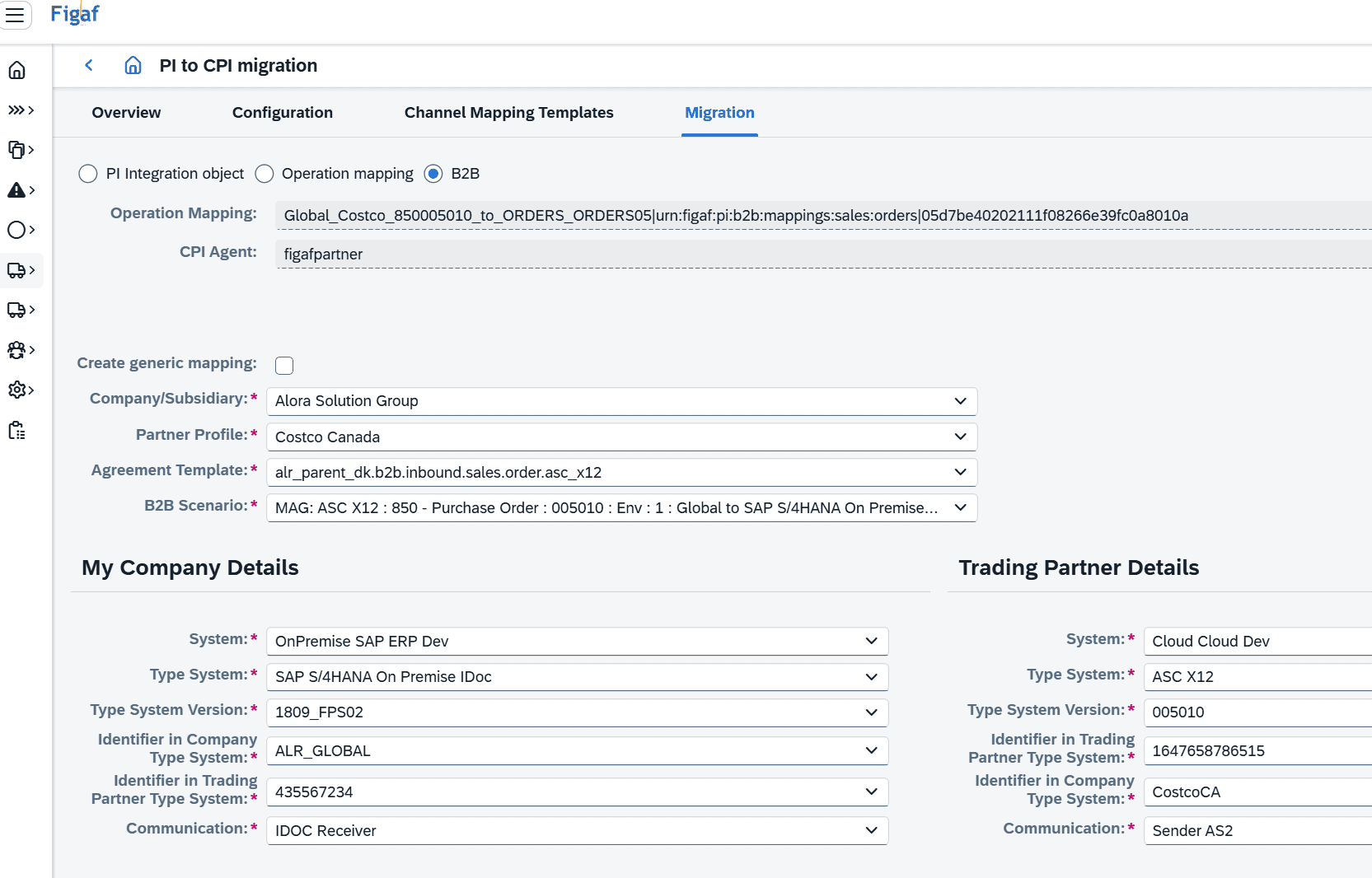
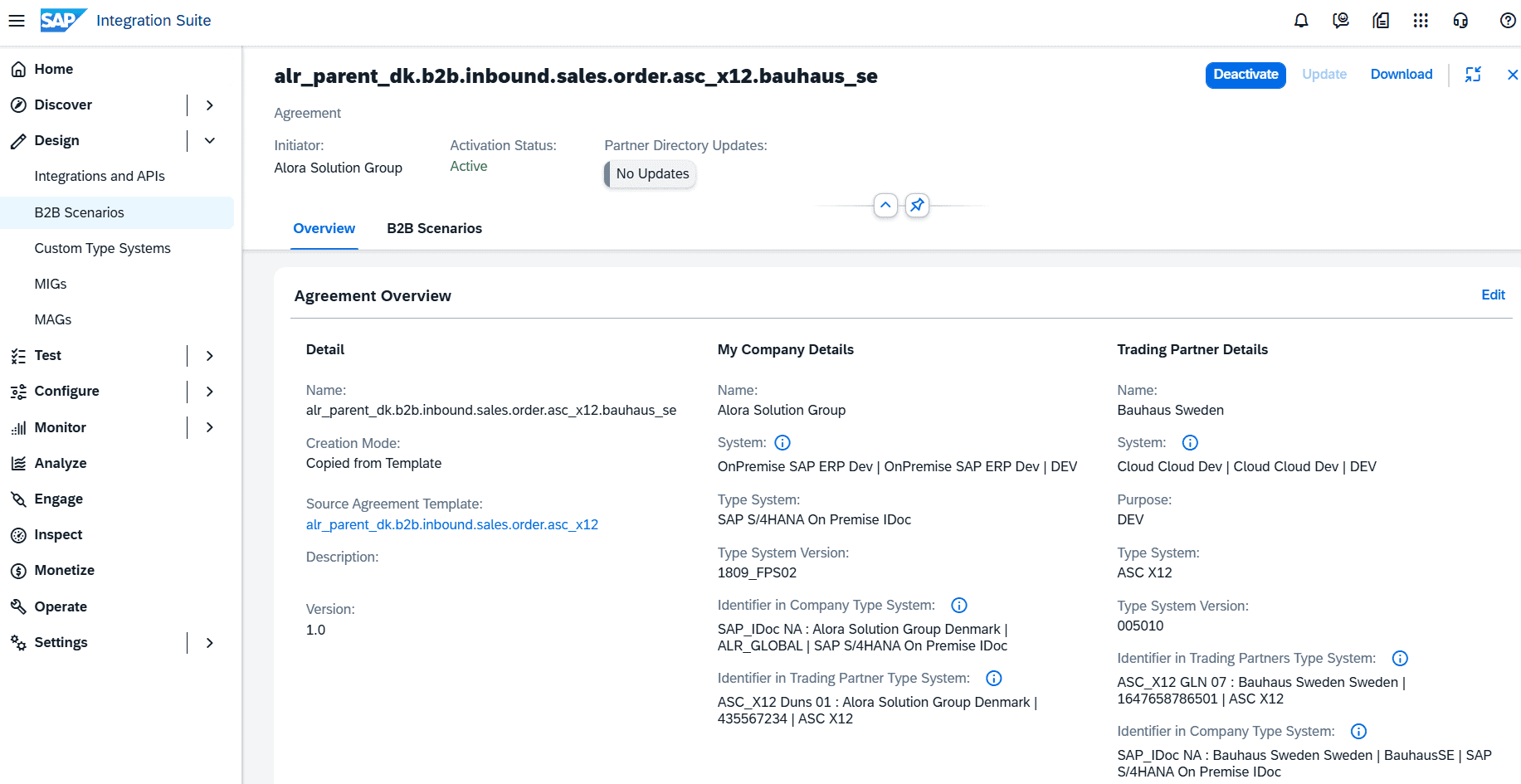
Migrate. Select the operation mapping, the partner profile, the agreement template and the B2B scenario. Figaf creates a ready-to-deploy custom iFlow with the migrated mapping, and a TPM agreement with the systems, type systems, communications and the custom mapping iFlow assigned (release 2507). The migration can be generic or partner-specific, and a generic mapping can be reused for other partners.
Deploy, activate and test. Deploy the custom mapping iFlow and activate the agreement from the overview. Then migrate the PI test cases: Figaf lists the test cases for every ICO that uses the operation mapping, so regression testing is available right away.
Details of the conversion:
The target flow contains your mappings plus a converter script between the PI and Integration Suite formats, which supports EDIFACT, X12 and Tradacom (release 2503). You can add your own XSLT and message mappings.
UDFs and function libraries can be migrated to Groovy scripts or to the function library object.
TypeSystem and TypeSystemVersion are determined automatically (release 2603).
EDI messages recorded on SAP PI/PO can be migrated to test cases on the relevant TPM agreements (release 2504), and archived messages can be uploaded to create test cases in bulk.
Select the TPM details for the operation mapping you migrate.The migration creates the TPM agreement and the custom mapping iFlow.
Business value
Reuse instead of rebuild. Mappings that took years to build are migrated, not rewritten, which reduces the effort of moving hundreds of partners.
Uniform results at scale. Partners and agreements are created from templates and naming conventions, so the setup is the same whether the migration covers 100 or 10,000 agreements, and whether 5 or 50 developers work on it.
Tested before go-live. PI test cases are migrated with the mapping, so each migrated agreement can be regression tested with real messages.
Proven in practice. Medela migrated its first 13 trading partners to Integration Suite with Figaf, with one B2B mapping per day, and no defects were reported by the partners moved live.
Visible gaps. Initial regression tests show where old PI logic, such as partner identifier lookups, needs review, so those decisions are made on facts.
Good to know
The first migration of B2B mappings came in release 2311. The operation mapping based migration came in releases 2507 and 2508.
Figaf offers a two-day B2B migration workshop where your installation is reviewed together with you.
Move your B2B partners and mappings into TPM instead of rebuilding them
Migrate PI/PO operation mappings into custom iFlows and TPM agreements, create partner profiles in one step, and reuse your PI test messages for regression testing.
Migrate B2B operation mappings to an operational TPM setup
Plan the B2B migration per PI operation mapping, migrate it in a single click into a custom mapping iFlow and a new TPM agreement, and migrate the PI test cases with it.
See b2b migration from sap pi/po on your landscape