Moving TPM partners, agreements, MIGs and MAGs between tenants is manual export and import, and one missed object breaks the agreement.
Traditional transport solutions do not support SAP Trading Partner Management (TPM), and offer limited transparency and governance for B2B content. Figaf B2B transport moves partners, agreement templates, agreements, MIGs, MAGs and their dependent objects between environments as one tracked, versioned unit, using the same DevOps framework that governs your integration artifacts. It is used by B2B teams and release managers who run a multi-tier landscape on SAP Integration Suite.
How it works
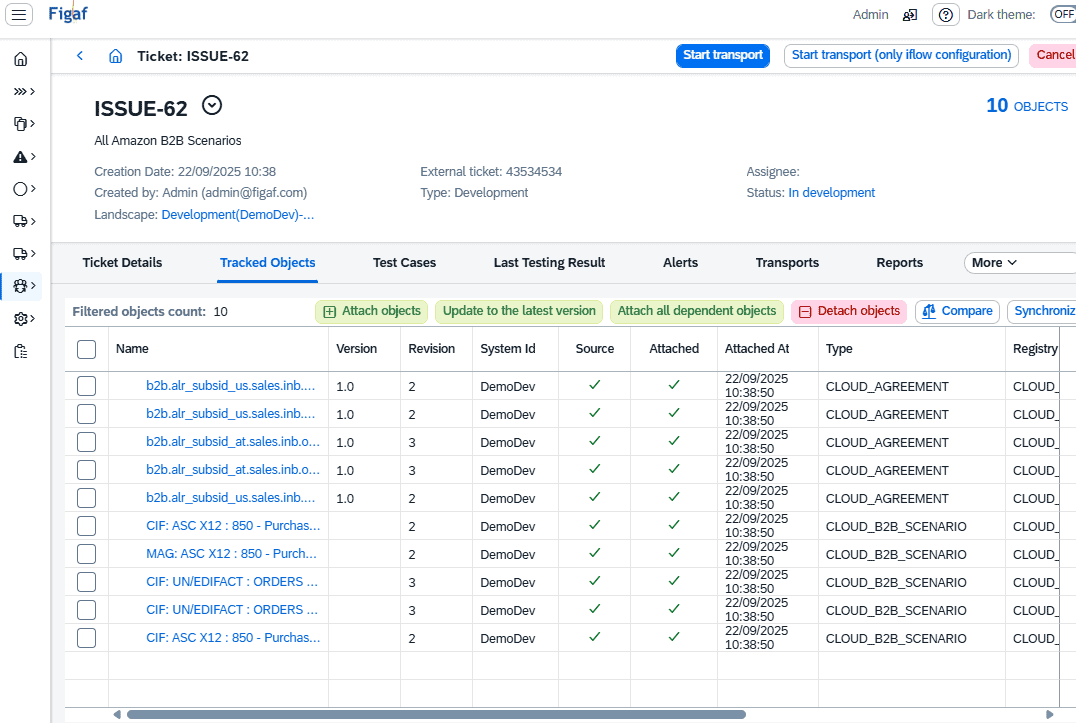
Assign to a ticket. From the B2B scenario overview you select one or more scenarios and assign them to an existing ticket, or to a new one created automatically. Agreements and scenarios are included automatically, and you can also add them by hand.
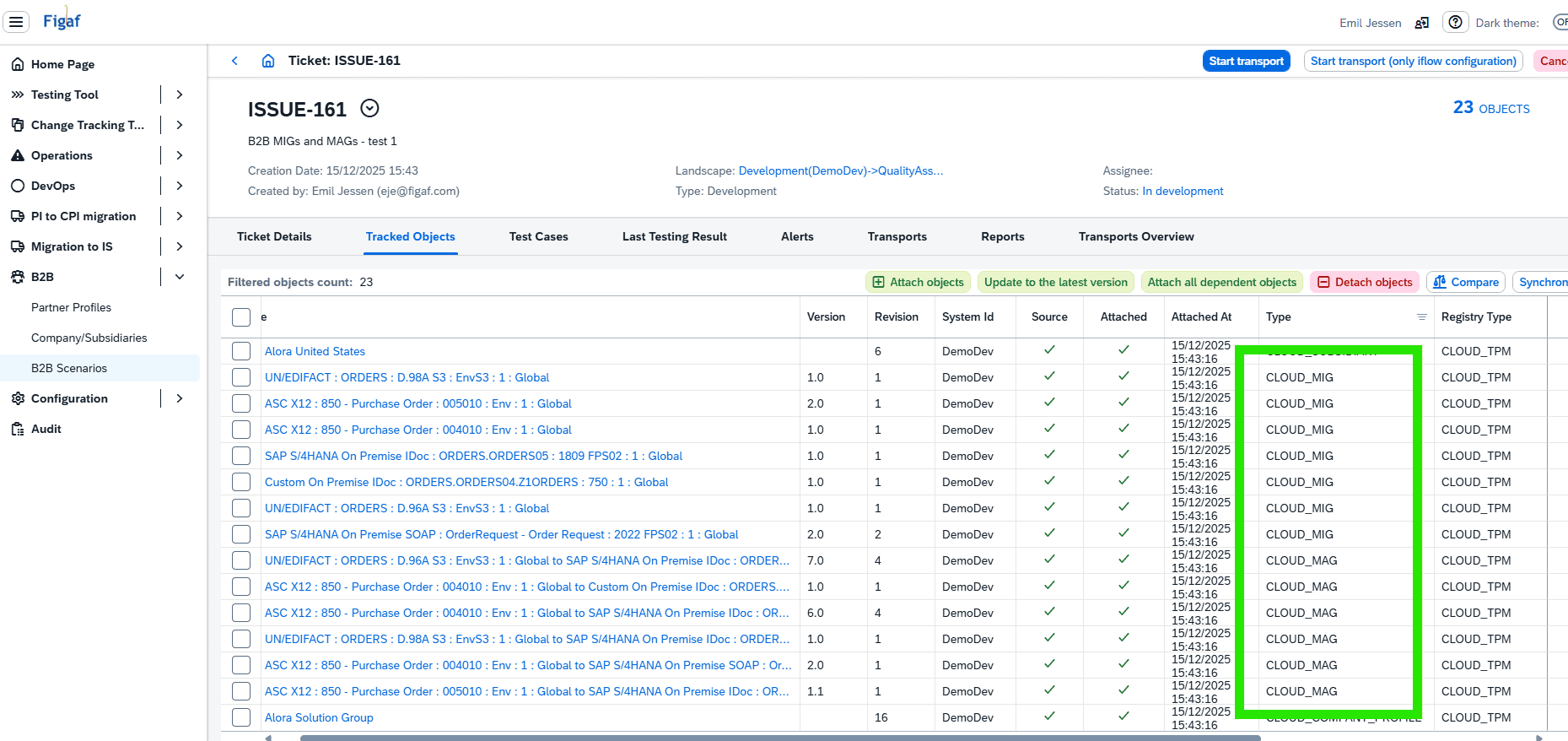
Dependent objects are added for you. Figaf tracks dependent objects and adds them, and “Attach all dependent objects” shows the complete list. Since release 2512 this includes MIGs and MAGs, also those used by other scenarios in the agreement template, because they must exist in the target system for the transport to succeed. Figaf checks whether the source version of each object already exists in the target, and skips it if it does.
System and purpose translation. You define the transport purpose for the target agent in the Figaf landscape, and the import respects the system and purpose translations.
Validation before import. Figaf checks that all objects are valid versions, so MIG and MAG drafts are stopped and you are asked to correct them first. Since release 2606 you can choose to allow drafts of agreement templates and agreements, which increases the risk because you cannot be sure what a draft covers.
Standard DevOps lifecycle. Automated tests can be triggered and linked to the ticket, approval workflows and release controls apply, and change tracking shows which objects were updated and which already existed in the target.
Import with SAP standard. The import uses SAP’s standard TPM Cross Actions, so you get both SAP’s standard logs and Figaf’s own audit trail. Global settings in the landscape let you customize the import to match the SAP standard cross action settings.
After the import. You review and activate the agreements, deploy new or updated design objects in the target tenant, and reuse existing test cases with the results shown in the ticket.
Governance settings. Since release 2605 a landscape setting can automatically enable archiving in the target system during B2B transports. Since release 2609 security artifacts for the company and subsidiaries can be transported, so system configuration can be kept in one source tenant.
B2B agreements and scenarios assigned to a ticketDependent objects, including MIGs and MAGs, are added automatically
Business value
No missing objects. Even five similar agreements for one customer can represent more than 50 technical objects. Figaf collects them for you, so the transport does not depend on manual selection.
Production stays clean. Validation blocks drafts and invalid versions before they reach production, and the approval process decides who may move what.
Audit ready. Every B2B change is linked to a ticket, with tests, approvals and both SAP’s logs and Figaf’s audit trail, so you can show who changed what and when.
Faster rollouts. In Medela’s migration, manual TPM transports were the bottleneck. Figaf added automation for creating trading partner profiles and agreements, and for transporting the agreements.
Aligned landscapes. Multi-tier landscapes stay synchronized, because the target always gets the same versions that were tested.
Good to know
B2B transport is part of standard Figaf DevOps Suite since release 2509, and is used in Figaf B2B Management. MIG and MAG transport was added in release 2512.
Figaf only enhances SAP standard: the content in your tenants stays standard TPM objects.
Move B2B objects between environments as one tracked unit
Partners, agreement templates, agreements, MIGs, MAGs and their dependent objects are transported together, with system and purpose translation, approvals and an audit trail.
Govern TPM content with the same transport process as your iFlows
Assign B2B agreements and scenarios to a ticket, and Figaf adds every dependent object, runs the tests and approvals, and imports through SAP's standard TPM functions.