Your API proxies and key value maps move between systems by hand, with settings to redo in every environment and no audit trail.
Figaf DevOps Suite supports SAP API Management next to SAP Cloud Integration and SAP PI/PO. You track, transport and configure API proxies and key value maps (KVMs) in the same tool and with the same governance as the rest of your integration content. It is used by integration developers and architects who run APIs and iFlows in the same landscape.
How it works
Connection. API Management is connected as its own agent. The agent uses service keys instead of an S-user and password, so Figaf only uses public APIs for API Management. Synchronization downloads only changed objects, which lowers the load on the system.
Versions. Figaf synchronizes API proxies and KVMs, so you see the different versions of each. Encrypted KVMs are synchronized without their values. KVMs are also stored in your Git repository, and the Figaf Gradle plugins support KVMs, so large KVMs are easier to update.
Tickets and transport. A ticket is linked to one landscape, which can be API Management. All changes are transported through the ticket, with approvers per landscape if you want them. Composite landscapes can combine SAP Cloud Integration and API Management.
Configuration per landscape. When you transport an API proxy, you configure its parameters per landscape, such as target endpoint URL, provider ID, relative path and proxy name. You can change the target endpoint entirely, for example from an API provider in development to a URL in production. KVMs, both encrypted and standard, can be configured per landscape, so the user, host and password for production are set in one place.
Multiple target endpoints. API proxies with multiple target endpoints can be transported and configured.
Virtual landscapes and rollback. Virtual landscapes let you rename proxies per stage, and you can roll back a transport one step to the last backed up version.
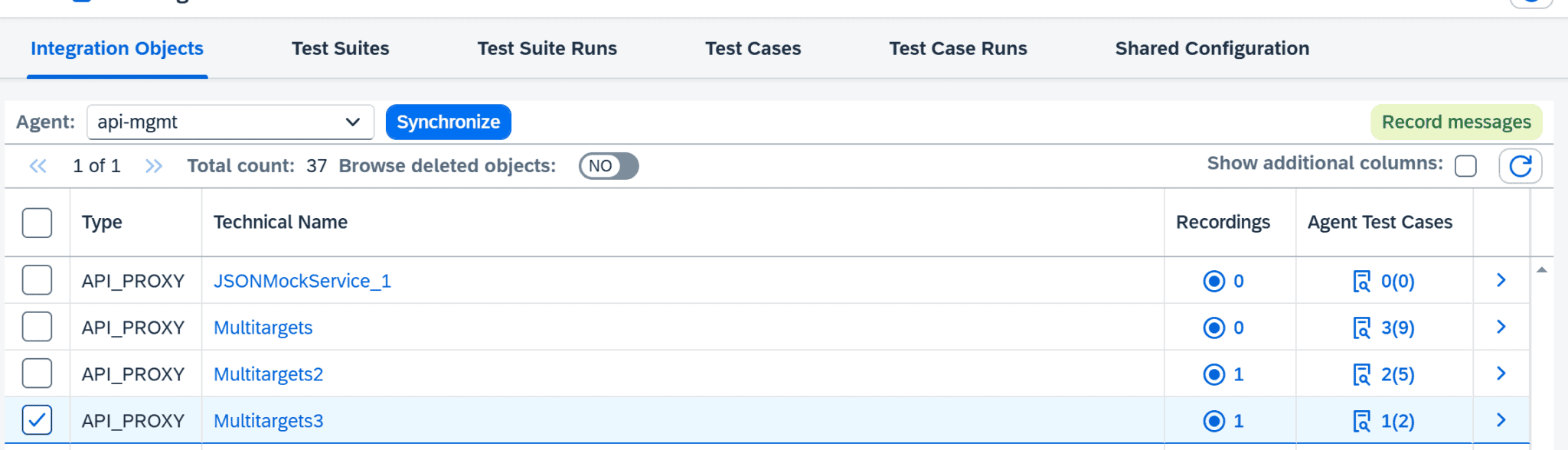
Testing. Figaf records messages sent to an API proxy and turns them into test cases. You create an API provider called FigafTestingToolApiProvider, through Cloud Connector or directly to the BTP subaccount where Figaf runs, and Figaf adds policies to the proxy to record. OAuth tokens used by a policy can be added on the common recording page. After a test run you compare the payloads.
Monitoring. Figaf can also handle alerts for API Management in the same tool.
Configure an API proxy differently for development, QA and production.Select an API proxy and record messages to create test cases.
Business value
One process for all integration content. APIs, iFlows and PI/PO objects follow the same ticket, approval and transport process, so teams do not need a separate way of working for API Management.
Full audit trail. Every transport of a proxy or KVM is recorded with its ticket and approval, which makes it easier to answer audit questions.
Fewer configuration errors. Environment specific settings are defined once per landscape instead of being redone by hand in each target system.
Lower risk in production. Testing with recorded messages and one step rollback reduce the impact of a change that does not work as expected.
Coordinated releases. Because API Management and SAP Cloud Integration transports are handled in the same tool, business functionality and integration changes can be delivered together.
Good to know
The DevOps license counts API Management proxies among the integration objects in your development system, and API Management is a separate agent.
KVM transport and configuration came with release 2101. API Management testing came with release 2502, and support for proxies with multiple target endpoints with release 2511.
Manage API proxies with the same process as your iFlows
Track versions of SAP API Management proxies and key value maps, and transport and configure them per landscape, with approvals, rollback, Git and testing.