SAP Cloud Integration only searches block names and descriptions, so finding where a value is configured means opening every step.
Figuring out where in a BPMN model a specific value is configured is a common challenge. In SAP Cloud Integration you can only search for the names and descriptions of blocks. In Figaf DevOps Suite, developers, architects and approvers can search all content in the model and see where externalized parameters are used.
How it works
Open the model. On an iFlow in the Change Tracking Tool, select Browse Payload and then the BPMN model with the viewer.
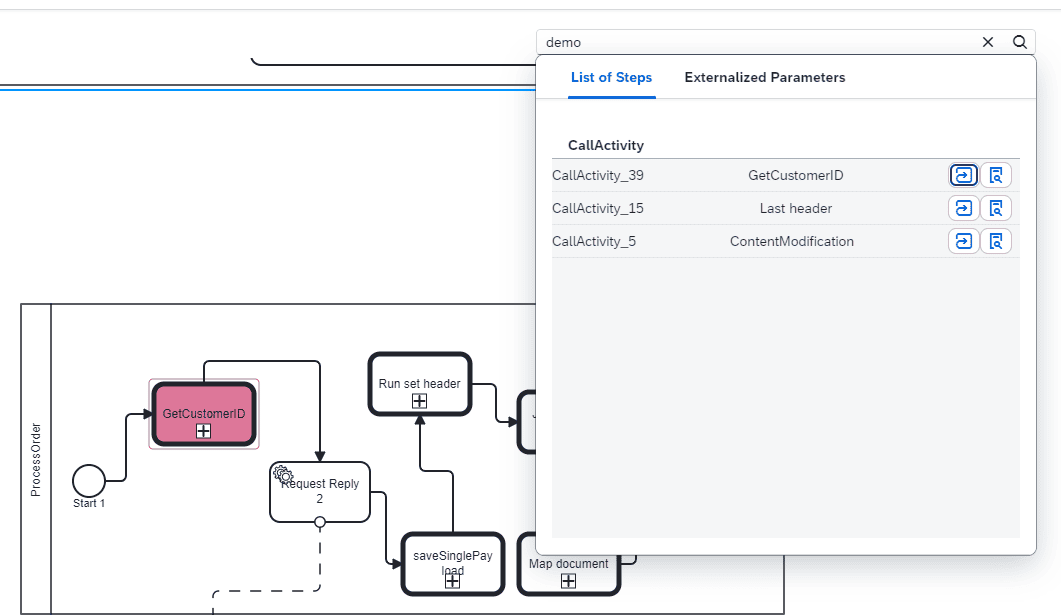
Search for any value. When you search for a value, Figaf shows where in the model it is used. Click the magnifying glass to see the details of the step.
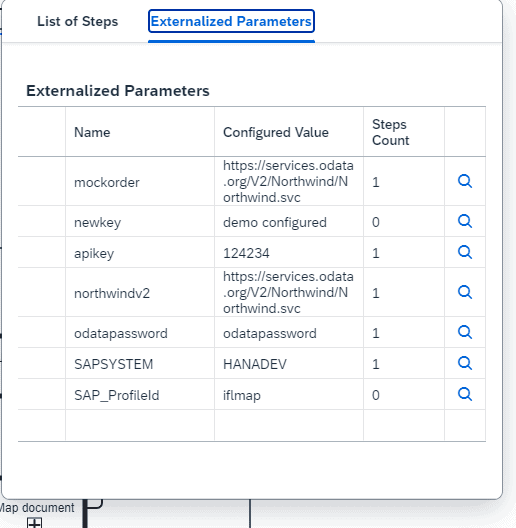
Externalized parameters. The viewer lists all externalized parameters with where they are used and, more importantly, which are not used. Click a number to see where that parameter is used.
During approval. The same view is available when you approve a transport: click the scale icon for the target object.
Across all iFlows. To search many iFlows at once, tagging rules search content in Cloud Integration objects with XPath or regex, with externalized parameters resolved first. Since release 2511, an AI based search also finds context in the BPMN model across iFlows, such as descriptions, step names and content, and security artifacts. The AI search requires your own OpenAI or SAP AI key and a PostgreSQL database.
Search the BPMN model and see where a value is usedSee which externalized parameters are used, and which are not
Business value
Faster troubleshooting and changes. Developers find where a host, value or setting is configured without opening each step of the iFlow.
Better governance. Unused externalized parameters stand out, so configuration stays clean and approvers know which parameters actually matter for a transport.
Safer approvals. Approvers can check the content of the target object while approving, instead of relying on the developer’s description.
Less dependency on the original developer. Anyone on the team can find out how an iFlow is built, which helps when the person who built it is not available.