Java mappings and custom adapter modules have no direct equivalent in SAP Cloud Integration, so they block the migration of the flows that use them.
Many SAP PI/PO processing chains use custom adapter modules and Java mappings, and those do not convert one to one to SAP Cloud Integration. The Figaf Migration Tool gives migration teams two ways to handle them: map the module or Java mapping to a Groovy script in a script collection, or wrap the existing Java mapping in a Groovy script that calls it.
How it works
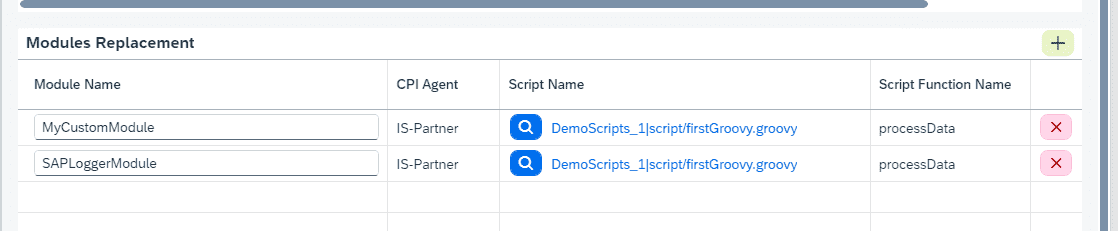
Modules to scripts. Since release 2401 you can set up a mapping from a named adapter module to a script in a script collection. When the ICO is migrated, the migrated flow uses that script in place of the module. If the module has parameters, Figaf adds a Content Modifier that sets them as properties, so your custom code can use them.
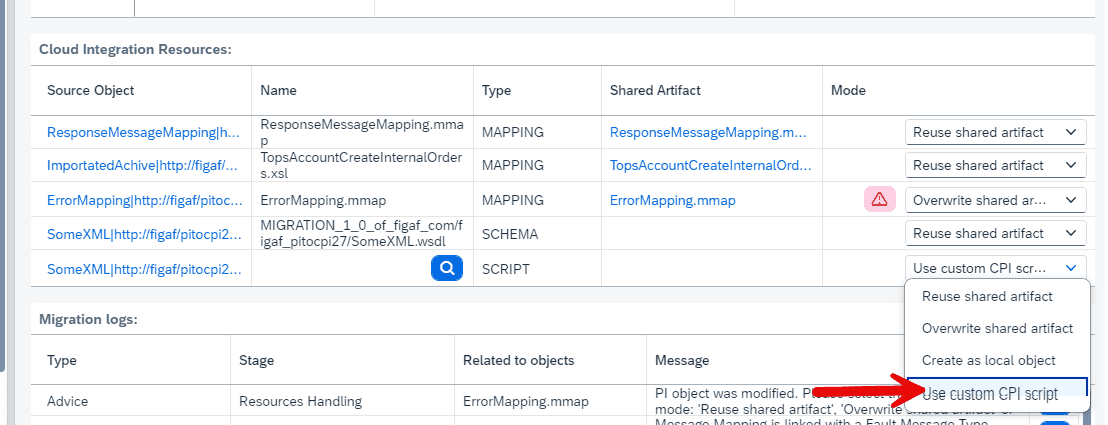
Java mappings to scripts. The same concept maps a Java mapping to a script in a script collection, so you can point it at a Groovy version you have written.
Java mapping wrapper. Since release 2410, a Java mapping used in an operation mapping can be migrated as it is. Figaf takes the same approach as SAP: it reuses SAP’s Groovy script, with a few modifications, and the script calls your Java mapping. Release 2510 improved the wrapper so it supports more cases.
Adapter modules in pipelines. When migrating to the pipeline concept, adapter modules and file to XML conversions are created as a separate iFlow with the required modules, linked through the Partner Directory.
Assessment first. The migration assessment report shows the adapter modules and the mapping types used per interface, including Java mappings and the imported archives they depend on, so you know up front which interfaces need this.
Limits: script collections cannot use external libraries. The Java mapping wrapper should not use SAP PI specific libraries, and features such as dynamic attributes limit it.
Map a module to a script in a script collectionThe same mapping concept for Java mappings
Business value
Fewer interfaces left for manual rebuild. Flows with modules and Java mappings can move with the rest of the migration instead of being set aside.
Reuse work you have already done. Once a module is mapped to a script, every flow that uses that module gets the same replacement, in a consistent way.
A path from quick to maintainable. The wrapper lets you move fast, and the script collection mapping lets you replace the Java with Groovy that your team can maintain. Figaf recommends rewriting the Java as Groovy for long term supportability, rather than keeping a JAR in your iFlow that cannot be maintained.
Lower risk, with proof. Whichever way you convert, test cases recorded on SAP PI/PO can be run on the migrated iFlow, so you compare the output instead of assuming it is right.
Good to know
Part of the Figaf Migration Tool. Module and Java mapping to script mapping is available since release 2401, the Java mapping wrapper since release 2410.
If you do not have the Java source, you can decompile the classes and port them to Groovy. Figaf has described converting a compiled Java mapping to Groovy with a coding assistant and verifying the output byte for byte against the original. Figaf does not plan to build a dedicated Java mapping converter into the tool.
The Figaf Groovy Editor is a good place to work on the resulting scripts.
Move flows with Java mappings and modules instead of leaving them behind
Map named adapter modules and Java mappings to Groovy scripts in a script collection, or wrap a Java mapping in a Groovy script that calls the original, so the flow migrates with the rest.
See java mapping and module migration on your landscape