Before a SAP PI/PO migration you need to know what you have and what it will take, and building that overview by hand takes days.
The migration assessment gives you a detailed report of your SAP PI/PO landscape before you plan the move to SAP Cloud Integration. It is used by integration architects, migration leads and partners who need to estimate the effort, decide what to retire or redesign, and find the interfaces that will cause problems. The assessment report is free in the Migration Edition.
How it works
You install Figaf, connect your SAP PI/PO system as an agent and synchronize it, which downloads all the artifacts. You then add a Cloud Integration agent (it does not need to be connected), add both systems on the migration configuration page, run the custom tag search, and generate the report from the migration overview page. Figaf estimates 10 to 20 minutes to install Figaf on a laptop and create the report, and about 30 minutes for the report itself.
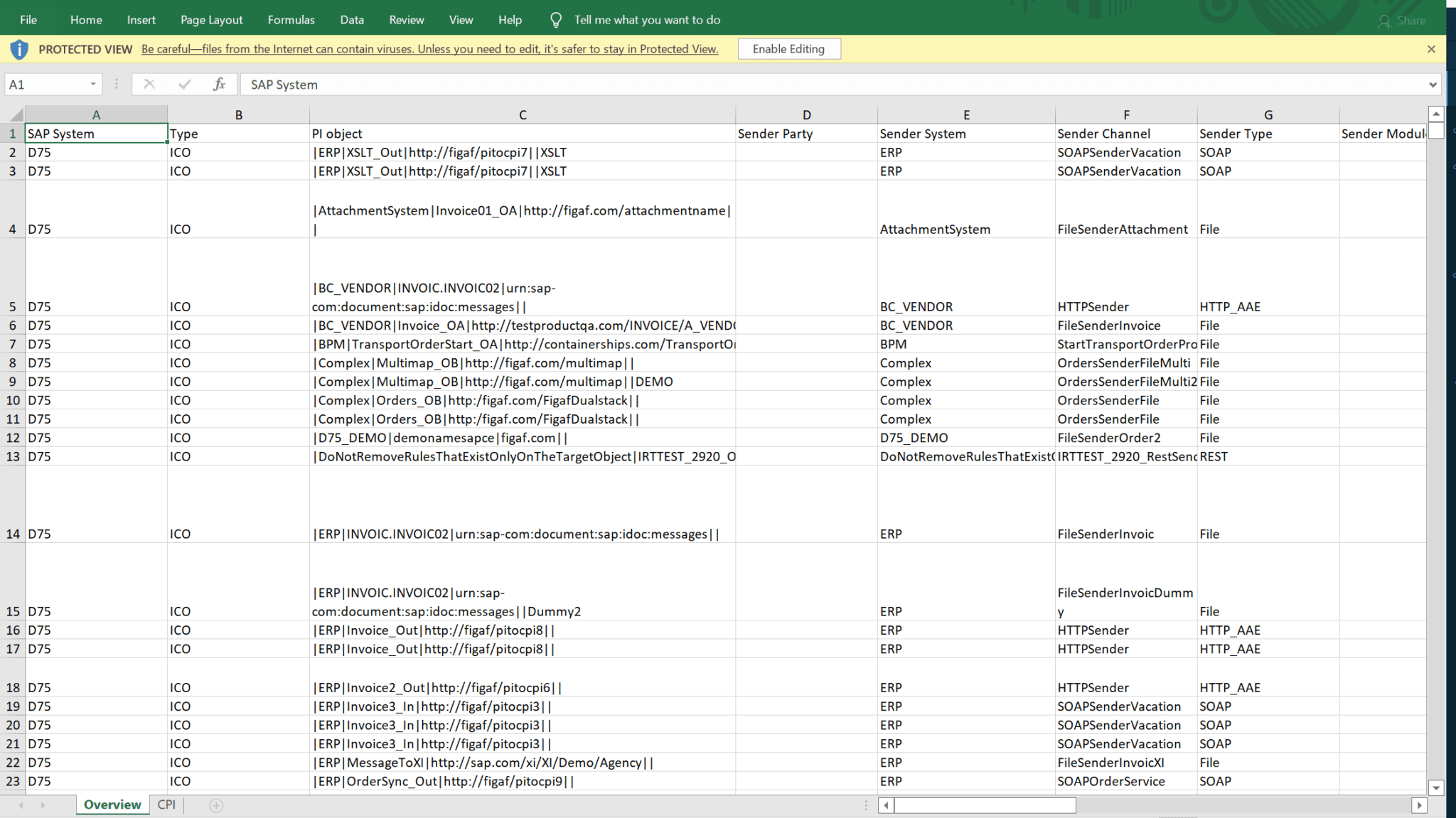
The report is an Excel file with a line per ICO or Receiver Determination, covering:
The systems involved in each integration
Channel types and status, with transport protocol and message protocol, and adapter specific attributes that are not transportable, such as hostnames and paths
The adapter modules, so you see if there is any special handling
Operation mappings and the type of mapping for each interface: message mapping, XSLT, Java or ABAP, and whether an operation mapping is a multi mapping
Function libraries, mapping parameters and RFC lookups, including which RFC functions are used
Imported archives used by Java mappings, XSLT, message mappings and function libraries
File content conversion, BPMN scenarios and scenario types
Message run statistics, such as the number of messages processed in the current month
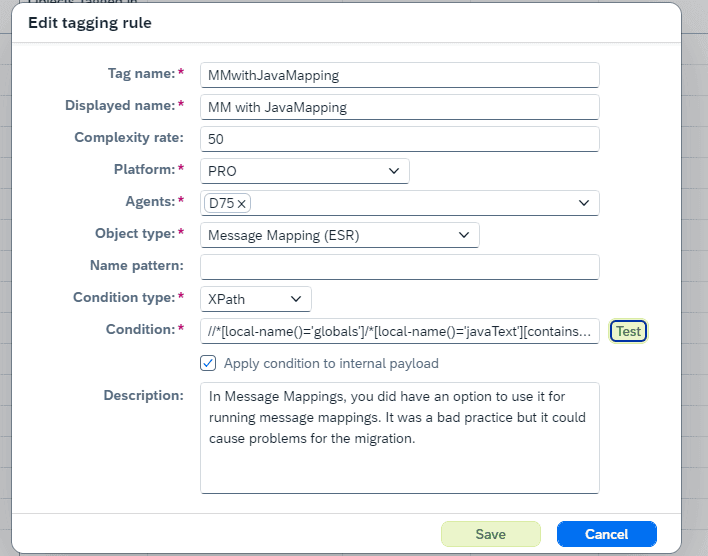
Custom tags. Since release 2402 you can run custom queries with Regex or XPath across your ESR and Directory content, for example to find SFTP channels with Archive on Error, and tag the matching objects. The assessment report shows which objects are tagged. Figaf provides a default list of rules, and you can add your own and run the assessment again without reviewing every object.
Once the migration starts, the migration overview shows which integrations have been migrated and moved into production.
The migration assessment reportCustom rules tag the objects that need attention
Business value
A realistic estimate before you commit. Complexity analysis gives you a basis for planning and prioritizing, instead of counting message mappings and finding the underlying issues during the migration.
Do not migrate what you no longer use. Message statistics show which interfaces are still used, so unused integrations can be retired before the migration begins.
Days saved at the start of the project. Foodstuffs South Island had spent days building their own assessment. Figaf’s report gave them more detail and saved days of the project. Figaf notes that buying a similar report from a partner usually costs from 5,000 EUR.
No surprises later. File content conversion, RFC lookups, imported archives and modules are visible up front, so the interfaces that need a decision are found at the start, not halfway through.
More detail than a summary. SAP’s migration report shows a summary. Figaf’s report covers the details of every interface.
Good to know
The assessment and migration dashboard are included free in the Migration Edition, together with 10 free migrations and a 2-month trial of Figaf DevOps Suite.
Figaf supports SAP PI 7.11 to 7.5, including dual stack systems, and both Receiver Determinations and ICOs. SAP’s own migration tooling supports SAP PI/PO 7.31, 7.4 and 7.5.
As a rule of thumb, 70% of interfaces can be migrated as they are, 15% should be redesigned, and 15% are outdated or can be replaced with standard content.
Analyze your SAP PI/PO landscape up front and get a per interface report of channels, mappings, modules, lookups and usage, so you see what converts cleanly, what needs work and what must be rebuilt.