You need to know which interfaces use a certain pattern, but checking hundreds of objects one by one takes days.
Tagging lets you search the content of your SAP PI/PO and SAP Cloud Integration objects with your own rules and label what you find. Architects use it to check design rules and warn about them in transports, and migration teams use it to find problem areas and plan the work. Tags can also be assigned by hand or uploaded, so they work as a general way to organize integrations.
How it works
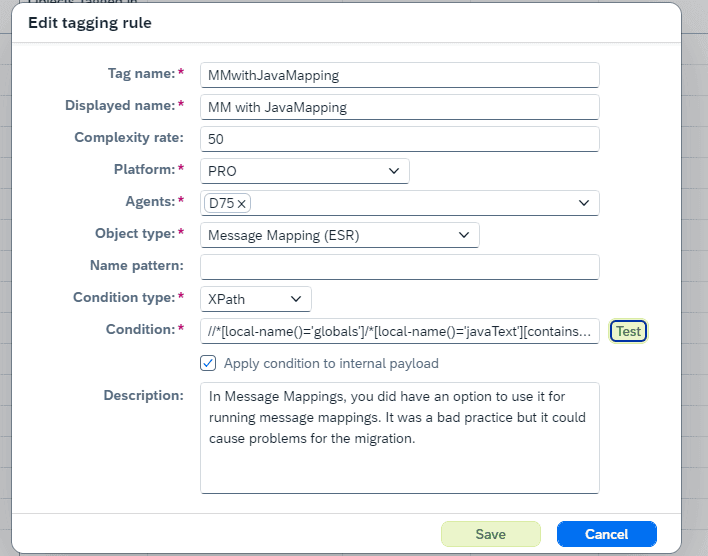
Rules in XPath or regex. A tagging rule queries the object content, such as the BPMN model of an iFlow or an ICO and its channels in SAP PI/PO, with XPath, including XPath 2.0, or a regex. Objects that match get the tag, so you can find them in the Change Tracking Tool. You start from an example of what you are looking for and turn it into a rule.
Examples. How many SFTP channels have archiving enabled, which iFlows use plain FTP, which iFlows or Groovy scripts use a given role, or which iFlows allow payloads greater than 40MB.
Externalized parameters resolved. If an iFlow uses externalized parameters, such as a max payload size, they are resolved before the XPath or regex runs, so the result reflects the real configuration.
All object types. You can search all object types in Cloud Integration.
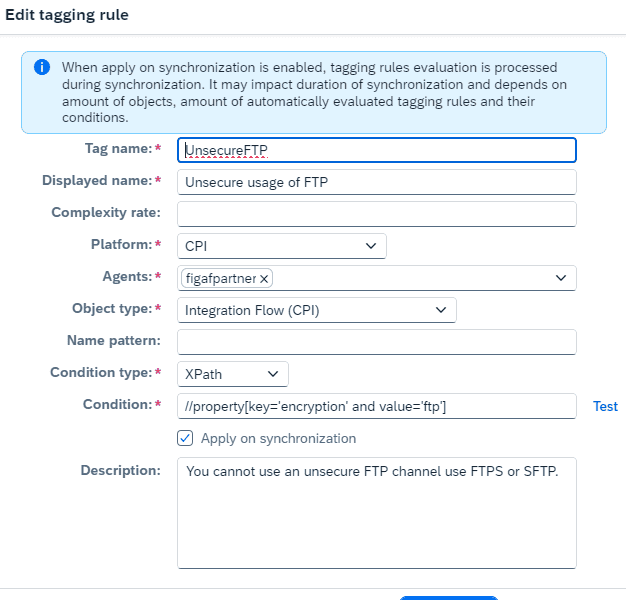
Auto tagging. Select “Apply on synchronization” on a tag, and Figaf runs the rule each time it sees a new object.
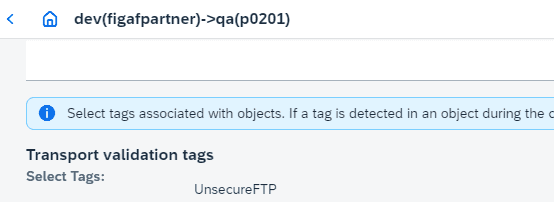
Warnings in transports. On a landscape item you select which tags give a warning when an object is transported. It is a warning only: the approver decides whether the change is fine or an exception.
Naming conventions. Naming rules in regex for PI channels, systems and Cloud Integration iFlows also create tags, including a tag for every object that does not follow your naming convention.
Predelivered rules. Figaf shares a list of tagging rules for migration, including rules for the Camel 3.14 upgrade of Cloud Integration, which you download as a JSON file and upload to your tenant.
Planning with tags. Assign tags such as Wave1 or a responsible developer to ICOs, iFlows and other objects, by hand or by uploading a file, then filter the migration overview by tag to see progress. Filters across several tags can use OR or AND logic, and you can clear a tag assignment.
Define a rule from an example of what you are looking forAuto tagging runs the rule on every new objectChoose which tags warn during a transport
Business value
Answers in minutes, not days. Questions about the whole landscape are answered by a query rather than by opening every channel or iFlow.
Better migration estimates. Running rules before a migration shows which interfaces need extra work, so planning is based on facts. New rules can be added as you learn, without reviewing every object again.
Governance that does not rely on memory. Design rules, such as no plain FTP, are checked in every transport instead of depending on the approver to remember them.
Clear ownership of work. Tags for waves, effort classes and developers show who works on what and how far the project is.
Shared knowledge. Rules capture what experienced developers know to look for, so the whole team can use it.
Good to know
Tagging is part of Figaf DevOps Suite and is used in the Figaf Migration Tool for the SAP PI/PO assessment.
Naming convention tags came in release 2210, custom search with XPath and regex in release 2402, auto tagging and transport warnings in release 2408, tag upload in release 2510 and OR and AND tag filters in release 2511.