With hundreds of ICOs to move, you lose track of what is migrated, tested and live, and which interfaces belong in the next wave.
A move from SAP PI/PO to SAP Integration Suite takes many months, and not every interface can be migrated automatically. The migration overview in the Figaf Migration Tool is the one place where you manage the full migration: it shows each ICO and its status, and with tags you split the work into waves. Developers use it to do the work, and project leads use it to follow the progress.
How it works
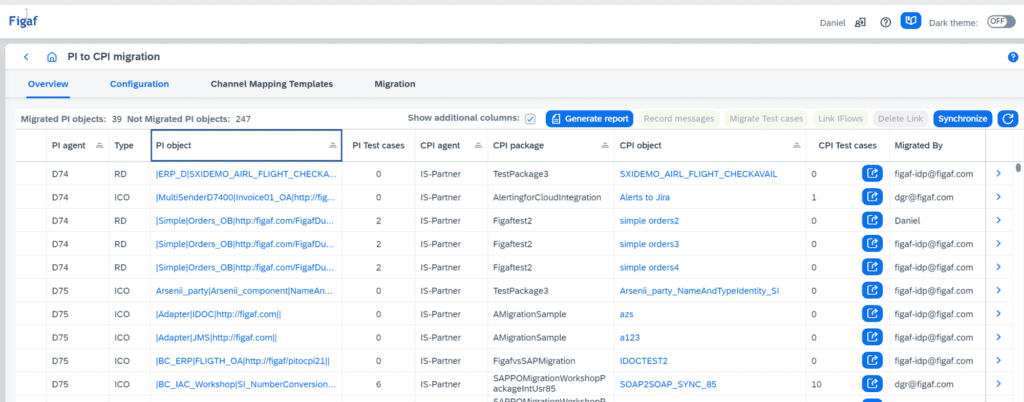
One row per ICO. The overview lists each SAP PI object with its Cloud Integration package, iFlow and test cases. You see which ICOs have been migrated, whether testing is done and whether the iFlow is in production.
Work from the overview. From the overview you migrate automatically or manually, create test cases on SAP PI/PO, migrate the test cases to SAP Cloud Integration, and check if an iFlow is in production. You can also open the object to check versions, test cases or monitoring.
Pipeline migrations. When an ICO is migrated into multiple iFlows, as with the pipeline concept, the overview shows that.
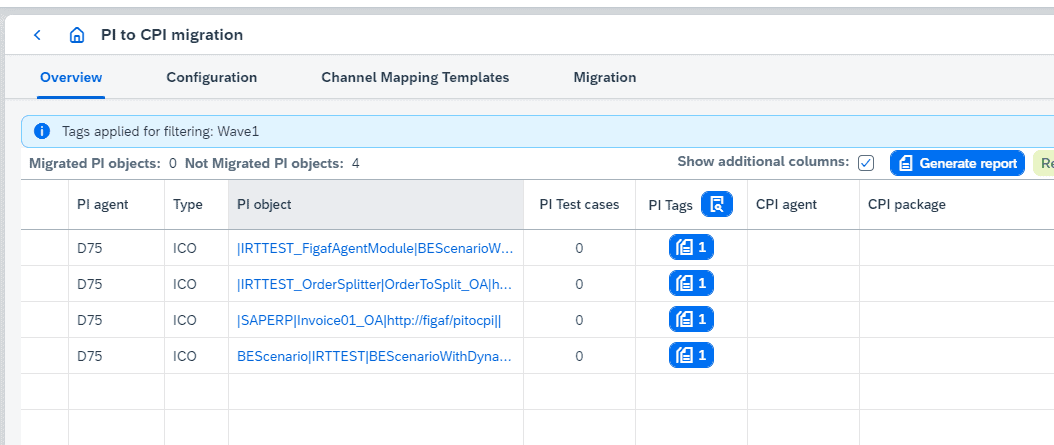
Waves with tags. You create a tag such as Wave1 and assign it to the ICOs in that wave. In the overview you select the tag and see the progress of all its items.
Other uses of tags. Tags can also classify migration effort, assign integrations and migrations to specific developers, and be set automatically by rules you define.
Tag upload. Instead of tagging by hand or through the API, you upload a file that tags many objects at once. For example, you take the ICOs from the PI to CPI migration report, create tags for wave1 and wave2 or for the responsible developer, and upload them.
Filtering. When you filter on several tags, you choose whether to combine them with AND or OR logic. You can also clear a tag assignment when the scope of a tag has grown large.
B2B migrations. For B2B, the Migration B2B Overview is based on operation mappings instead of ICOs, and you can plan it with tags in the same way.
The migration overview: each ICO with its iFlow and test cases.Filter the overview on a wave tag to follow its progress.
Business value
A clear status for the whole project. Managers see which interfaces are migrated, tested and in production, without collecting status from each developer.
Plans that match the work. Typical projects put 40 to 100 ICOs in each wave. Tagging them makes it easier to decide which wave to work on next and to report on each one.
Less time switching between tools. Developers go from test data on SAP PI to migration to checking production status in one place, instead of jumping between many parts of the application.
Shared ownership. Tags for effort and responsible developer show who works on what, so the plan does not live in one person’s spreadsheet.
Fewer surprises. Because testing status is part of the overview, interfaces that have not been tested are visible before they go live.
Good to know
The migration overview was introduced in release 2204. Release 2309.1 improved the navigation, release 2405 showed ICOs migrated into multiple iFlows, release 2406 added filtering by tag, release 2510 added tag upload and release 2511 added AND and OR filtering.
The overview is part of the Figaf Migration Tool. You can try it with the Migration Edition, which includes 10 free migrations.
To plan the migration you also need message volumes and the artifacts that can cause problems, which the assessment report gives you.
Follow the migration of each ICO from test case to migrated iFlow to production, and use tags to group interfaces into waves, effort classes or assigned developers.
See migration overview and wave planning on your landscape