Imports often have to happen in the evening or on the weekend, so someone has to log in to the company network and Figaf to run them.
Many SAP Cloud Integration imports have to be coordinated with the process teams, so they need to happen at an agreed time, often outside working hours. Scheduled imports let release managers and integration developers set that time in Figaf, instead of being online to import the transport by hand.
How it works
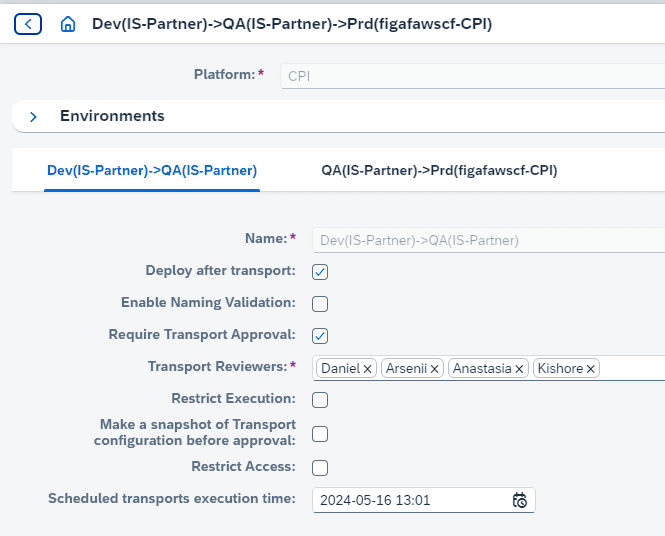
Set the time on the landscape. On the target landscape you add the time when scheduled items should be imported.
Schedule after approval. Once the ticket is approved, you enable scheduled import for the items you want to move at that time.
One time per landscape. You can have one scheduled time per landscape, and all items marked as scheduled are imported at that time.
Notification. When the scheduled imports have run, you get a notification. The transport email notifications tell you whether a transport was imported successfully or with an error.
Possible failures. An import can still fail, for example because a target system is not active or a newer version of the iFlow exists in the source or target landscape. You should still be available to check the result.
Setting the time for scheduled imports on a landscape
Business value
Imports at the right time for the business. Changes go live when the process teams have agreed, such as in the evening or on the weekend, without coordination on the night itself.
Less out-of-hours work. Nobody has to log in to the company network and Figaf late at night just to press import.
Governance stays intact. Only approved items are scheduled, so the approval process and the record of who approved what are the same as for any other import.
Faster reaction when something goes wrong. The notification about the result means the team knows straight away if an import needs attention.
Good to know
Scheduled imports are part of the transport process in the Figaf DevOps Suite. Available since release 2405, announced as coming soon in release 2404.