Setting up unit tests for SAP Cloud Integration Groovy scripts takes boilerplate code and test data that nobody has time to write.
Unit testing for scripts lets integration developers test the Groovy scripts in their SAP Cloud Integration iFlows without writing the test setup themselves. Figaf DevOps Suite reuses the test cases you already recorded for an iFlow and turns them into test data and unit tests for its scripts. It is part of the Figaf Testing Tool, and it is bundled with the Git integration so developers can run and debug scripts in their own IDE.
How it works
Generate from test cases. If you have created test cases for an iFlow in Figaf, you select “Generate Groovy Scripts Test data”. Figaf creates test data for all the scripts in that iFlow.
JSON test data. Each input and output message, with its headers, properties and body, is written as a JSON file in the Git repository. This lets Figaf create automated assertions of all the parameters in the message.
Generated test class. Figaf creates a JUnit test method for each script in the flow, linked to its test messages. You can remove the scripts you do not want to test, and exclude parameters from the comparison with getIgnoredKeys.
Add more data over time. Each time you generate, Figaf adds more test data with an increasing number, so you can extend coverage as new test cases are recorded.
Custom assertions. Besides comparing input with expected output, you can send a message through the script and write your own assertions, for example with AssertJ soft assertions.
Mock services. The repository contains mock implementations of the services a script needs, so scripts run without connecting to them. You add the SAP Cloud Integration jars yourself. Since it is a mock, some exotic functions may not behave exactly as on the tenant, so you should still test in SAP Cloud Integration.
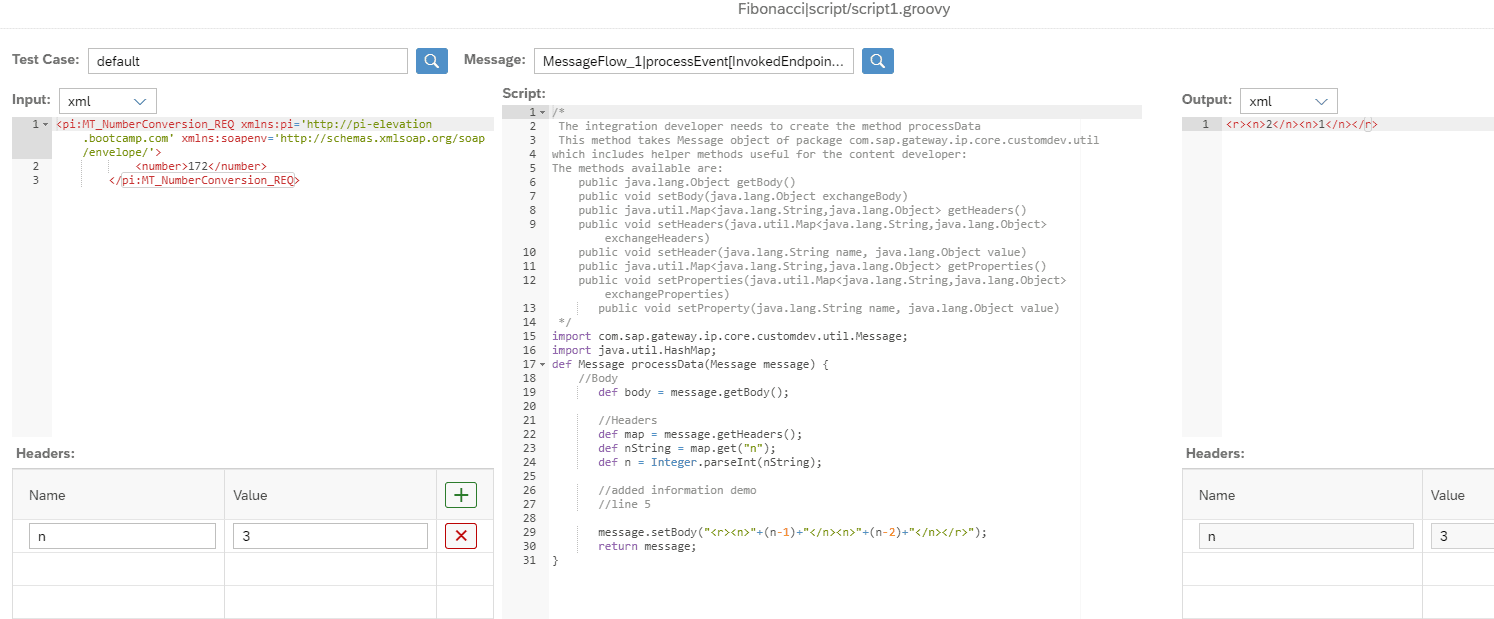
In Figaf too. In Figaf’s own Groovy and XSLT editor, you pick a test case as input, run the script on your tenant and compare the output with the expected result from the test case.
In the pipeline. Unit tests can run in a Git pipeline, such as GitHub Actions, and a failing result is shown on the transport.
Generated unit tests run in your own IDERun a script against a test case in the Figaf editor
Business value
Faster fixes. Developers can run a script against real test data in seconds, instead of deploying the iFlow and sending a message for every attempt.
Fewer regressions. Every script change can be checked against the messages it handled before, so unexpected changes in output are caught early.
Less effort to build tests. The test setup and test data are generated, so teams get unit tests without spending time on boilerplate code.
Knowledge kept in tests. The behavior of each script is recorded in test data that the whole team can run, not only the developer who wrote it.
Good to know
Unit testing for scripts is part of Figaf DevOps Suite and the Figaf Testing Tool, and works with the Git integration.
Release 2604 removed Figaf’s Gradle plugins from the public Git repository, since they are no longer maintained.
Unit tests for your Groovy scripts, generated from test cases you already have
Reuse the test cases recorded for an iFlow to create unit tests and test data for every Groovy script in it, so developers can run and debug their changes quickly.