Synchronize with an Agent system
Synchronization fetches the objects of a PRO, CPI or Api Management Agent system into Change Tracking Tool, so that Figaf Tool starts tracking their versions. This page describes how to run it and what each of its options does.
Check that you’ve configured an Agent entry and tested integration with it. See Agent Configuration to learn how to do it.
|
You can run synchronization from 2 pages on UI: |
1. Synchronization with Agent system step-by-step
-
Click on
Change Tracking Toolon the side menu or click on the tile on the home page. It opensTracked Objectspage.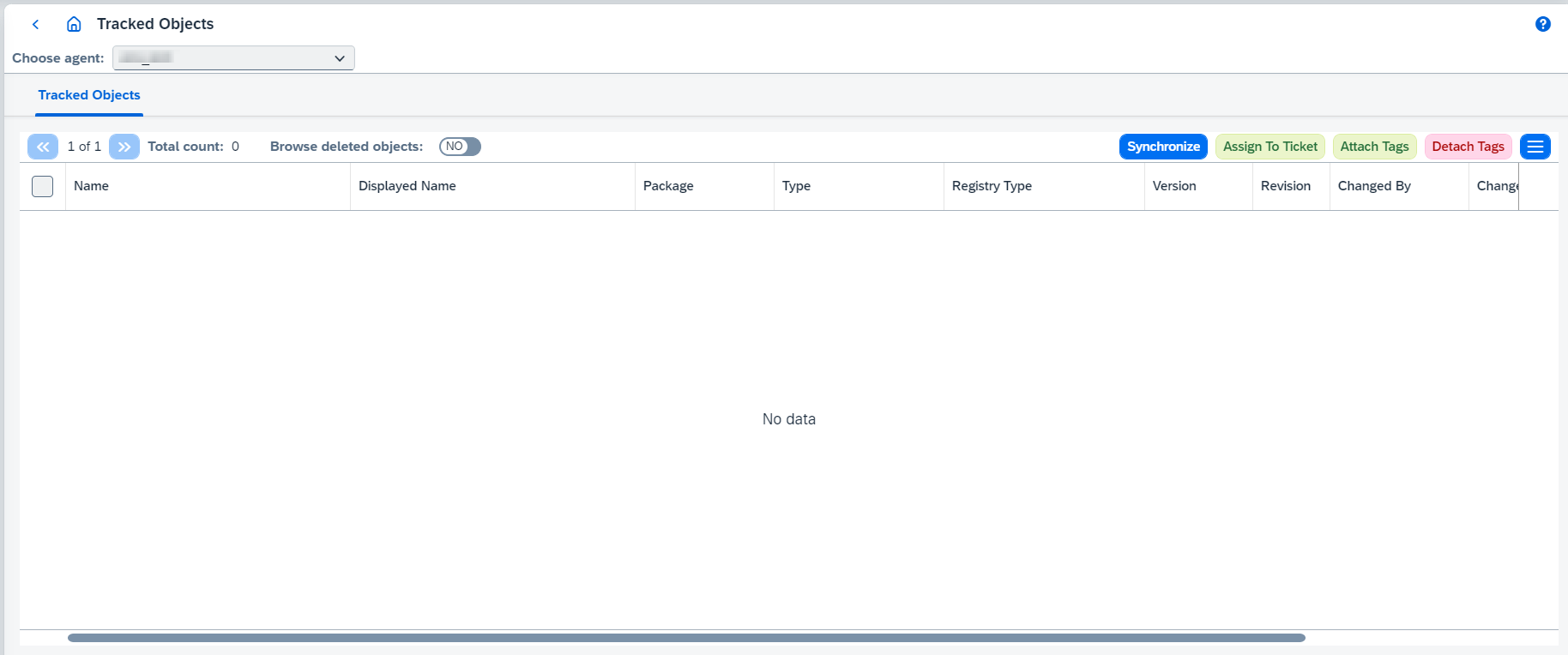
-
Select needed agent system and click on
Synchronizebutton to run synchronization. It will synchronize all object types for current SAP system type listed in the Supported business objects section.For
PRO,CPIandApi ManagementAgent systems you can configure synchronization settings:-
for
PROAgent system you are able to configure the following settings: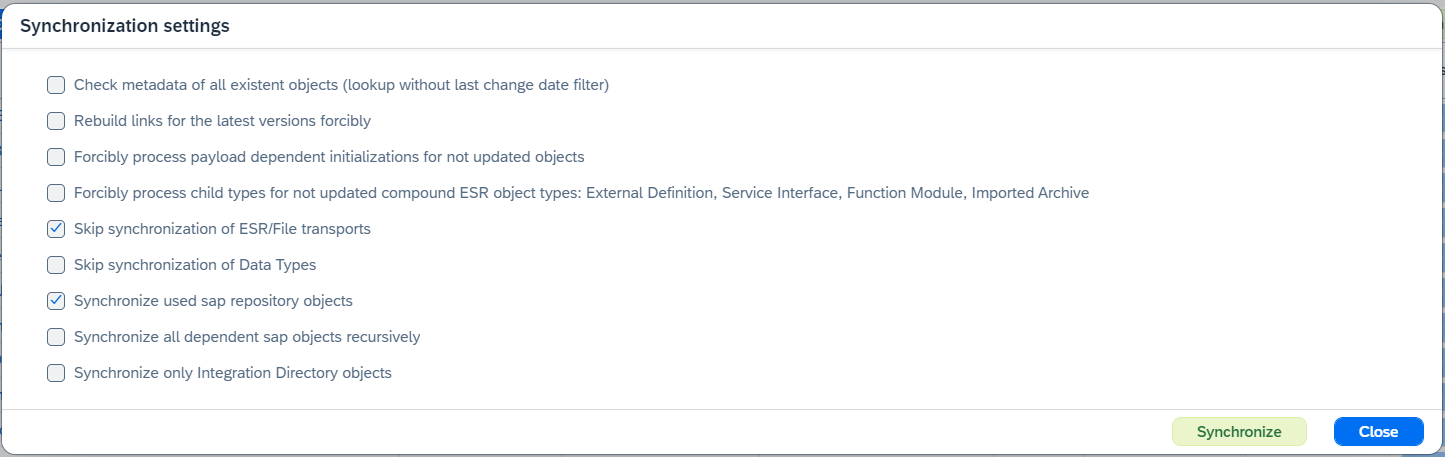
Check metadata of all existent objects (lookup without last change date filter)runs synchronization without last change date filter forCTTobject types.It is possible to clear this filter manually (see field Reset synchronization query on Edit Agent Dialog).
Rebuild links for the latest versions forciblyis required when you mix different synchronization settings. For example, first time you synchronize objects onIntegration Objectspage (that synchronization includes onlyIntegration Directorytypes), then you synchronize them onTracked Objectspage to browse ESR objects inCTT. It’s related to the fact that all objects have only one-way links in the received metadata. AnIntegrated configurationobject has links toOperation Mappingobject, butOperation Mappingobject doesn’t contain any links toIntegrated configuration. So, if an Integrated Configuration object has been already synchronized, it won’t be possible to link it with currently synchronized Operation Mapping object having only Operation Mapping differences information. If the flag is enabled, synchronization algorithm will check all latest versions for chosen object types and build links between them properly.Forcibly process payload dependent initializations for not updated objectsmakes synchronization process payload dependent operations (payload, in that case, can be loaded either from DB e.g. forICO,CHANNEL, or from agent e.g. forID_FILE_TRANSPORT,ID_CTS_CHILD_TRANSPORT,ESR_FILE_TRANSPORT,ESR_CTS_CHILD_TRANSPORT. Skipping that option makes Directory objects and transports synchronization faster. Use it for recovery purposes in case of some potential inconsistency.Forcibly process child types for not updated compound ESR object types: External Definition, Service Interface, Function Module, Imported Archiveenables checks of inner child objects for all objects of the listed types. Use it for recovery purposes in case of some potential inconsistency with related types.Skip synchronization of ESR/File transportsdisables synchronization of transport object types. If enabled, then synchronization of transport object types will be completely skipped.Skip synchronization of Data Typesdisables synchronization of data types. If enabled, then synchronization of data types will be completely skipped.Synchronize used sap repository objectsruns synchronization for used sap repository objects. If it isfalse, all sap repository objects will be synchronized.Synchronize all dependent sap objects recursivelyruns synchronization for child sap objects even if the object hasn’t been changed/created/deleted. If it isfalse, child sap objects will be synchronized only if the object on the current level has been changed/created/deleted.Synchronize used sap repository objectsandSynchronize all dependent sap objects recursivelysettings are available only if Synchronize used sap repository objects on demand setting is enabled on Edit Agent Dialog.ApplicationException: Duplicate tracked object identified. Recording already exists but has another groupId.error might occur during synchronization if Synchronize used sap repository objects on demand setting is enabled.Synchronize only Integration Directory objectsruns synchronization of Integration Directory objects. -
for
CPIAgent system you are able to configure the following settings:
Synchronize objects forcibly- use that function to remove cached values of last change dates for each tracked object types. These dates are used in synchronization algorithm to minimize amount of objects to check (checking only changed objects).Rebuild links for the latest versions forcibly- if true, links will be rebuilt for the latest versions.Initialize externalized parameters of deployed IFlows- if true, externalized parameters of deployed IFlows will be initialized and configurations for design-time and deployed versions will be compared fairly.Synchronize all packages- if true, all packages will be synchronized. If false, you can select packages to be synchronized. -
for
Api ManagementAgent system you are able to configure the following settings:Synchronize objects forcibly- use that function to remove cached values of last change dates for each tracked object types. These dates are used in synchronization algorithm to minimize amount of objects to check (checking only changed objects).
-
-
Once synchronization is started, you can see the dialog with progress information:
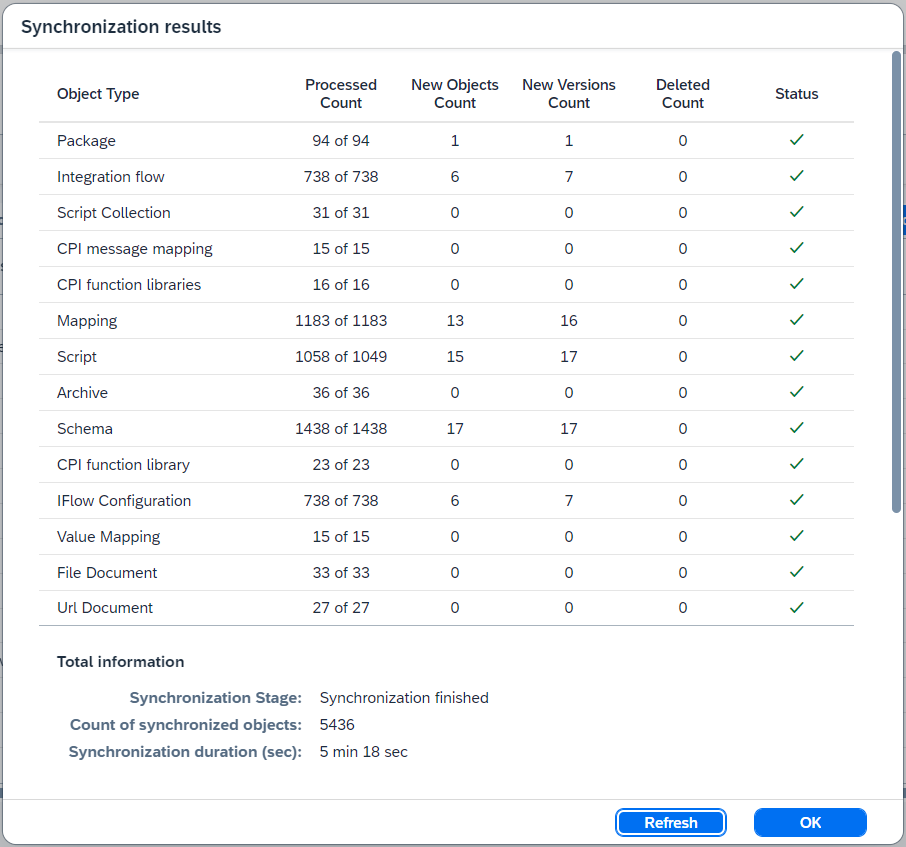
The dialog information is updated automatically time-to-time. Synchronization is finished when the
Synchronization Stagefield is equal toSynchronization finished.