Test Suite Run page
Test Suite Run page opens a historical test suite run and browse related test runs:
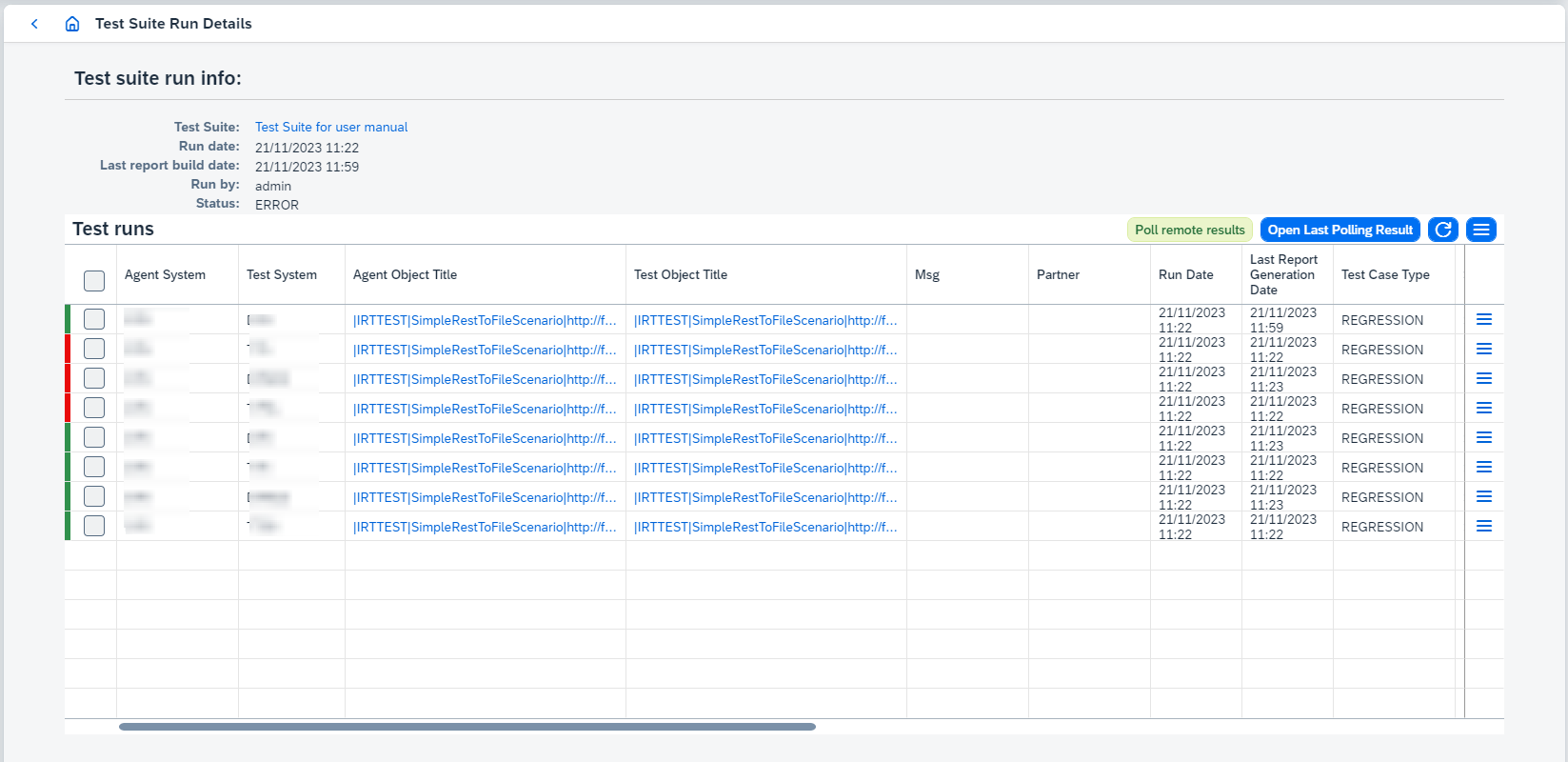
On this page you can:
-
View linked test suite. It opens Test Suite page.
-
Work with test runs:
-
View Agent and Test Objects clicking on
Agent Object TitleorTest Object Title. It opens Integration Object Details page. -
Poll remote results clicking on
Poll remote results.Since Figaf Tool 2.15 automatic polling is added for SAP CPI
Agents. Once the messages have been run successfully, automatic polling is started.Since Figaf Tool 2.15.2 active polling statistics can be viewed. If there is polling in progress for the integration objects and you open another poll remote data dialog, then
-
recordings/test runs which are in both polling requests will be marked as
SKIPPED_AS_DUPLICATEand statistics will be copied from original item and shown on UI in the new one. -
recordings/test runs which are not in the original polling request will be
SKIPPEDin the new one.
Since Figaf Tool 2305 polling will not be started if there is already a started polling requests with same objects in progress or polling has been already completed for all selected objects.
If you have polled almost all messages and you just need to poll small number of messages to finish testing, you can enable option
Ignore messages cache during pollingon Application configuration page. When this option is enabled, already polled messages won’t be skipped. It affects performance when the amount of messages is large and you just need to poll small number to finish testing. -
-
View last polling result clicking on
Open Last Polling Result.Open Last Polling Resultbutton is available after polling remote data and until page is refreshed. -
Do the following actions clicking on
 and choosing corresponding option:
-
Rerunreruns required test case. -
View testcaseopens 'Test Case Details' page. -
Download report.Report type can be one of 2 types:
-
xlsxreport:-
Contains information about test run/test suite run results.
-
By default only failed results are added to
xlsxreport. If you want to change this behavior, go toConfiguration → Applicationpage and enableShow successful messages in the test suite’s reportproperty.
-
-
ziparchive with 3csvreports:-
test-run-metadata.csv- contains common information about test run/test suite run (e.g. test object, counters for success/error/unexpected/not/compared/unfinished test run/test suite run results). -
diff-report.csv- contains diff report for test run/test suite run. -
processed-messages-report.csv- contains processed messages report for test run/test suite run.
-
The report type is defined from
Use bundled CSV report generation strategyproperty configured on Application configuration page. If it’s true, the report type iszip, otherwise, it’sxlsx. -
-
View resultsopens Test Run Details page.
-
-
-
Menu options:
-
Compare resultsfor selected test runs. -
Open Used Mapping Configurationopens used mapping configuration. -
Test suite run reportdownloads test suite run report.Report type can be one of 2 types:
-
xlsxreport:-
Contains information about test run/test suite run results.
-
By default only failed results are added to
xlsxreport. If you want to change this behavior, go toConfiguration → Applicationpage and enableShow successful messages in the test suite’s reportproperty.
-
-
ziparchive with 3csvreports:-
test-run-metadata.csv- contains common information about test run/test suite run (e.g. test object, counters for success/error/unexpected/not/compared/unfinished test run/test suite run results). -
diff-report.csv- contains diff report for test run/test suite run. -
processed-messages-report.csv- contains processed messages report for test run/test suite run.
-
The report type is defined from
Use bundled CSV report generation strategyproperty configured on Application configuration page. If it’s true, the report type iszip, otherwise, it’sxlsx. -
-
Export to CSVdownloads test runs CSV report. -
Extract related source data as a test casecopies message groups related to filtered (not successful or not compared) test run results from all test runs to the new test case. -
Rerunreruns selected test runs.
-