Transport Configuration page
Transport Configuration page shows the transport configuration of selected object on selected landscape and looks:
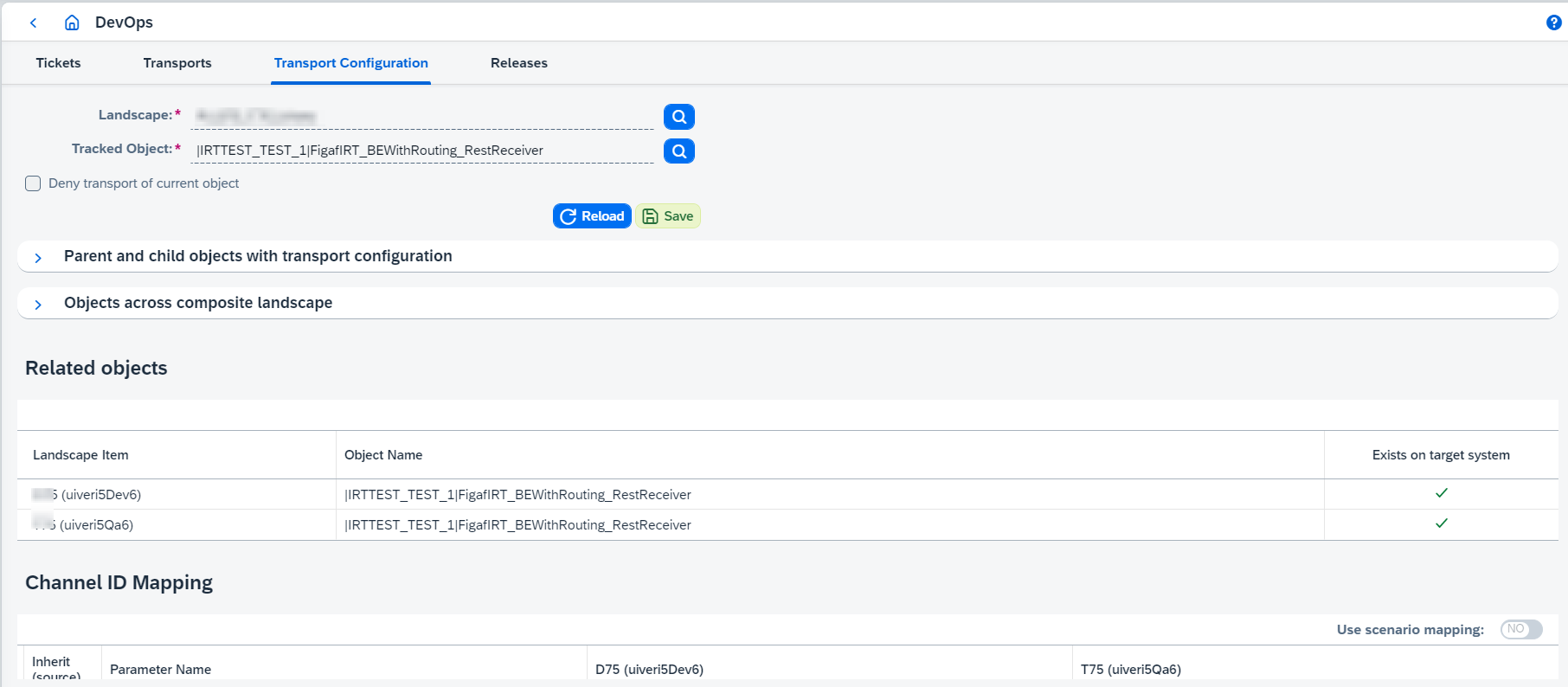
Transport Configuration is validated during opening, and validation errors are shown in warning message, e.g.:

On this page you can do the following:
-
Configure whether object is transportable or not. If
Deny transport of current objectis enabled, the object will not be attached to tickets and transports. -
Navigate between Transport Configurations of parent and child objects with transport configuration.
-
Navigate between Transport Configurations of the same object across the Composite landscape.
-
Browse child objects name mapping lookup for binary landscapes.
-
Configure parameters. There are 3 possible cases for transport configuration parameters:
-
Parameter value should be taken from source object version and set on the target object. Default behavior for all non-password parameters.
-
Parameter value should be kept from target object version, so, it won’t be updated. Default behavior for all password parameters.
-
Parameter value should be configured manually for chosen target system.
-
Transport configuration is configured differently for varied objects:
-
PRO objects:
For parties, components, systems, communication channels, and ICOs it’s possible to configure name mapping. For communication channels it’s also possible to configure adapter specific attributes and module parameters. You also can configure mappings and switch on/off
Use scenario mappingoption for PRO non-binary landscapes.You can browse changes between source ICO state and the state to upload clicking on
Changes overviewbutton on ICO transport configuration page for PRO binary landscapes.Routing conditions can be configured for receivers and interfaces on ICO transport configuration page for PRO binary landscapes:
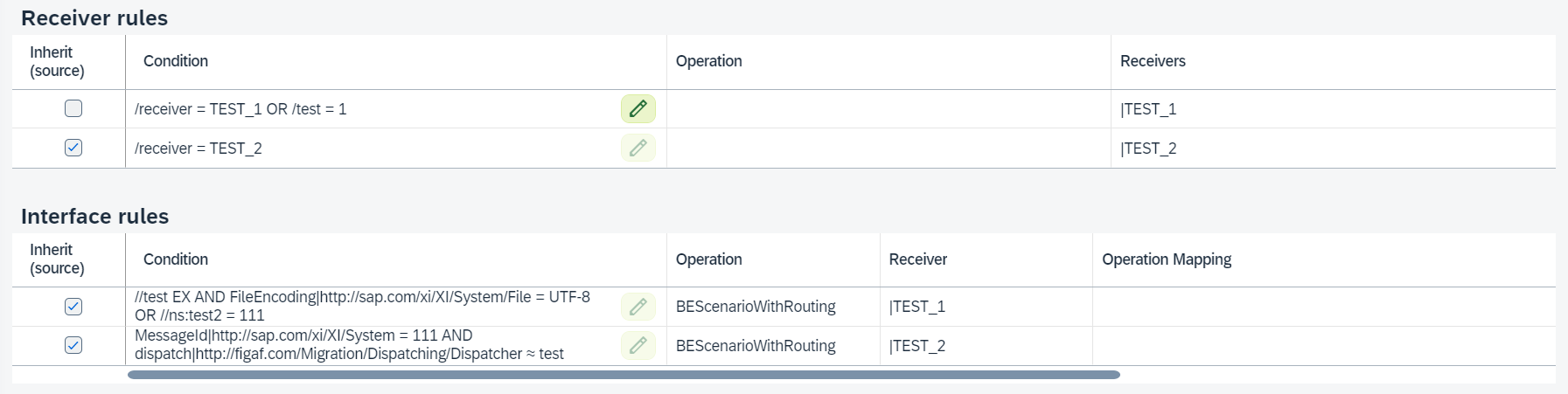
By default, condition is taken from object payload. If
Inherit (source)is disabled, routing condition can be changed and this new condition will be used during transport. If it’s required to reuse condition from target object for the same rule, then use ignoring option ofReceivers/Interfaces projectionsettings.For receiver interface rules it’s not possible to have projection option (exclude or ignore) and manually defined condition at the same time. The feature has restrictions and limitations. Please consider the following:
Receiver rule is identified by key
<operation> + <receivers party and service>and that one rule can contain multiple receivers. Receiver interface rule is identified by key<receiver party and service> + <operation> + <operation mapping> + <interfaces>.While all rules have unique keys and they stay immutable (i.e. no changes in receivers list for receiver rule or interfaces list in receiver interface rule) - identification can be done without any problems, but when there are multiple rules with the same key or when some rule’s key is updated during source object update, we have troubles with matching previously manually configured condition with the updated set of rules. To summarize:
-
If transport configuration has a persisted condition but related key is not found in the actual list of rules, it’s no longer possible to apply that condition and it will be lost. New rules that are inherited from source by default will be shown.
-
If transport configuration has a persisted condition but related key is found multiple times in the actual list of rules, further identification is possible only if initially object has rules with the same key but different conditions.
-
If at some moment of time object gets fully duplicated rules (key+condition), for now it will initialize all conditions with the value from the condition of the first rule in the list of duplicated rules.
One more tricky case occurs when
Don’t remove rules that exist only on the target objectis enabled inReceivers/Interfaces projectionsettings. If the option is enabled and conditions are changed for some receivers/interfaces, then:-
If target object has already had all receivers and interfaces, target object will contain these receivers and interfaces (with previous conditions) and receivers and interfaces with new conditions after transport.
-
If target object hasn’t had these receivers and interfaces, target object will contain receivers and interfaces with new conditions after transport.
Projection can be configured in
Receivers/Interfaces projectionsettings on ICO transport configuration page for PRO binary landscapes: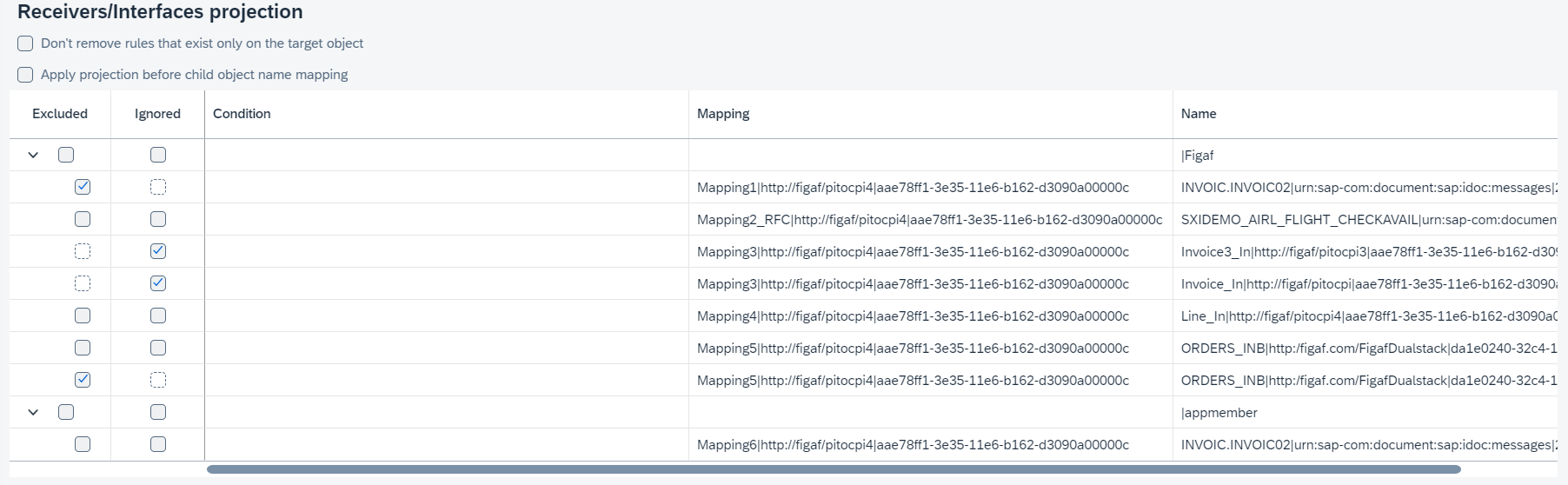
You can keep receiver/interface rules that exist only on target object enabling
Don’t remove rules that exist only on the target object.You can either exclude or ignore receiver/interface rules:
-
If you exclude specified receiver/interface rules during transport of the ICO, then these rules will be ignored completely and will not be transported.
-
If you ignore specified receiver/interface rules during transport of the ICO, then these rules won’t be excluded but taken from the current target ICO instead. So, specified rules won’t be updated during transport. If the target object doesn’t exist, ignoring isn’t processed.
If the whole receiver is ignored and target object already has this receiver, extra rules from source object will not be moved to target object.
On Channel transport configuration page there are a lot of Adapter specific attributes and since of 2112 Figaf Tool supports a possibility to add parameter description with context GUI information that can be taken from adapter metadata payload, filter items by different criteria.
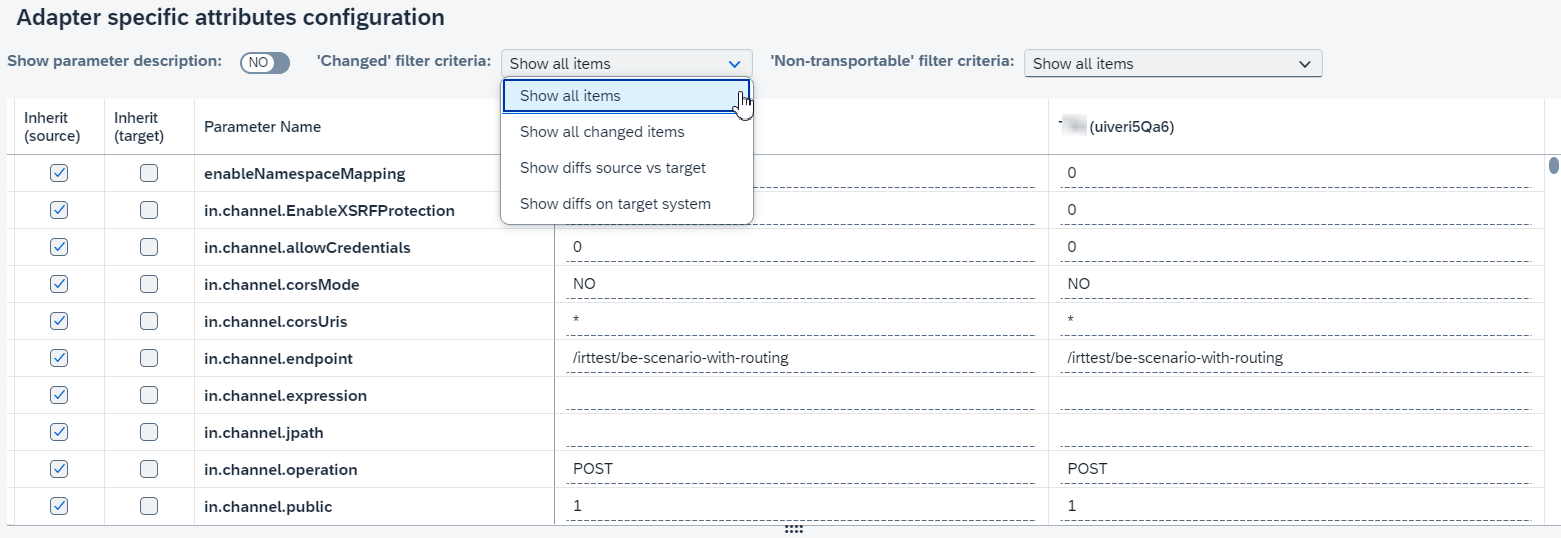
The following filters are available:
-
'Changed' filter criteriafilters attributes by differences. So all items, all changed items, items having diffs between source and target or items having diffs on target system are shown. -
'Non-transportable' filter criteriafilters attributes by transportable criteria. So all items, all non-transportable items, all passwords/credentials items or all transportable items are shown.
Also parameter description with context GUI information can be shown depending on
Show parameter descriptionswitcher value.Parameter description with context GUI information that can be taken from adapter metadata files which location (path to the folder with files) should be set in bootstrap parameter irt.config.pi-adapter-metadata-files. The files should be downloaded from PI system. See Application properties to learn more about bootstrap parameters. -
-
CPI Objects:
You can override transport configuration for older IFlow versions (to enable this feature click on
Override for a particular versionand select a version).It is possible to select draft version only if it’s the latest (it’s impossible to select historical draft versions).
You can initialize transport configuration by the ancestor values clicking on
Init by another object. It opens the dialog where you can select IFlow which IFlow configuration will be used as an ancestor to initialize IFlow external configuration parameters of target object.Once transport is created for an object, corresponding transport configuration will be persisted. The following cases are possible:
-
There is no persisted transport configuration for an object and persistence is requested for the latest version, then Figaf Tool will persist new config for the latest version (by group id only).
-
There is no persisted config for an object and persistence is requested for particular version, then Figaf Tool will persist new config for particular version (by group id and tracked object id).
-
There is persisted config for the latest version and persistence is requested for latest version, then Figaf Tool will update persisted config for the latest version.
-
There is persisted config for the latest version and persistence is requested for the particular version
-
if a particular version is not the latest, then Figaf Tool will persist new config for the particular version.
-
if a particular version is the latest, then Figaf Tool will update the persisted latest version as a particular version.
-
-
There is a config only for a particular version and persistence is requested for the latest version
-
if a particular version is not the latest, then Figaf Tool will persist new config for the latest version (it’s not the real case for normal usage).
-
if a particular version is the latest, then Figaf Tool will update the content of the particular version without changing its type.
-
-
There is config only for a particular version and persistence is requested for a particular version, then Figaf Tool will update persisted config for the particular version.
When a configuration is persisted for a concrete transport it’s possible to edit transport configuration for transport items which haven’t been approved yet.
'Changed' filter criteriafilters attributes by differences. So all items, all changed items, items having diffs between source and target or items having diffs on target system are shown. -
-
Api Management Objects:
You can configure Api Proxies (target endpoint properties and URL) and Key Value Maps.
'Changed' filter criteriafilters attributes by differences. So all items or all changed items.