
Faster message mappings in SAP Integration Suite: meet the CI Mapping Toolkit
A free, open-source Chrome extension that brings quick, keyboard-driven editing back to the Cloud Integration mapping editor.
Figaf DevOps Suite
Standardize your SAP integration delivery with automation, governance and complete visibility across your landscape.
We only enhance SAP standard - we never replace it
Every customer running Figaf still has 100% SAP standard underneath. You can use Figaf, scale it back, or remove it completely, at any point, without losing that standard functionality. You’re not locking yourself in: if a better solution comes along, whether that’s SAP’s own roadmap or something you build yourselves, walking away from Figaf stays simple.
| Many organizations today | Standardized with Figaf |
|---|---|
| Critical knowledge about integrations often exists only in the heads of a few experienced developers, or in documentation that is no longer up to date. | Integration knowledge is automatically documented, searchable and shared, making it available to the entire team instead of a few individuals. |
| Developers spend valuable time searching for information, understanding previous changes and performing repetitive manual tasks. | AI-assisted development and automation reduce repetitive work, giving developers more time to deliver new business capabilities. |
| Preparing a release often involves multiple manual steps, coordination between teams and the risk of overlooking important changes. | A governed delivery process automates approvals, documentation and release preparation, making deployments faster and more predictable. |
| It is difficult to understand what is running in production, how systems are configured or what changed between releases. | One platform provides complete visibility into integrations, configurations, deployments and change history across the SAP landscape. |
| As the integration landscape grows, organizations often introduce additional tools to solve individual problems, increasing complexity and maintenance. | One integrated platform combines AI, automation, governance and visibility, reducing complexity while standardizing SAP integration delivery. |
When SAP integration knowledge is visible, reusable and governed, the benefits become measurable: faster delivery, lower operational risk, less manual effort and better use of developer expertise. Every SAP landscape is different, but these examples illustrate where organizations typically realize the greatest return from standardizing SAP integration delivery.
≈ €3,200/month*
Automate repetitive delivery tasks and free up around 10 developer hours every week, so developers can focus on delivering new business capabilities.
≈ €4,600/month*
Use virtual environments within a single Integration Suite tenant for development and QA, avoiding the cost of maintaining an additional tenant.
≈ €20,000*
Start with a mature SAP integration delivery platform instead of investing several hundred engineering hours building and maintaining your own.
* Illustrative examples. Actual savings depend on your SAP landscape, release frequency and development processes.
Open a feature to see how it works and what it looks like in a real landscape.
Figaf commits your iFlows, packages and API Management content to your Git repository every day, so you always have a versioned backup, and tools such as CPILint can work from it. Develop Groovy scripts in Figaf’s editor with the real message and trace data in front of you, and open scripts straight from the CPI Helper plugin.
In practice: Fixing a mapping script against the message that broke it, without a deploy cycle between each attempt. Read more →
Figaf monitors all the objects that matter for your SAP integration and finds every difference between versions, so you can see when and why something was changed.
In practice: During Medela’s migration, the team could see which version was deployed on each tenant, what differed between them, and the transports and test results behind each one.
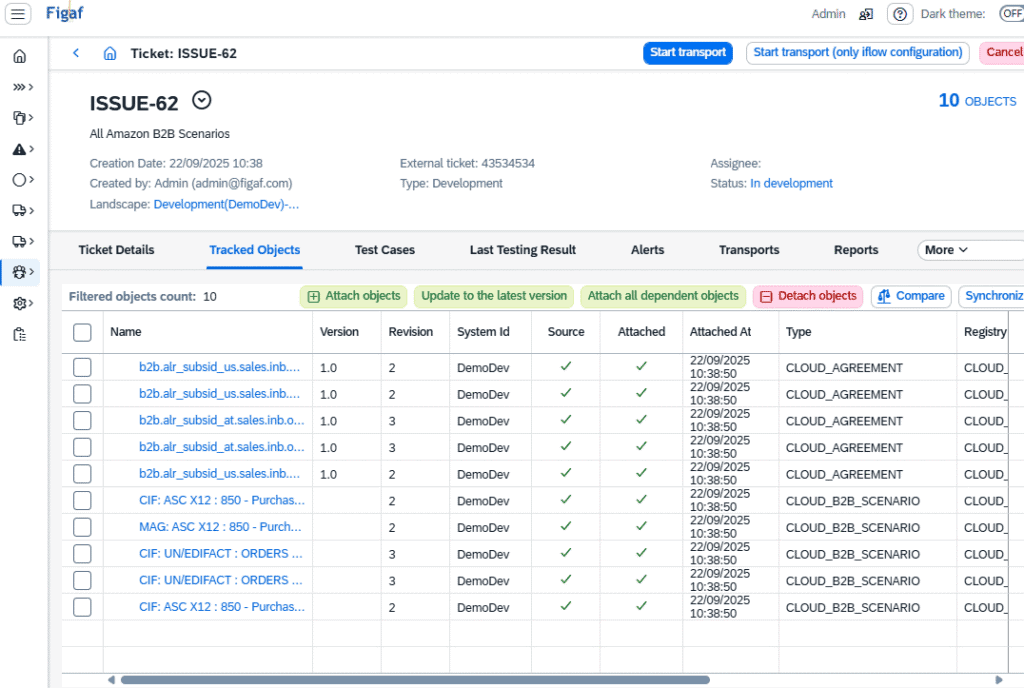
Every change to your code should have a reason, normally a service request or a ticket from the business. Figaf logs which objects a change affects and links them to the business request, so on every version of every object you can find the reason for the change.
Figaf works with Jira, Azure DevOps and ServiceNow, and with SAP Solution Manager ChaRM and Cloud ALM, through webhooks and its transport API.
Transport is about understanding what is moving through your landscape, with the right approval, configuration and testing. Figaf shows which integrations are transported, makes sure managers or architects know what they approve, and lets you test how the change affects your integration.
You can also roll back to the previous version, schedule imports outside working hours, and transport SAP Discovery content.
In practice: A release that used to take an afternoon of coordination between the integration team and Basis, done in one approval. Read more →
Figaf adds a virtual QA stage on your development tenant. Content is renamed per stage and moves through the same transport process as everything else, so you run three stages on two tenants.
In practice: Dürr runs development, QA and production on two tenants, with QA as a virtual tenant on the development system and the same transport process throughout.
Set approvers for each stage of your landscape, so developers stay out of production. Before an import, Figaf checks the transport against your naming conventions, SAP’s design guidelines and your own rules, such as no plain FTP, and the approver decides.
In practice: At Dürr, developers no longer change the production tenant. Every change goes live through Figaf, and only admins keep emergency access.
Each time you import new content, it has to be configured to point to the right systems, normally by hand after the import. Figaf is a central repository with all the information you need, which makes transports simpler and easier to perform.
In practice: Foodstuffs South Island had interfaces with many conditional endpoints. They exported the endpoints to a spreadsheet, changed them all at once and imported them again.
One view of the iFlows and other objects on every tenant, filtered by the tickets you are working on. Tenant and parameter reports, a comparison of deployed and configured settings, and deployment of many iFlows at once, on Cloud Integration and Edge Integration Cell.
In practice: When we help customers with transports, they often have a lot of old configuration still in place. The parameter report shows it across the whole landscape, without opening each iFlow.
Documentation is one of the processes that takes the most time. Figaf creates both kinds you need, automatically:
In practice: An auditor asks what changed in the order interface last quarter, and the answer takes a search rather than a week. Read more →
Testing makes sure a change does not introduce unexpected behavior. Figaf automates it: create test cases from your production data, with all its variations, and run only the interfaces a change affects instead of every test case. The same recording and comparison covers API Management proxies and Event Mesh.
In practice: A developer changes a mapping on Friday afternoon and knows within a minute whether the other fourteen fields still land correctly. Read more →
In practice: Running the nightly regression suite at 02:00, when the partner's system is down for maintenance. Read more →
You can only react in time if you have a tool to handle and sort alerts. Figaf lets you set up simple rules for every abnormality in your SAP integration, so you find and resolve critical issues much faster.
In practice: A failed message raises a ServiceNow incident with the payload attached, before anyone downstream notices. Read more →
Search your integrations in plain language, generate iFlow documentation, get help resolving errors, and vibe code Groovy and XSLT. With the Figaf MCP server, Claude or your own self-hosted model can find, compare and trace iFlows. You use your own OpenAI key.
Suite size options are based on the scope of your integration landscape.
| Tier | Scope | Per month |
|---|---|---|
| Small | Up to 100 iFlows in your development system | €2,000 |
| Medium | 101-500 iFlows | €3,800 |
| Large | 501-1,000 iFlows | €4,700 |
| Enterprise | More than 1,000 iFlows | Talk to us |

A free, open-source Chrome extension that brings quick, keyboard-driven editing back to the Cloud Integration mapping editor.
How Figaf fits under your existing release process - without changing it
What SAP Integration Suite’s new GitHub integration for iFlows does, where it falls short, and how it compares with Figaf’s automatic Git workflow.