Manage Partner Directory parameters
Since of 2405 Figaf Tool supports management of Partner Directory parameters. To work with the feature go to Change Tracking Tool → Tracked Objects page, select CPI or Integration Suite Agent and go to Partner Directory parameters tab:
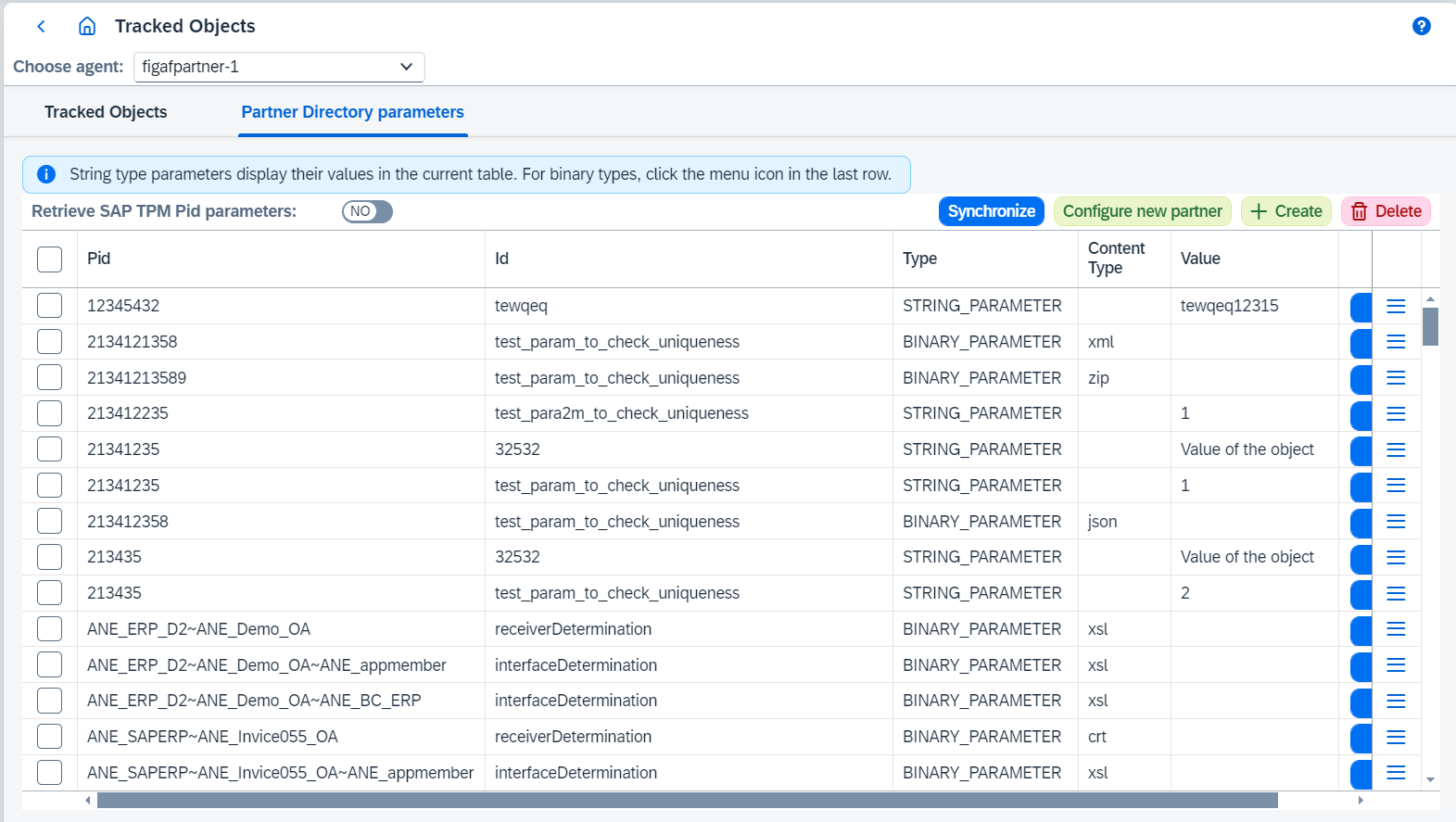
On this page you can:
-
Retrieve SAP TPM Pid parametersswitch to hide and show SAP TPM Pid parameters. -
Synchronizepartner directory parameters. -
Configure new partnerclicking on related button.Configure new partner
It opens
Create and configure partnerdialog where:-
Select
From Pidobject. -
Define
New Pid. -
Set
Copy not defined binary parameters from chosen partnervalue. If true and related parameter value isn’t defined, parameter value from source Pid will be used. If false and related parameter value isn’t defined, empty value will be used. -
Select parameters which should be copied.
-
Define parameter values by clicking on
 and then
  and defining new configuration.
 -
Once everything is configured, save. Then new partner with all selected parameters will be created and automatically synchronized.
-
-
Createnew parameterCreate parameter
To create new parameter follow the steps:
-
Go to
Change Tracking Tool → Tracked Objectspage. -
Select CPI or Integration Suite Agent.
-
Go to
Partner Directory parameterstab. -
Click on
Createbutton. It opensCreate partner directory parameterdialog where should be configured:-
Pidexisting or new Pid. -
TypeisString,Binary,Interface Determination,Receiver Determination.Stringparameter will be saved as string parameter,Binary,Interface DeterminationandReceiver Determinationwill be saved as binary parameter. -
Parameter Idshould be new value. Not modifiable forInterface DeterminationandReceiver Determination. -
for binary parameters
Content Typedefines content type. Not modifiable forInterface DeterminationandReceiver Determination. -
for xsl content type
Open IDEopens IDE. -
for binary parameters
Import fileprovides a possibility to load selected file. -
for binary parameters
Base64 formatencodes or decodes to or from Base64 format. Not modifiable forzip,gz,zlib,crtcontent types. -
Valueis parameter value.
-
-
Once everything is configured, save. Then new parameter will be created and automatically synchronized.
-
-
Delete selected parameters.
-
Edit parameter.
Edit partner
To edit existing parameter follow the steps:
-
Go to
Change Tracking Tool → Tracked Objectspage. -
Select CPI or Integration Suite Agent.
-
Go to
Partner Directory parameterstab. -
Click on
button. It opens Edit partner directory parameterdialog where new configuration should be configured. -
Once everything is configured, save. Then parameter will be updated and automatically synchronized.
-
-
Go to tracked object of the parameter.