Scenario mapping
You can have a case when scenario interfaces on the Agent system and Test system are a
little different. Thus, messages which were recorded on the Agent system can’t be
immediately used in the testing process because internal interface determination will fail and you
will get only unexpected testing results. Use scenario mapping feature to solve that issue.
You can configure it on Configuration page (Mapping tab):
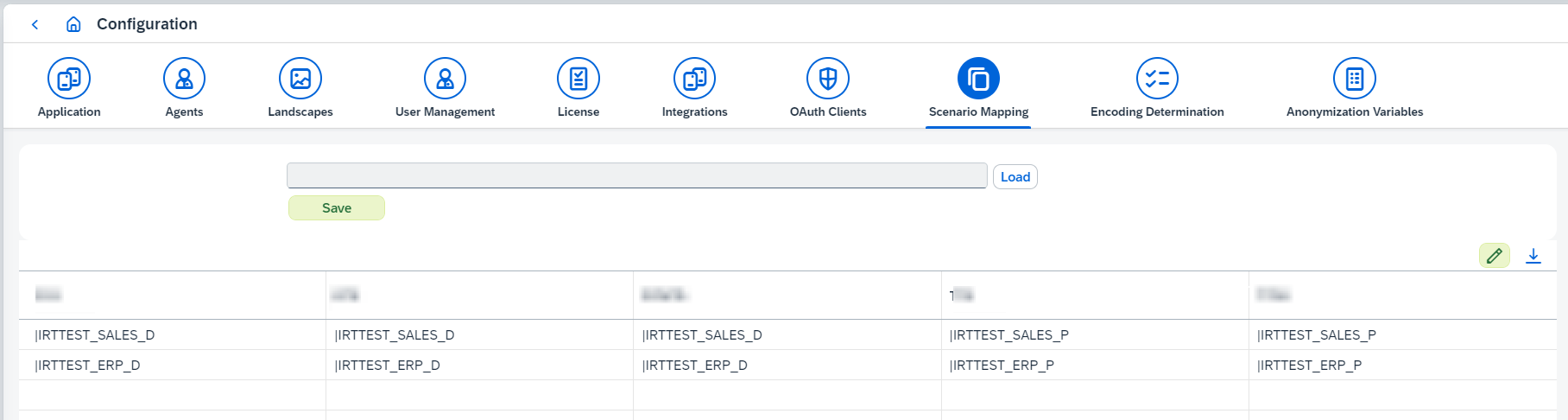
There two ways of configuring mappings:
-
Table with mappings on UI. You need to open Configuration page (Mapping tab) and edit the table with mappings.
-
Define all mappings in csv file and them upload the file. On the first line you need to define systems for which you want to configure a mapping. The number of systems is not restricted. The names of the systems must be separated by a semicolon. Each line below must contain the same number of values (or empty strings) as the first line has. The values must be separated by a semicolon as well:
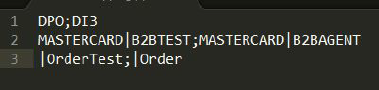
In both cases each value of the mapping has to follow the pattern:
<party>|<component> or <party>|<component>|<interface_name>|<interface_namespace>.
If you don’t have some part, skip it, but keep | in the mapping entry.
1. Value mapping
Look at the example above. Assume you have DPO as a Test system and DI3 as an Agent system, you have two integrated configurations with one receiver and one interface on DPO and DI3.
-
DI3:
-
Party: MASTERCARD
-
Component: B2BAGENT
-
Interface name: INT_OUT
-
Interface namespace: http://figaf.com/irt
-
-
DPO:
-
Party: MASTERCARD
-
Component: B2BTEST
-
Interface name: INT_OUT
-
Interface namespace: http://figaf.com/irt.
-
If you define that scenario mapping, Figaf Tool will expect testing result with MASTERCARD|B2BTEST|INT_OUT|http://figaf.com/irt interface,
not MASTERCARD|B2BAGENT|INT_OUT|http://figaf.com/irt, despite recorded message has the second one.
In this case, interface name and interface namespaces are the same. So it wasn’t necessary to add them in the mapping.
If they are not the same, you can also map them.
2. Generic mapping
It’s possible to avoid configuring lots of similar mappings if they have common parts.
For example, in the table below you can see some mappings which have the service pattern: BS*P (or even *P) on Agent system and BS*Q (or even *Q) on Test system.
| Agent System | Test System |
|---|---|
B2B|BS_ERP1_P|intName|int_ns|| |
B2B|BS_ERP1_Q|intName|int_ns|| |
B2B|BS_ERP2_P|intName|int_ns|| |
B2B|BS_ERP2_Q|intName|int_ns|| |
B2B|BS_ERP3_P|intName|int_ns|| |
B2B|BS_ERP3_Q|intName|int_ns|| |
B2B|BS_DDL1_P|intName|int_ns|| |
B2B|BS_DDL1_Q|intName|int_ns|| |
B2B|BS_DDL2_P|intName|int_ns|| |
B2B|BS_DDL2_Q|intName|int_ns|| |
B2B|BS_DDL3_P|intName|int_ns|| |
B2B|BS_DDL3_Q|intName|int_ns|| |
B2B|BS_DDL4_P|intName|int_ns|| |
B2B|BS_DDL4_Q|intName|int_ns|| |
… |
… |
Instead of 7 different mappings, it can be covered by one generic mapping: B2B|BS*P → B2B|BS*Q.
The star * in that mapping means identical part on both sides. For example for scenarios B2B|BS_DDL3_P|intName|int_ns|| and B2B|BS_DDL3_Q|intName|int_ns|| it’s possible to apply mapping B2B|BS*P → B2B|BS*Q. Here * is _DDL3_.
The same can be done for party/interface name/interface namespace as well.
Value mappings have higher priority than generic mappings: firstly Figaf Tool looks for a value mapping. If it’s not found Figaf Tool looks for a generic mapping.
Important
Party and service can be a wildcard (value equal to *, e.g., B2B|* or *|*|OUTB_INT|http://company.com).
In this case, such mapping must be determined as value mapping, not as generic mapping.
|
If you want to map party |
Scenario mappings are used when replaying recordings in
Testing Tool, and can also be applied during transport —
see the Use scenario mapping option on the
Transport Configuration page.