Application configuration
Application page provides general configuration and looks:
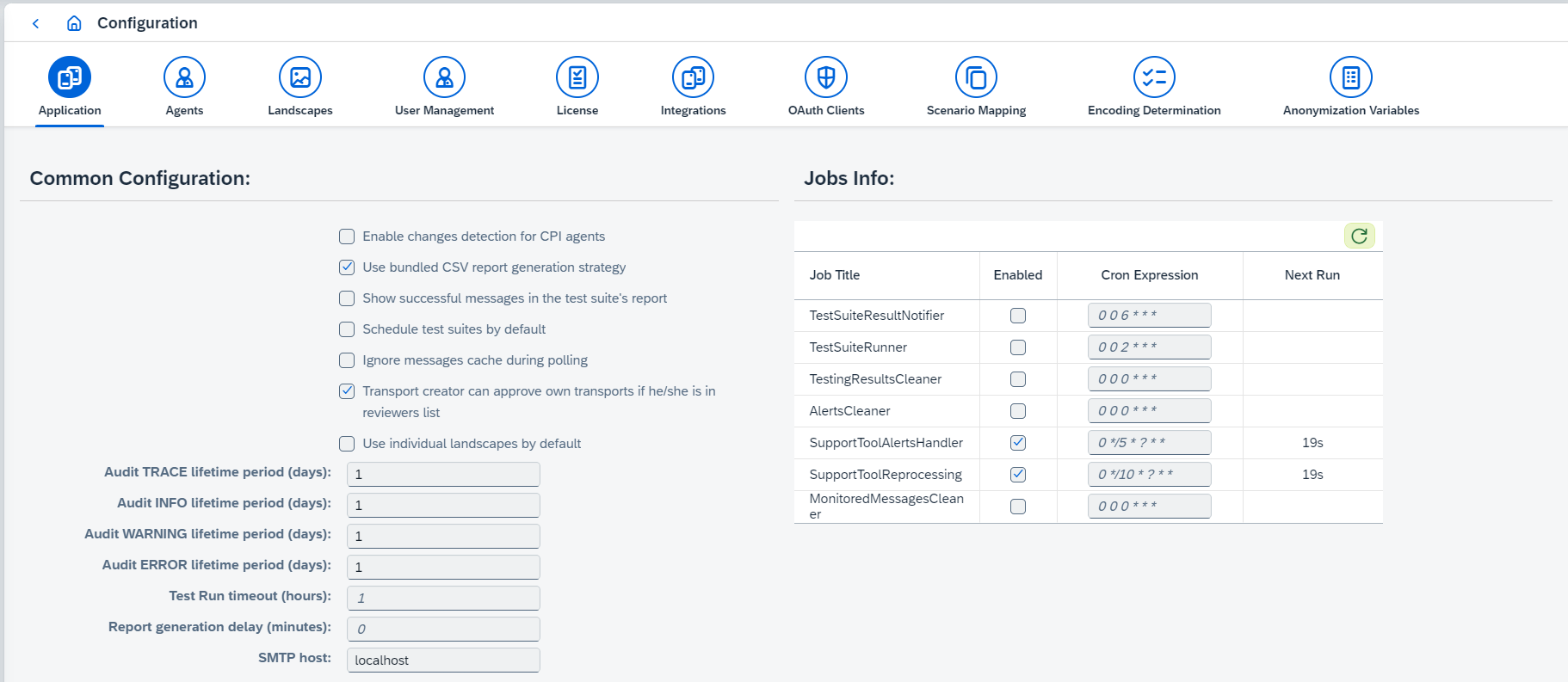
The following application configurations are available:
-
Common Configurationsection:-
Enable changes detection for CPI agentsenables notification about CPI version updates by email. If it’s enabled,Emails where sent notifications tois shown and defines a list of emails where notification will be sent. The email contains information about version updates for all configured CPI agents. -
Use bundled CSV report generation strategydefines test reports generation strategy. If it’s true, Zip archive with 3 CSV reports: processed messages report, diff report, and test runs metadata report is generated. Otherwise, Excel report is generated. -
Show successful messages in the test suite’s reportconfigures whether successful messages are added to the excel report or not. It makes sense to enable it only ifUse bundled CSV report generation strategyis disabled. Otherwise, it has no effect. -
Schedule test suites by defaultenablesScheduledsetting for all new test suites. -
Ignore messages cache during polling- if you have polled almost all messages and you just need to poll small number of messages to finish testing, you can enable the option. When this option is enabled, already polled messages won’t be skipped. It affects performance when the amount of messages is large and you just need to poll small number to finish testing. -
Transport creator can approve own transportsdefines whether reviewer which creates transport can approve it or not. -
Use individual landscapes by defaultdefines whether individual or composite landscapes are preferable. Default value isfalsewhich means that Composite landscapes mode is a preferable one. -
Skip synchronization of Data Types by defaultdefines whether data types should be synchronized by default or not. The value is initialized depending on presence of synchronized data types in the database. If there are at least 1 data type object, the value isfalse, otherwise, it istrue.If it’s true, synchronization of Data Types will be skipped whenever synchronization is performed (e.g. during PI to CPI migration, import/rollback, etc.). The exceptional case is import/rollback of transport having Data Types attached.
-
Enable automated licensingenables automatic license of objects. -
Audit TRACE lifetime period (days),Audit INFO lifetime period (days),Audit WARNING lifetime period (days)andAudit ERROR lifetime period (days)define lifetime period for audit entries. Cron jobs get triggered every day at 3 pm. -
Test Run timeout (hours) -
Report generation delay (minutes) -
SMTP host,SMTP port,SMTP username,SMTP password,Email Protocol,Enable StartTLSare SMTP host configuration. Options are available only on embedded Figaf Tool version. -
Email Fromis an email which is used as a sender in emails sent by Figaf Tool. Option is available only on embedded Figaf Tool version. -
Email Tois an email to which emails is sent by Figaf Tool. -
OpenAI API Key,OpenAI Default ModelandOpenAI Default Temperatureconfigure connection settings to Open AIs API. These settings power theFigaf Bothelp during development in the IDE, the AI documentation of IFlows (and the embeddings), and the Figaf AI assistant.
-
-
Jobs Infosection:-
TestSuiteResultNotifierenables test suite run reports sending by email and configures interval (as cron expression). The reports are sent only for test suites with enabledSend report by emailoption. It is required to have SMTP host configurations,Email From, andEmail Tosettings configured. -
TestSuiteRunnerenables automatic test suite running and configures interval (as cron expression). Only test suite with enabledScheduledoption is run automatically. -
TestingResultsCleanerenables automatic test results cleaning and configures interval (as cron expression). -
AlertsCleanerenables automatic alerts cleaning and configures interval (as cron expression).Alerts lifetime period (days)defines how long alerts are stored before being cleaned up. Minimum allowed value is 3 days. -
SupportToolAlertsHandlerenables automatic alerts polling and configures interval (as cron expression). -
SupportToolReprocessingenables alerts reprocessing and configures interval (as cron expression). This job is required for PRO agents. -
MonitoredMessagesCleanerenabled automatic EDI monitored messages cleaning and configures interval (as cron expression).
-