Landscapes configuration
Landscapes page shows all existing landscapes and looks:
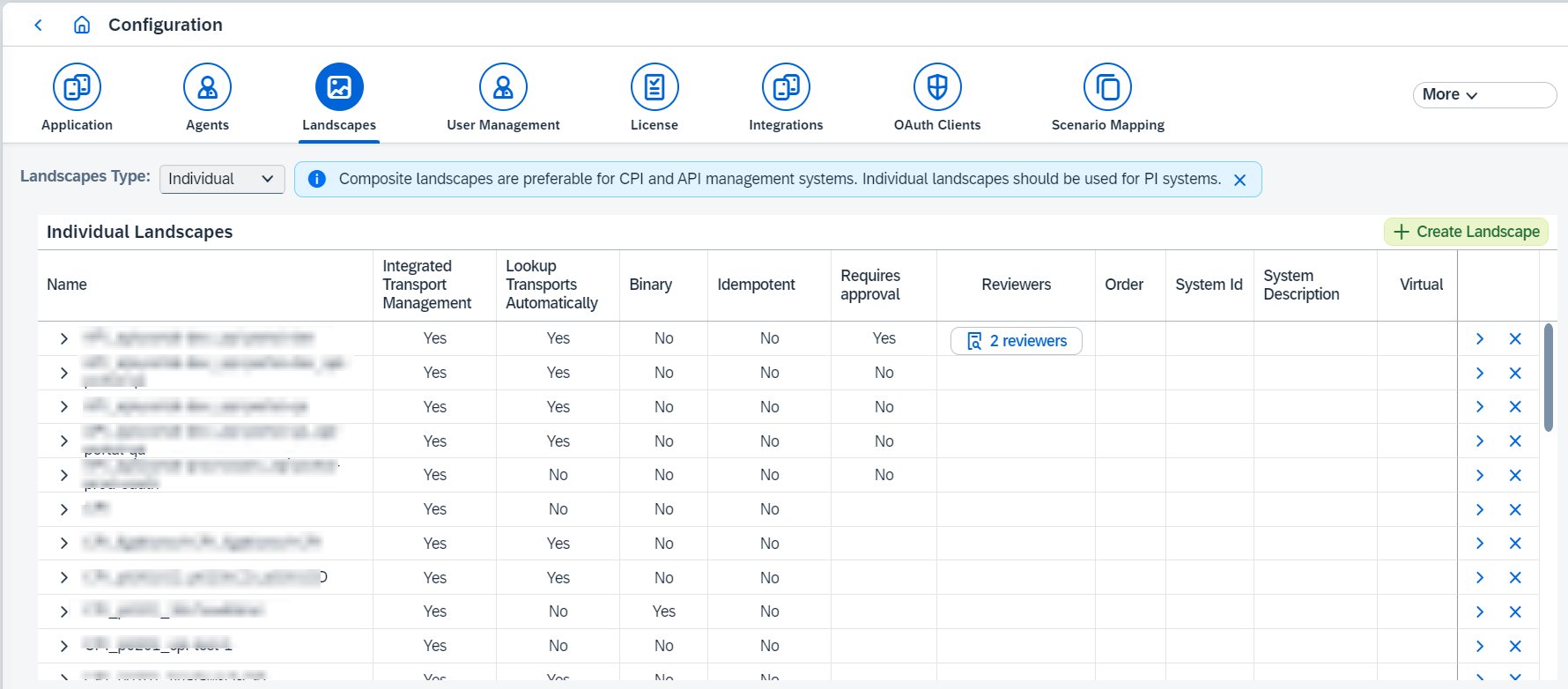
On this page you can:
-
Create new landscape clicking on
Create Landscapebutton (see Landscape configuration examples to learn how to configure landscapes):-
See Landscape configuration (PRO platform) to create PRO landscape.
-
See Landscape configuration (CPI platform) to create CPI landscape. (Deprecated. We recommend to configure Composite landscapes configuration (CPI/Api Management)).
-
See Landscape configuration (Api Management platform) to create Api Management landscape. (Deprecated. We recommend to configure Composite landscapes configuration (CPI/Api Management)).
-
-
Manage composite landscapes (CPI/Api Management only) selecting
CompositeinLandscapes Typeselector (see Composite landscapes configuration (CPI/Api Management)). -
Delete a landscape clicking on its
 button.
Landscapes linked to any object (release, ticket, etc.) can’t be deleted. -
Archive a landscape that is no longer used but is linked to tickets, transports or releases. The
Archivebutton is on the landscape page, see Archive a landscape. -
Edit landscapes clicking on its
 button.
You can edit only
Require Transport ApprovalandTransport Reviewerssettings (for PRO and Api Management landscapes) andDeploy after transport,Require approval, andReviewer emailslandscape items settings (for CPI landscapes).All transports linked with the landscape must be in
IMPORTED,CANCELED, orDECLINEDstatuses, otherwise you will get an error that it is not possible to change transport approval value because some transports are in WAITING_FOR_APPROVAL, IN_PROGRESS or CREATED state. -
Expand/Collapse node of a landscape to view/hide landscape items.
-
Show archived landscapes- shows archived landscapes and composite landscapes as well. They are hidden by default (see After archiving).
1. Landscape configuration (PRO platform)
Follow the steps to configure landscape:
-
Go to the
Landscapestab onConfigurationpage, selectIndividualinLandscapes Typeselector and add your landscape throughCreate Landscapebutton: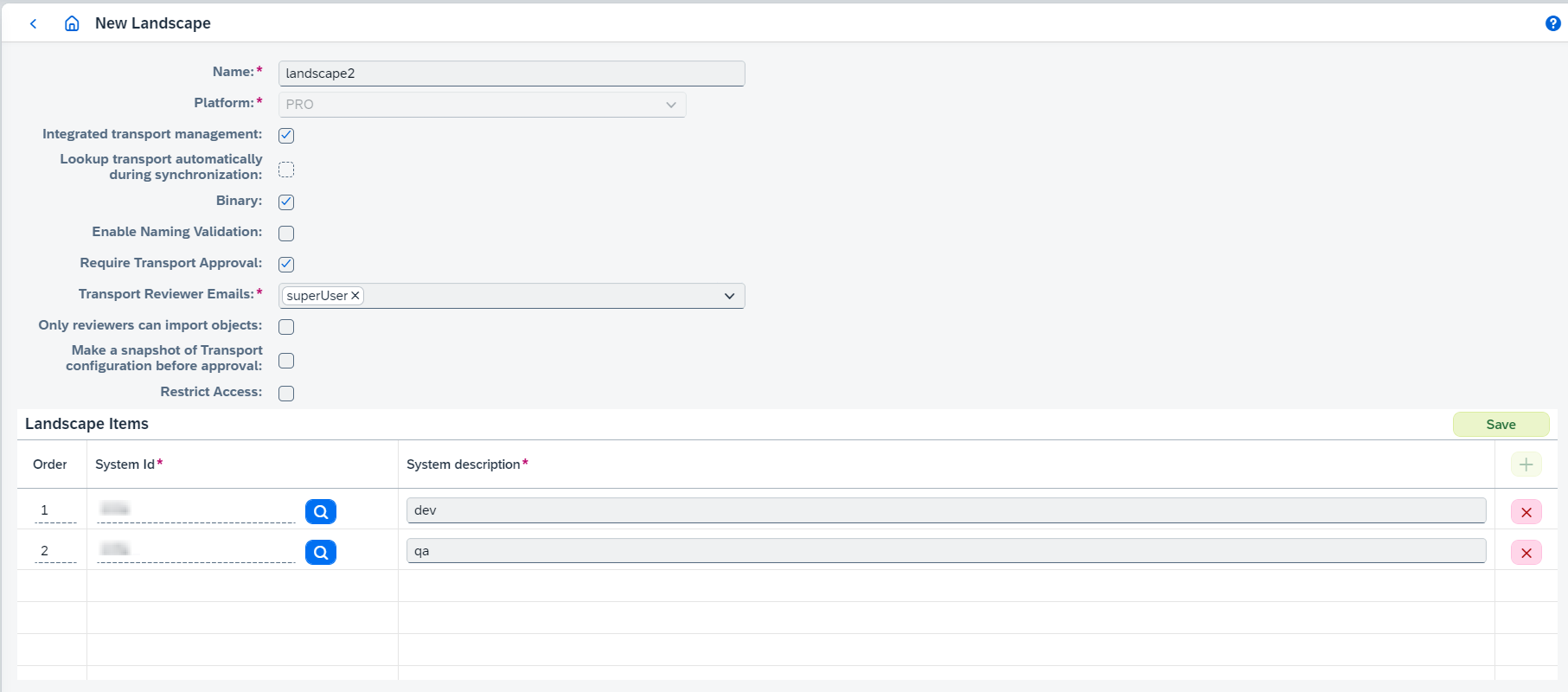
-
Configure the following properties:
-
Nameof new landscape. Should be unique within the organization. -
Platform- select the type of your landscape - PRO. -
Integrated transport management- if true, Figaf Tool will use file transport EJB API to process transport of ESR (Enterprise Service Repository) objects and integration directory WS (Web Service) for Directory objects. Otherwise, user should attach transports to tickets (transports are synchronized in CTT). -
Lookup transport automatically during synchronizationfinds Figaf Tool transport (withIN_PROGRESSstatus and the landscape has a flagLookup transports during synchronization) when new transports with Import type were handled by CTT during synchronization. That operation is asynchronously executed at the end of synchronization.This option can be enabled if Integrated transport managementis disabled. -
Binarydefines landscape with 2 landscape items. Binary landscape has a lot of features:Binary landscapes features
-
Idempotent binary landscape is a binary landscape having landscape items with the same agent. For such landscapes there are 2 flows of transport import:
-
When the object is mapped during transport, then new object will be created on the same system.
-
When object is not mapped, then it will be updated on the same system.
-
-
PredecessorsandSuccessorsare used to define a composite landscape. Composite landscape includes binary landscapes and links them together. For example: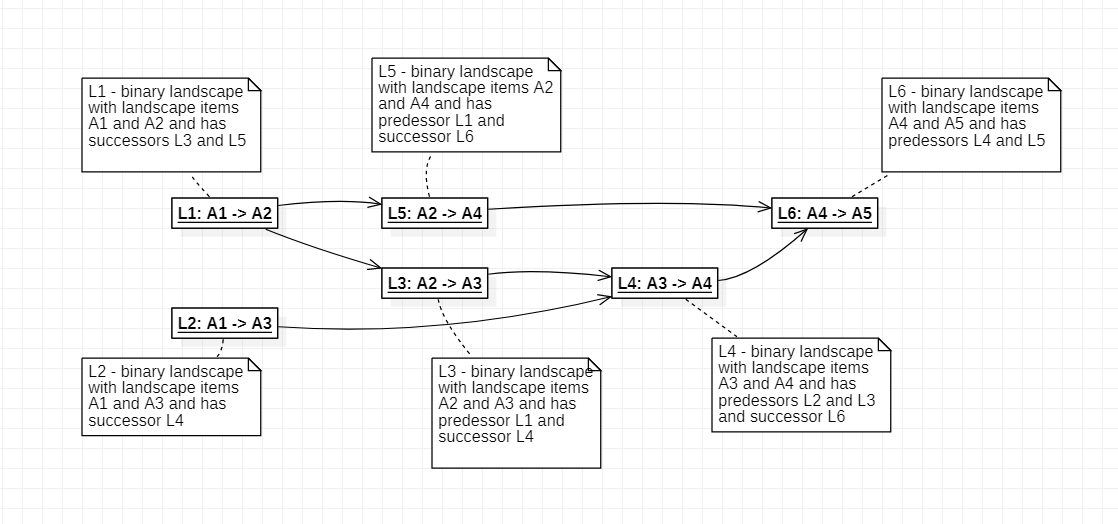
-
'Deny if matches' criteria,'Allow if matches' criteria,'Deny if object exists' criteriaconfigurations (see transport denying rules). -
Batch import of Integration Directory transports linked with the same PI binary landscape. Batch import is not supported for groups of transports (when multiple transports created for one ticket).
-
Batch rollback of Integration Directory transports imported in batch mode.
-
Possibility to split import process for Integration Directory transports done through WS. You can choose if changelist should be activated immediately after upload of all objects or not.
-
Validation of Integration Directory transports done through WS after upload completion (split import process). If related PI changelist is invalid, transport is marked Invalid in Figaf Tool and import can’t be completed.
If you import several transports in batch mode and PI changelist is invalid for one of them, then related changelist will be canceled but batch import will continue for other transports. So invalid PI changelist will be 'skipped' during batch import operation.
-
Possibility to update routing conditions in ICO Transport Configuration (see Transport Configuration page).
-
Possibility to keep receiver/interface rules that exist only on target object after import (see Transport Configuration page).
-
Projection of receiver/interface rules in ICO Transport Configuration (see Transport Configuration page).
-
Possibility to browse changes between source ICO state and the state to upload in ICO Transport Configuration (see Transport Configuration page).
-
Consistency check of the list of directory objects in transport as a part of transport validation.
Let’s have a Configuration Scenario that has a set of objects related to one ICO (parties, components, channels). Map party to get it nonexistent on the target system. Then add all objects related to Configuration Scenario to transport but detach mapped party from the ticket. Validation will be processed and all objects except channels will have a validation error. Channel won’t have it because it depends on component, but the component is in transport, so, it shouldn’t be validated during validation of channel. It’s expected behavior because it’s impossible to proceed further - components are not valid in transport.
If a component is not in transport, then channel dependencies will be validated fully.
-
Validation of uniqueness of target objects in transport.
-
Possibility to view changes overview for ICOs and communication channels.
Only for transports of integration directory objects. -
Selection of
adapterEngineNamechannel parameter on transport configuration page. Decentral adapter engine labels are used as values in the selector. -
Tracked objects name mapping lookup across the composite landscape.
-
Navigation between Transport Configurations of the same object across the Composite landscape.
-
Child objects name mapping lookup on Transport configuration page.
-
Validation of naming convention rules.
-
"Soft" decline to move transport to the CREATED state (before approval).
-
Possibility to complete import if all landscape items are either imported or skipped but transport status is still
IN_PROGRESS. -
Possibility to create a next ticket for the next landscape in the chain from successfully processed transport page.
Only if landscape from current transport has one successor. -
Possibility to download parameters report that contains all external properties that are used in the transport. It supports CPI IFlows (CPI platform), communication channels (PRO platform) and API Proxies and Key Value Maps (Api Management platform).
-
Possibility to perform a mass update of transport configuration parameters. It supports CPI IFlows (CPI platform), communication channels (PRO platform) and API Proxies and Key Value Maps (Api Management platform). See batch parameters update to upload transport configuration parameters for more details.
-
Possibility to schedule import process execution. See schedule import for more details.
-
Integration with a webhook (see Webhook integration).
-
Integration to fetch external tickets data (see Ticket Management System Integration).
-
-
(Only for binary landscapes)
Enable Naming Validationenables objects names mappings validation on transport level. If you have a ruleTEST.*, related objects can’t be mapped toTST.*Naming validation rules should be uploaded for agent related to a source landscape item (upload naming convention rules). -
Require Transport Approvalenables review step between transport creation and import. -
Transport Reviewersdefines reviewers. This option is available only ifRequire Transport Approvalis true.If Restrict Accessis configured, all reviewers should also be landscape developers. -
Make a snapshot of Transport configuration before approval- if true, transport configuration is cached once transport is sent to approval. The option is visible ifRequire Transport Approvaloption is enabled for at least one landscape item. -
Restrict Executionenables transport executors configuration. -
Transport Executorsdefines executors. This option is available only ifRestrict Executionis true.If Restrict Accessis configured, all executors should also be landscape developers. -
Landscape Developersdefines users who are allowed to work with the landscape. This option is available only ifRestrict Accessis true. -
(Only for binary landscapes)
Scheduled transports execution timeconfigures left bound for import process execution. After configured time global scheduler will have a pulse each 5 minutes. If a lot of transports are scheduled around same period, then target system may be overloaded with transports for some period of time. So that not all transports will be scheduled and executed in time. -
Landscape Itemsdescribes groups of Agents in specific order and assignment. Landscape items can be added by clicking on and deleted by clicking on its .
The items have the following configuration:
-
System Idis selected agent.If
Binaryis true and both landscape items have the sameSystem Id, then it will be idempotent binary landscape. For such landscapes there are 2 flows of transport import:-
When the object is mapped during transport, then new object will be created on the same system.
-
When object is not mapped, then it will be updated on the same system.
-
-
System descriptionis description for current system (e.g.qa).
-
-
(Only for binary landscapes)
PredecessorsandSuccessorsare used to define a composite landscape. Composite landscape includes binary landscapes and links them together. For example:
-
Parameter values replacementdefines parameter values replacement rules for transport configuration parameters. To enable this feature during landscape creation switchConfigureon. Then for each landscape item you can define rule type (substring or exact match) and parameter values which will be used in transport configuration parameters.Only parameters inherited from source will be replaced according to defined strategy. Example: let’s define a landscape with 3 landscape items:
Dev,Qa,Prodand configureParameter values replacement (substring criteria):Rule Type Dev Qa Prod Substring
dev.system.com
qa.system.com
prod.system.com
Exact Match
sapdev
sapqa
sapprod
Exact Match
dev.system.com:2222
qa.system.com:3333
prod.system.com:4444
Substring
dev.system.ondemand.com
qa.system.ondemand.com
So all parameters inherited from source in all objects transported through the landscape will be replaced by corresponding value in the table. If value isn’t defined, empty string will be used in transport configuration parameters.
-
Transport validation tagsconfigures tags either technical or not-technical. If a tag is detected in an object during the creation of transport, it will be displayed as a warning. This functionality allows for easily tracking of non-blocking issues resulting from transport validation. -
(Only for binary landscapes)
'Deny if matches' criteriadefines criteria for objects that will not be attached to tickets and transports. So such objects can’t be imported. You can define criteriaObject name patterns(as regular expression appended by list of types if it is needed),Object TypesandObject Tags.Define bootstrap parameter
irt.devops.exclude-denied-objects-from-dev-scope = truein order to exclude denied objects from dev scope of composite landscape, -
(Only for binary landscapes)
'Allow if matches' criteriadefines criteria for objects that will be attached to tickets and transports. Only objects match this criteria can be imported. You can define criteriaObject name patterns(as regular expression),Object TypesandObject Tags. If the criteria is defined and object doesn’t match all filters, then its devops is denied (in other words, if object matches any filter - its devops is allowed). -
(Only for binary landscapes)
'Deny if object exists' criteriadefines criteria for objects that will not be attached to tickets and transports if target objects exist. So such objects can be imported only if corresponding objects don’t exist on target system. You can define criteriaObject name patterns(as regular expression),Object TypesandObject Tags.Priority of resolution from the high to low: 'Deny if matches' → 'Allow if matches' → 'Deny if object exists'. It means if some object matches 'Deny if matches' criteria other 2 won’t be checked. If object doesn’t match it but matches 'Allow if matches' criteria, then checking of 'Deny if object exists' will be skipped. -
Email integrationenables or disables emails sending for approval and import operations. Configure the settings:-
Notify about approval actions- if enabled, notification about sending for approval and execution of approval (approve, decline, soft decline) will be sent. By default, it’sdisabled. -
Notify about transport process completion- if enabled, notification about transport process completion (import, complete import, rollback, etc.) will be sent. By default, it’sdisabled. -
Additional recipients to inform about transport process completion- list of user emails that should be added to CC list in the transport process completion notification email.
-
-
(Only for binary landscapes)
Ticket Management System Integrationconfigures send message request used to fetch external tickets.It is recommended to select send message request configured by yourself. The IFlow used in the send message request should return json in the following format:
[
    {
        "ID": "<ID>",
        "URL": "<URL>",
        "Title": "<Title>",
        "Description": "<Description>",
        "Status": "<Status>"
    },
    {...},
    ...
]
There is a possibility to create default Jira Issues Request automatically. IFlow
Jira_SearchIssuesfromFigafJiraIntegrationpackage should be synchronized at least on one agent. Then related send message request will be created on any agent where the IFlow is synchronized.Then it is possible to
Select from external ticketsand initialize ticket data during ticket creation or update. -
(Only for binary landscapes)
Webhook integrationdefines events which should fire via webhook. To configure webhook go to Integrations page and create HTTP(S) integration.When event is triggered, related Audit event will be logged.
-
2. Composite landscapes configuration (CPI/Api Management)
CPI and Api Management binary landscapes are managed only in scope of a composite landscape and support only linear flow. So if you want to use binary landscape features, it’s required to configure corresponding composite landscape.
We recommend this flow because it provides a lot of benefits:
Binary landscapes features
-
Idempotent binary landscape is a binary landscape having landscape items with the same agent. For such landscapes there are 2 flows of transport import:
-
When the object is mapped during transport, then new object will be created on the same system.
-
When object is not mapped, then it will be updated on the same system.
-
-
PredecessorsandSuccessorsare used to define a composite landscape. Composite landscape includes binary landscapes and links them together. For example: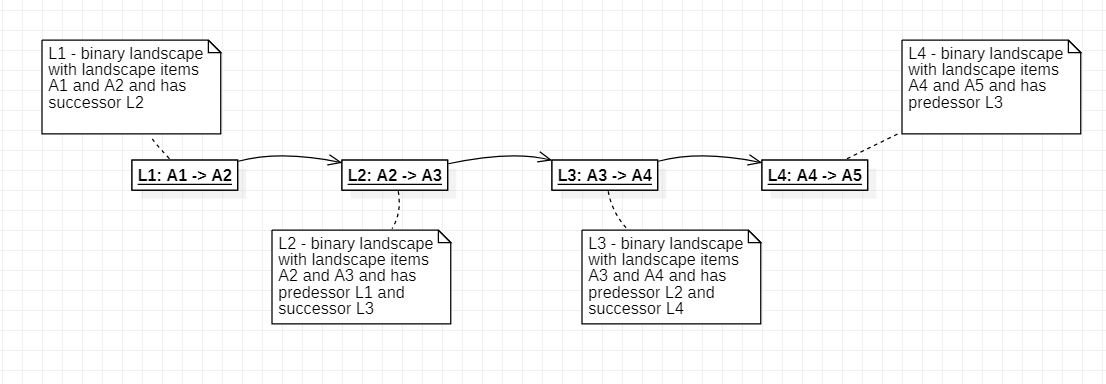
CPI and Api Management binary and composite landscapes are managed by Figaf Tool on Composite landscapes configuration (CPI/Api Management) page
-
CPI only. Import of Partner Directory and Security Content objects.
Edit and save related security content objects on Management of Security Content objects page to successfully import Security Content objects. It’s needed to have credentials stored in Figaf Tool, otherwise import will not be performed. -
CPI only. Import of TPM objects.
Supported objects are Company Profile, Subsidiary, Trading Partner, Agreement Template, Agreement, B2B Scenario. The import is performed for Agreements and objects linked with the agreement attached to the transport will be imported to target system.
It is recommended to use the feature in the following way:
-
Import MIGs/MAGs manually using export/import operation on Integration Suite environment from source tenant to target tenant.
-
Create CPI composite landscape (see that section to learn how to do that) if it is not configured yet.
-
Create ticket and attach TPM objects to it.
-
Process import to target system.
There are also several important notes that we recommend to be aware of:
-
If TPM objects already exist on target system and were created manually (not using Figaf Tool transport), the transport will fail and it is expected.
-
If some TPM objects attached to the ticket aren’t linked with any agreement attached to the ticket, these TPM objects will be skipped in the transport.
-
It doesn’t really matter if other TPM objects except Agreements are attached to the ticket or not. Agreement will be imported together with all other objects always. So, the fact whether other TPM objects are linked to the ticket or not, affects only the fact if the target objects will be linked to the ticket after transport and it doesn’t affect the content of the archive at all.
-
Idempotent landscapes aren’t supported.
-
Rollback isn’t supported.
-
Identifiers, systems, etc. will no be deleted on target objects after transport if they are deleted on source objects. This is SAP standard behaviour, deletion is not included, only create or overwrite.
-
B2B agreements archive import operation has timeout that could be configured by bootstrap parameter
irt.devops.b2b-import-archive-timeout. Default value might be not enough for transports with a lot of agreements.
-
-
CPI only. Replication of changes through CPI composite landscape. Replication will automatically create tickets, start and import transports and resolve tickets if some changes are found during synchronization of source system.
-
CPI only. Possibility to transport older versions.
-
Batch import of CPI/Api Management transports linked with the same binary landscape.
-
Batch rollback of Integration Directory transports imported in batch mode.
-
Parameter mapping rulesdefines name mapping rules. SeveralRule Typesare supported and depending on chosen types different configuration is required. -
'Deny if matches' criteria,'Allow if matches' criteria,'Deny if object exists' criteriaconfigurations (see transport denying rules). -
Tracked objects name mapping lookup across the composite landscape.
-
Navigation between Transport Configurations of the same object across the Composite landscape.
-
Child objects name mapping lookup on Transport configuration page.
-
Validation of naming convention rules.
-
"Soft" decline to move transport to the CREATED state (before approval).
-
Possibility to complete import if all landscape items are either imported or skipped but transport status is still
IN_PROGRESS. -
Initialize transport configuration by the ancestor values in IFlow Transport Configuration (see Transport Configuration page).
-
Tracking source and target objects automatically using technical tags.
-
Defining comment propagation policy used during import/rollback operations.
-
Possibility to browse all objects in scope of composite landscape on Landscape Overview page.
-
Possibility to change default behavior of inheritance flag for existing objects to 'Inherit from source'.
-
Possibility to create a next ticket for the next landscape in the chain from successfully processed transport page.
Only if landscape from current transport has one successor. -
Possibility to download parameters report that contains all external properties that are used in the transport. It supports CPI IFlows (CPI platform), communication channels (PRO platform) and API Proxies and Key Value Maps (Api Management platform).
-
Possibility to perform a mass update of transport configuration parameters. It supports CPI IFlows (CPI platform), communication channels (PRO platform) and API Proxies and Key Value Maps (Api Management platform). See batch parameters update to upload transport configuration parameters for more details.
-
Possibility to schedule import process execution. See schedule import for more details.
-
Integration with a webhook (see Webhook integration).
-
Integration to fetch external tickets data (see Ticket Management System Integration).
2.1. Composite landscapes configuration (CPI)
To configure CPI composite landscape follow:
-
Go to the
Landscapestab onConfigurationpage, selectCompositeinLandscapes Typeselector. -
In order to create new composite landscape, click on
. New composite landscape page will be opened: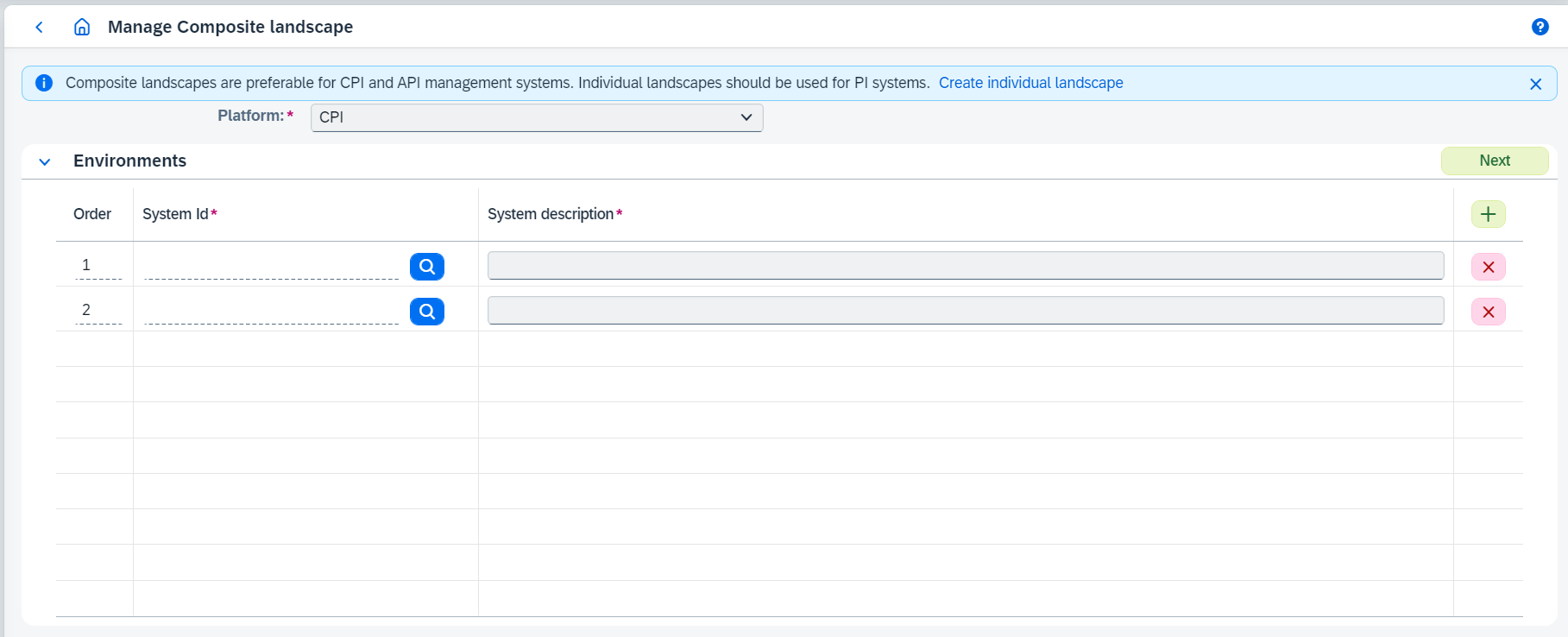
-
Select:
-
Platform. -
Transport Workflow(can be defined only during creation) - Latest version (default) or Locked version.Choose the most appropriate depending on your desired DevOps process:
-
Latest Version workflow. This is the default workflow for composite landscapes. Composite landscape is built in a chained way. For example, for environments
Dev,Qa,PreProd,Prodit will include binary landscapes:Dev→Qa;Qa→PreProd;PreProd→ProdEach binary landscape has the separate ticket and each ticket has the separate transport. Transport is allowed only for latest versions of objects (except MIGs/MAGs from B2B).
That approach provides a flexible workflow, where the next ticket should be created only after the import to the current target system and the next ticket becomes based on the transported state.
-
Locked Version workflow. That workflow allows transport of historical versions and only from development environment. Composite Landscape is built in a way so that each binary landscape has the development environment as the source system. For example, for environments
Dev,Qa,PreProd,Prodit will include binary landscapes:Dev→Qa;Dev→PreProd;Dev→ProdTicket is created only for the first binary landscape, i.e. only one ticket is used to transport across the composite landscape.
Start Transportoperation of the ticket creates all transports at once, but it’s possible to import them only in order of target environments.Additional validations are applied to help with consistency checks:
-
Runtime version match: during the import, for CPI artifact object types, it checks if attached object version matches actual runtime artifact version on previous target system (or dev system in case of the first landscape).That validation is not blocking, it’s possible to suppress it during the next import execution.
-
Presence of the active transport with older design version: during the import, for CPI artifact object types it checks if there is a transport that has older design version of the object in scope of the same composite landscape. That transport will become invalid after completion (see the next validation).That validation is not blocking, it’s possible to suppress it during the next import execution.
-
Presence of already imported transport with newer design version: during the import, for CPI artifact object types it checks if there is a transport that has a newer design version in scope of the same composite landscape.That validation is blocking, it’s not possible to suppress it. Otherwise, newer design version will be overridden by the older one.
-
-
-
Configure
Environments.
Once this configuration is done, click on
Nextbutton.PlatformandEnvironmentswill become uneditable and all corresponding binary landscapes will be predefined: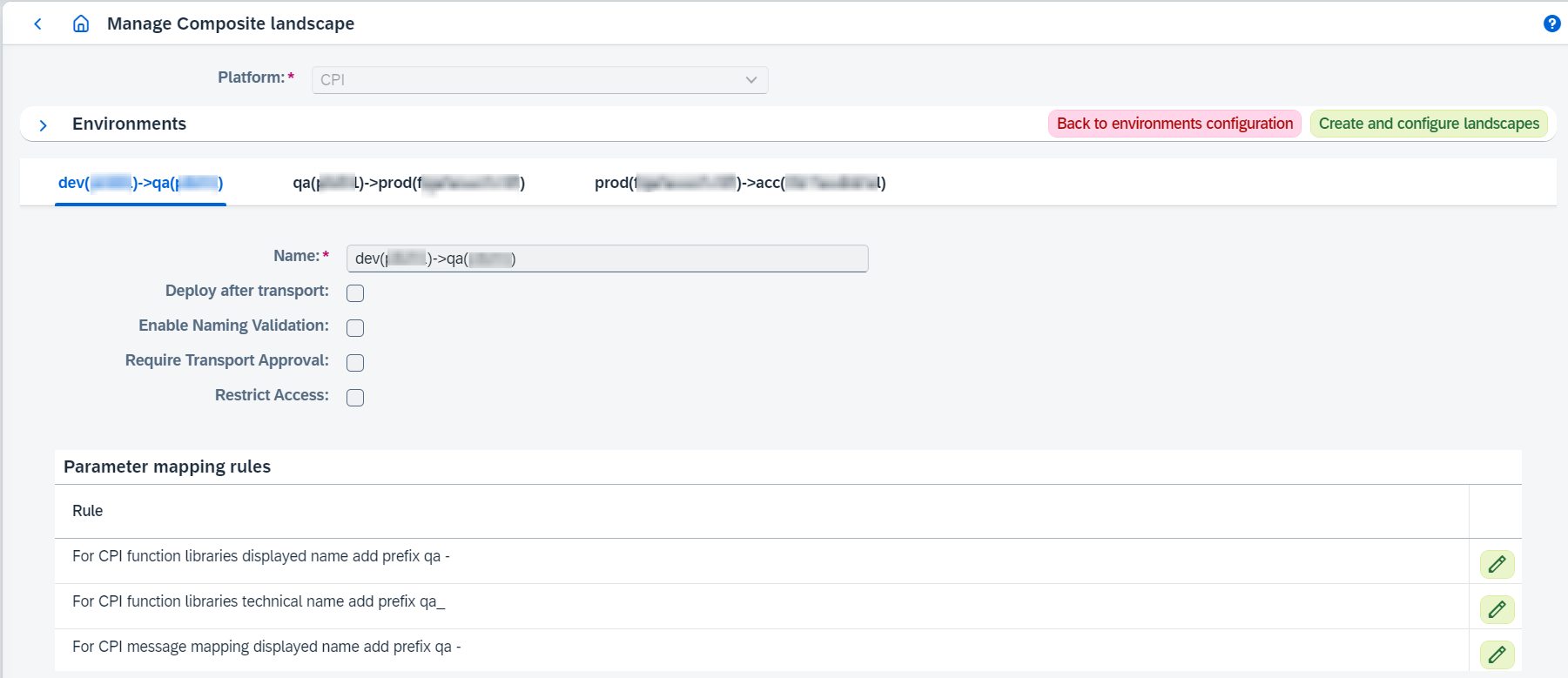
-
-
Configure each landscape:
-
Nameof landscape -
Deploy after transportdefines whether objects imported to current system are deployed or not. -
(Only for binary landscapes)
Enable Naming Validationenables objects names mappings validation on transport level. If you have a ruleTEST.*, related objects can’t be mapped toTST.*Naming validation rules should be uploaded for agent related to a source landscape item (upload naming convention rules). -
Make a snapshot of Transport configuration before approval- if true, transport configuration is cached once transport is sent to approval. The option is visible ifRequire Transport Approvaloption is enabled for at least one landscape item. -
Restrict Executionenables transport executors configuration. -
Transport Executorsdefines executors. This option is available only ifRestrict Executionis true.If Restrict Accessis configured, all executors should also be landscape developers. -
Allow transport of older versionsallows import older versions to target systems. -
Enable 'Inherit from source' by default for existing target objectschanges default behavior of inheritance flag for existing objects to 'Inherit from source'. Default values isfalse, that means 'Inherit from target' flag for existing objects. -
Use 'Default Value' of Externalized Parameters instead of 'Configured Value'changes IFlow Externalized Parameters values used in transport configuration. IFlow Externalized Parameters have 'Default Value' and 'Configured Value'. When this option is enabled and the parameter has 'Inherit from source' mode, the 'Default Value' will be used. -
Set Transport Configuration as 'Default Values' for Edge runtimewrites the values from the transport configuration into the target IFlow model as 'Default Value' of the externalized parameters, in addition to applying the IFlow configuration through the Public API. It’s a temporary workaround for SAP Integration Suite keeping externalized parameter configuration separately per runtime: an Edge Integration Cell runtime configuration can be neither read nor written through the Public API, so writing the values as default values is the only way to deliver them during transport. The option applies per IFlow — only IFlows whose runtime profile resolves to an Edge Integration Cell runtime on the target system are affected. IFlows resolved for the Cloud Integration runtime keep their configured values as usual, and on a target system without an Edge runtime the option changes nothing.On the affected IFlows the separation between 'Default Value' and 'Configured Value' is lost on the target — the transported values appear in the 'Default' section. It also can’t be checked whether a target IFlow already holds configured values for the Edge runtime: if it does, they take precedence over the default values, so the transport won’t change the values the IFlow actually runs with, and they have to be adjusted directly on the target system.
Before the transport is executed, each affected IFlow is flagged with a transport validation warning so you can review which objects are impacted.
-
Landscape Developersdefines users who are allowed to work with the landscape. This option is available only ifRestrict Accessis true. -
(Only for binary landscapes)
Scheduled transports execution timeconfigures left bound for import process execution. After configured time global scheduler will have a pulse each 5 minutes. If a lot of transports are scheduled around same period, then target system may be overloaded with transports for some period of time. So that not all transports will be scheduled and executed in time. -
Attach all dependent objects for B2B transportsdefines whether dependent objects of B2B objects attached to the ticket are attached automatically to the tickets and transports or not. All dependent objects will be attached automatically during the following operations:-
Attach objects to the ticket
-
Update to the latest version
-
Start transport for ticket
-
Next ticket creation
-
Copy ticket
-
Clone transport with the latest versions
-
-
Auto-activate B2B agreementsdefines whether agreements imported to current system are activated (for not activated agreements) and updated (for edited agreements) automatically or not. -
Customize TPM import settings(since 2606) defines whether the agreement import selections are customized during transport import. It’s disabled by default. When enabled, you can configure the import selections (modeled on SAP’sAction Import Agreementscreen), which are then applied when the TPM agreement is imported. The settings are applied at import time (even for Locked Version landscapes).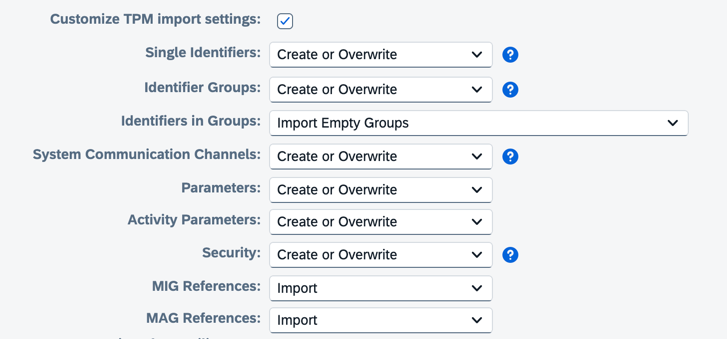
-
Suppress warnings for Auxiliary B2B objects - allow imports alwaysdefines whether warning related to Auxiliary B2B objects should be suppressed or not. Auxiliary B2B objects are:-
Company
-
Subsidiary
-
Trading Partner
-
Communication Partner
-
Agreement Template
-
-
Allow B2B transports of Draft state(since 2606) defines whether B2B objects inDraftstate can be added to transports and transported. It’s disabled by default, so adding aDraftobject to a transport is blocked. When enabled, agreements, agreement templates and B2B scenarios inDraftstate can be transported. It’s useful when you don’t use TPM versioning and keep these objects permanently inDraft. Drafts of Message Implementation Guidelines and Mapping Guidelines remain blocked. The option is defined per landscape, so it must be enabled on every landscape in the transport chain; when aDraftobject is blocked, the message names the landscape and points to this option. -
Parameter mapping rulesdefines name mapping rules. SeveralRule Typesare supported and depending on chosen types different configuration is required. -
Parameter values replacementdefines parameter values replacement rules for transport configuration parameters. To enable this feature during landscape creation switchConfigureon. Then for each landscape item you can define rule type (substring or exact match) and parameter values which will be used in transport configuration parameters.Only parameters inherited from source will be replaced according to defined strategy. Example: let’s define a landscape with 3 landscape items:
Dev,Qa,Prodand configureParameter values replacement (substring criteria):Rule Type Dev Qa Prod Substring
dev.system.com
qa.system.com
prod.system.com
Exact Match
sapdev
sapqa
sapprod
Exact Match
dev.system.com:2222
qa.system.com:3333
prod.system.com:4444
Substring
dev.system.ondemand.com
qa.system.ondemand.com
So all parameters inherited from source in all objects transported through the landscape will be replaced by corresponding value in the table. If value isn’t defined, empty string will be used in transport configuration parameters.
-
Transport validation tagsconfigures tags either technical or not-technical. If a tag is detected in an object during the creation of transport, it will be displayed as a warning. This functionality allows for easily tracking of non-blocking issues resulting from transport validation. -
(Only for binary landscapes)
'Deny if matches' criteriadefines criteria for objects that will not be attached to tickets and transports. So such objects can’t be imported. You can define criteriaObject name patterns(as regular expression appended by list of types if it is needed),Object TypesandObject Tags.Define bootstrap parameter
irt.devops.exclude-denied-objects-from-dev-scope = truein order to exclude denied objects from dev scope of composite landscape, -
(Only for binary landscapes)
'Allow if matches' criteriadefines criteria for objects that will be attached to tickets and transports. Only objects match this criteria can be imported. You can define criteriaObject name patterns(as regular expression),Object TypesandObject Tags. If the criteria is defined and object doesn’t match all filters, then its devops is denied (in other words, if object matches any filter - its devops is allowed). -
(Only for binary landscapes)
'Deny if object exists' criteriadefines criteria for objects that will not be attached to tickets and transports if target objects exist. So such objects can be imported only if corresponding objects don’t exist on target system. You can define criteriaObject name patterns(as regular expression),Object TypesandObject Tags.Priority of resolution from the high to low: 'Deny if matches' → 'Allow if matches' → 'Deny if object exists'. It means if some object matches 'Deny if matches' criteria other 2 won’t be checked. If object doesn’t match it but matches 'Allow if matches' criteria, then checking of 'Deny if object exists' will be skipped. -
Email integrationenables or disables emails sending for approval and import operations. Configure the settings:-
Notify about approval actions- if enabled, notification about sending for approval and execution of approval (approve, decline, soft decline) will be sent. By default, it’sdisabled. -
Notify about transport process completion- if enabled, notification about transport process completion (import, complete import, rollback, etc.) will be sent. By default, it’sdisabled. -
Additional recipients to inform about transport process completion- list of user emails that should be added to CC list in the transport process completion notification email.
-
-
(Only for binary landscapes)
Ticket Management System Integrationconfigures send message request used to fetch external tickets.It is recommended to select send message request configured by yourself. The IFlow used in the send message request should return json in the following format:
[
    {
        "ID": "<ID>",
        "URL": "<URL>",
        "Title": "<Title>",
        "Description": "<Description>",
        "Status": "<Status>"
    },
    {...},
    ...
]
There is a possibility to create default Jira Issues Request automatically. IFlow
Jira_SearchIssuesfromFigafJiraIntegrationpackage should be synchronized at least on one agent. Then related send message request will be created on any agent where the IFlow is synchronized.Then it is possible to
Select from external ticketsand initialize ticket data during ticket creation or update. -
(Only for binary landscapes)
Webhook integrationdefines events which should fire via webhook. To configure webhook go to Integrations page and create HTTP(S) integration.When event is triggered, related Audit event will be logged.
If you need to update Environmentsclick onBack to environments configuration. -
-
Once configuration is ready, click on
Create and configure landscapesbutton.Composite Landscape Creation Confirmationdialog will be opened: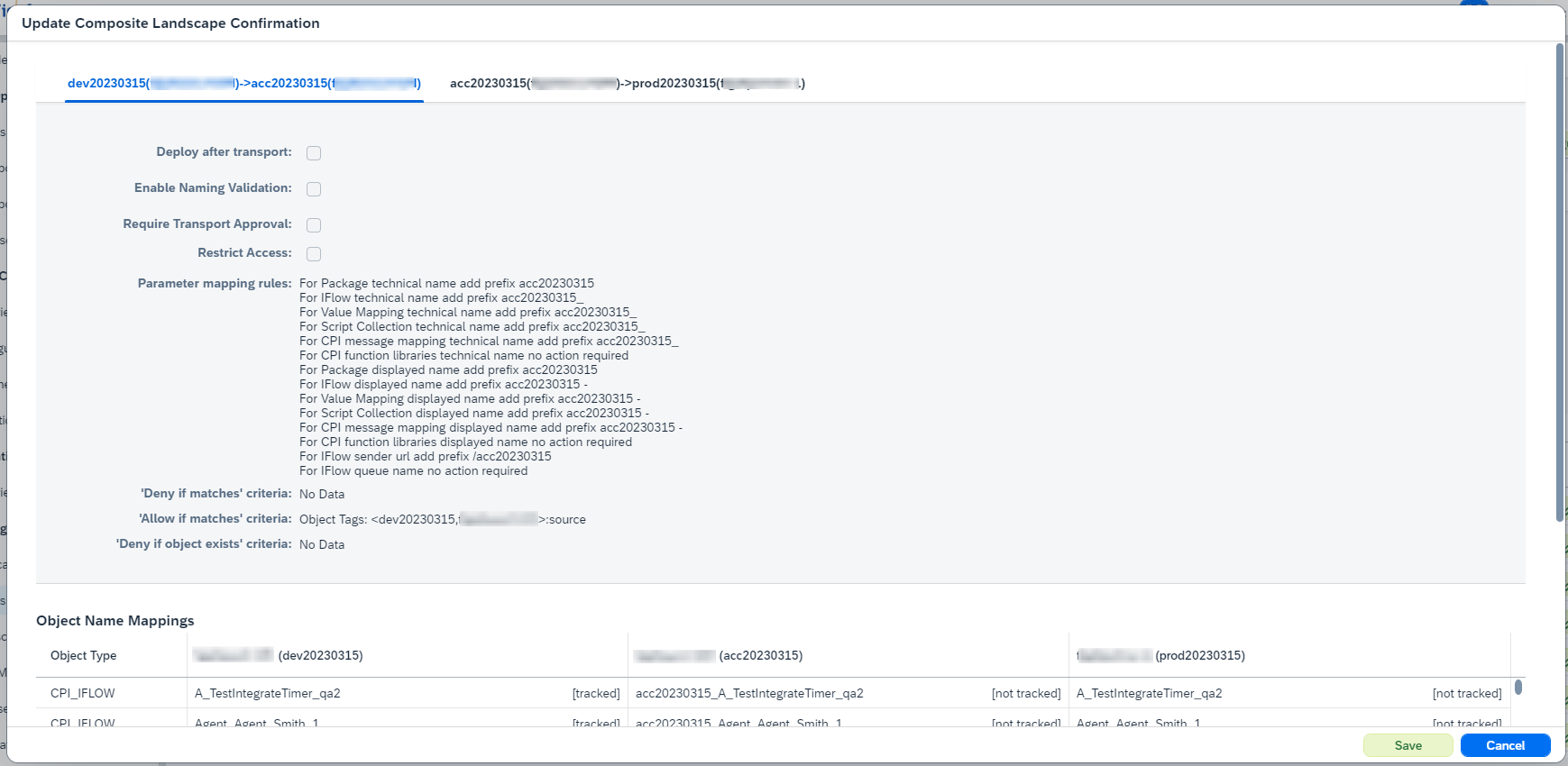
You can check configurations of all landscapes, technical tags, object name mappings.
2.2. Composite landscapes configuration (Api Management)
To configure Api Management composite landscape follow:
-
Go to the
Landscapestab onConfigurationpage, selectCompositeinLandscapes Typeselector. -
In order to create new composite landscape, click on
. New composite landscape page will be opened:
-
Select:
-
Platform. -
Configure
Environments.
Once this configuration is done, click on
Nextbutton.PlatformandEnvironmentswill become uneditable and all corresponding binary landscapes will be predefined:
-
-
Configure each landscape:
-
Nameof landscape -
(Only for binary landscapes)
Enable Naming Validationenables objects names mappings validation on transport level. If you have a ruleTEST.*, related objects can’t be mapped toTST.*Naming validation rules should be uploaded for agent related to a source landscape item (upload naming convention rules). -
Require Transport Approvalenables review step between transport creation and import. -
Transport Reviewersdefines reviewers. This option is available only ifRequire Transport Approvalis true.If Restrict Accessis configured, all reviewers should also be landscape developers. -
Make a snapshot of Transport configuration before approval- if true, transport configuration is cached once transport is sent to approval. The option is visible ifRequire Transport Approvaloption is enabled for at least one landscape item. -
Restrict Executionenables transport executors configuration. -
Transport Executorsdefines executors. This option is available only ifRestrict Executionis true.If Restrict Accessis configured, all executors should also be landscape developers. -
Enable 'Inherit from source' by default for existing target objectschanges default behavior of inheritance flag for existing objects to 'Inherit from source'. Default values isfalse, that means 'Inherit from target' flag for existing objects. -
Landscape Developersdefines users who are allowed to work with the landscape. This option is available only ifRestrict Accessis true. -
(Only for binary landscapes)
Scheduled transports execution timeconfigures left bound for import process execution. After configured time global scheduler will have a pulse each 5 minutes. If a lot of transports are scheduled around same period, then target system may be overloaded with transports for some period of time. So that not all transports will be scheduled and executed in time. -
Parameter mapping rulesdefines name mapping rules. SeveralRule Typesare supported and depending on chosen types different configuration is required. -
Parameter values replacementdefines parameter values replacement rules for transport configuration parameters. To enable this feature during landscape creation switchConfigureon. Then for each landscape item you can define rule type (substring or exact match) and parameter values which will be used in transport configuration parameters.Only parameters inherited from source will be replaced according to defined strategy. Example: let’s define a landscape with 3 landscape items:
Dev,Qa,Prodand configureParameter values replacement (substring criteria):Rule Type Dev Qa Prod Substring
dev.system.com
qa.system.com
prod.system.com
Exact Match
sapdev
sapqa
sapprod
Exact Match
dev.system.com:2222
qa.system.com:3333
prod.system.com:4444
Substring
dev.system.ondemand.com
qa.system.ondemand.com
So all parameters inherited from source in all objects transported through the landscape will be replaced by corresponding value in the table. If value isn’t defined, empty string will be used in transport configuration parameters.
-
Transport validation tagsconfigures tags either technical or not-technical. If a tag is detected in an object during the creation of transport, it will be displayed as a warning. This functionality allows for easily tracking of non-blocking issues resulting from transport validation. -
(Only for binary landscapes)
'Deny if matches' criteriadefines criteria for objects that will not be attached to tickets and transports. So such objects can’t be imported. You can define criteriaObject name patterns(as regular expression appended by list of types if it is needed),Object TypesandObject Tags.Define bootstrap parameter
irt.devops.exclude-denied-objects-from-dev-scope = truein order to exclude denied objects from dev scope of composite landscape, -
(Only for binary landscapes)
'Allow if matches' criteriadefines criteria for objects that will be attached to tickets and transports. Only objects match this criteria can be imported. You can define criteriaObject name patterns(as regular expression),Object TypesandObject Tags. If the criteria is defined and object doesn’t match all filters, then its devops is denied (in other words, if object matches any filter - its devops is allowed). -
(Only for binary landscapes)
'Deny if object exists' criteriadefines criteria for objects that will not be attached to tickets and transports if target objects exist. So such objects can be imported only if corresponding objects don’t exist on target system. You can define criteriaObject name patterns(as regular expression),Object TypesandObject Tags.Priority of resolution from the high to low: 'Deny if matches' → 'Allow if matches' → 'Deny if object exists'. It means if some object matches 'Deny if matches' criteria other 2 won’t be checked. If object doesn’t match it but matches 'Allow if matches' criteria, then checking of 'Deny if object exists' will be skipped. -
Email integrationenables or disables emails sending for approval and import operations. Configure the settings:-
Notify about approval actions- if enabled, notification about sending for approval and execution of approval (approve, decline, soft decline) will be sent. By default, it’sdisabled. -
Notify about transport process completion- if enabled, notification about transport process completion (import, complete import, rollback, etc.) will be sent. By default, it’sdisabled. -
Additional recipients to inform about transport process completion- list of user emails that should be added to CC list in the transport process completion notification email.
-
-
(Only for binary landscapes)
Ticket Management System Integrationconfigures send message request used to fetch external tickets.It is recommended to select send message request configured by yourself. The IFlow used in the send message request should return json in the following format:
[
    {
        "ID": "<ID>",
        "URL": "<URL>",
        "Title": "<Title>",
        "Description": "<Description>",
        "Status": "<Status>"
    },
    {...},
    ...
]
There is a possibility to create default Jira Issues Request automatically. IFlow
Jira_SearchIssuesfromFigafJiraIntegrationpackage should be synchronized at least on one agent. Then related send message request will be created on any agent where the IFlow is synchronized.Then it is possible to
Select from external ticketsand initialize ticket data during ticket creation or update. -
(Only for binary landscapes)
Webhook integrationdefines events which should fire via webhook. To configure webhook go to Integrations page and create HTTP(S) integration.When event is triggered, related Audit event will be logged.
If you need to update Environmentsclick onBack to environments configuration. -
-
Once configuration is ready, click on
Create and configure landscapesbutton.Composite Landscape Creation Confirmationdialog will be opened:
You can check configurations of all landscapes, technical tags, object name mappings.
3. Landscape configuration (CPI platform)
This is a deprecated feature for CPI platform. We recommend to use Composite landscapes configuration (CPI/Api Management) because it provides a lot of benefits:
Binary landscapes features
-
Idempotent binary landscape is a binary landscape having landscape items with the same agent. For such landscapes there are 2 flows of transport import:
-
When the object is mapped during transport, then new object will be created on the same system.
-
When object is not mapped, then it will be updated on the same system.
-
-
PredecessorsandSuccessorsare used to define a composite landscape. Composite landscape includes binary landscapes and links them together. For example:
CPI and Api Management binary and composite landscapes are managed by Figaf Tool on Composite landscapes configuration (CPI/Api Management) page
-
CPI only. Import of Partner Directory and Security Content objects.
Edit and save related security content objects on Management of Security Content objects page to successfully import Security Content objects. It’s needed to have credentials stored in Figaf Tool, otherwise import will not be performed. -
CPI only. Import of TPM objects.
Supported objects are Company Profile, Subsidiary, Trading Partner, Agreement Template, Agreement, B2B Scenario. The import is performed for Agreements and objects linked with the agreement attached to the transport will be imported to target system.
It is recommended to use the feature in the following way:
-
Import MIGs/MAGs manually using export/import operation on Integration Suite environment from source tenant to target tenant.
-
Create CPI composite landscape (see that section to learn how to do that) if it is not configured yet.
-
Create ticket and attach TPM objects to it.
-
Process import to target system.
There are also several important notes that we recommend to be aware of:
-
If TPM objects already exist on target system and were created manually (not using Figaf Tool transport), the transport will fail and it is expected.
-
If some TPM objects attached to the ticket aren’t linked with any agreement attached to the ticket, these TPM objects will be skipped in the transport.
-
It doesn’t really matter if other TPM objects except Agreements are attached to the ticket or not. Agreement will be imported together with all other objects always. So, the fact whether other TPM objects are linked to the ticket or not, affects only the fact if the target objects will be linked to the ticket after transport and it doesn’t affect the content of the archive at all.
-
Idempotent landscapes aren’t supported.
-
Rollback isn’t supported.
-
Identifiers, systems, etc. will no be deleted on target objects after transport if they are deleted on source objects. This is SAP standard behaviour, deletion is not included, only create or overwrite.
-
B2B agreements archive import operation has timeout that could be configured by bootstrap parameter
irt.devops.b2b-import-archive-timeout. Default value might be not enough for transports with a lot of agreements.
-
-
CPI only. Replication of changes through CPI composite landscape. Replication will automatically create tickets, start and import transports and resolve tickets if some changes are found during synchronization of source system.
-
CPI only. Possibility to transport older versions.
-
Batch import of CPI/Api Management transports linked with the same binary landscape.
-
Batch rollback of Integration Directory transports imported in batch mode.
-
Parameter mapping rulesdefines name mapping rules. SeveralRule Typesare supported and depending on chosen types different configuration is required. -
'Deny if matches' criteria,'Allow if matches' criteria,'Deny if object exists' criteriaconfigurations (see transport denying rules). -
Tracked objects name mapping lookup across the composite landscape.
-
Navigation between Transport Configurations of the same object across the Composite landscape.
-
Child objects name mapping lookup on Transport configuration page.
-
Validation of naming convention rules.
-
"Soft" decline to move transport to the CREATED state (before approval).
-
Possibility to complete import if all landscape items are either imported or skipped but transport status is still
IN_PROGRESS. -
Initialize transport configuration by the ancestor values in IFlow Transport Configuration (see Transport Configuration page).
-
Tracking source and target objects automatically using technical tags.
-
Defining comment propagation policy used during import/rollback operations.
-
Possibility to browse all objects in scope of composite landscape on Landscape Overview page.
-
Possibility to change default behavior of inheritance flag for existing objects to 'Inherit from source'.
-
Possibility to create a next ticket for the next landscape in the chain from successfully processed transport page.
Only if landscape from current transport has one successor. -
Possibility to download parameters report that contains all external properties that are used in the transport. It supports CPI IFlows (CPI platform), communication channels (PRO platform) and API Proxies and Key Value Maps (Api Management platform).
-
Possibility to perform a mass update of transport configuration parameters. It supports CPI IFlows (CPI platform), communication channels (PRO platform) and API Proxies and Key Value Maps (Api Management platform). See batch parameters update to upload transport configuration parameters for more details.
-
Possibility to schedule import process execution. See schedule import for more details.
-
Integration with a webhook (see Webhook integration).
-
Integration to fetch external tickets data (see Ticket Management System Integration).
Follow the steps to configure landscape:
-
Go to the
Landscapestab onConfigurationpage, selectIndividualinLandscapes Typeselector and add your landscape throughCreate Landscapebutton: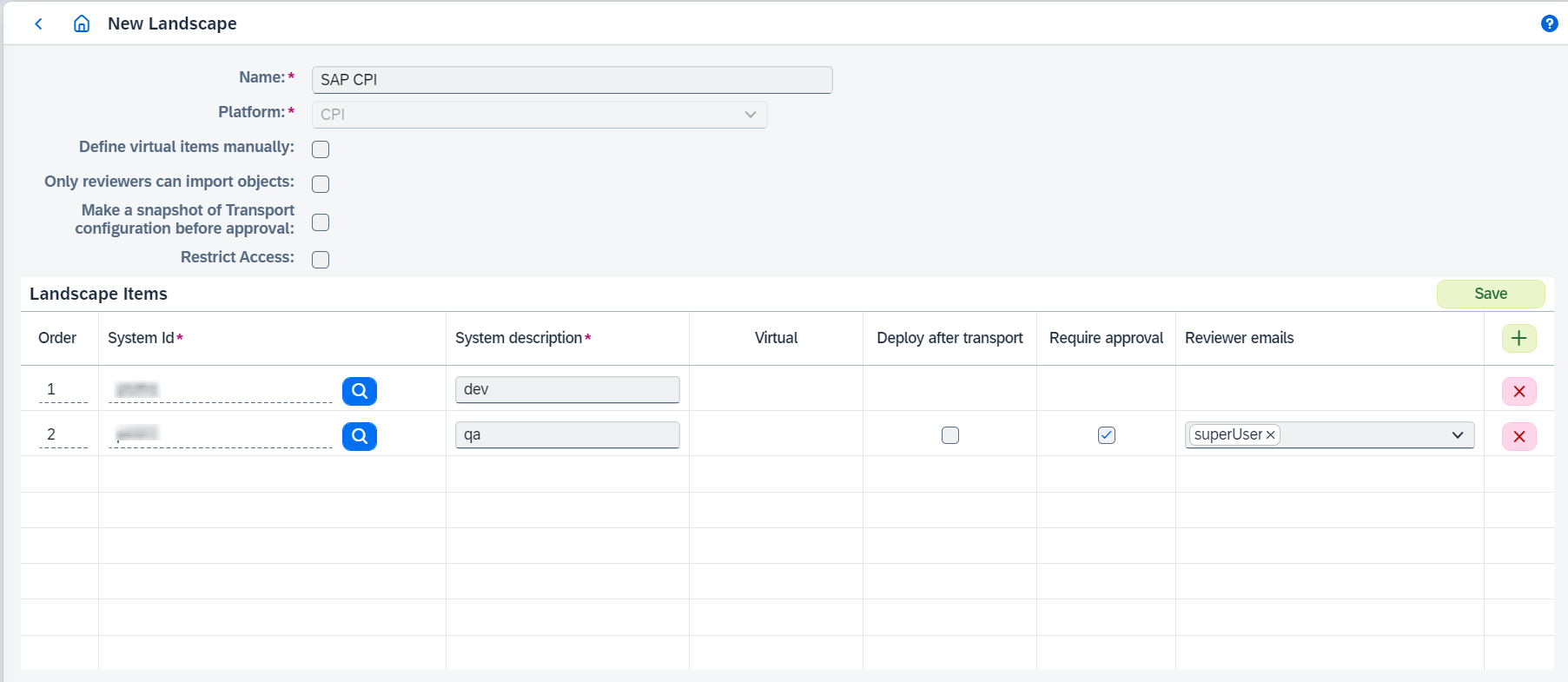
-
Configure the following properties:
-
Nameof new landscape. Should be unique within the organization. -
Platform- select the type of your landscape - CPI. -
Define virtual items manuallyenables possibility to define virtual landscape items manually. Enable this option if you need landscape configuration similar toSystem A → System B (virtual) → System B → System C.If this option is disabled, agent system is marked as virtual for the 2nd and subsequent inclusions (see Landscape configurations examples).
-
Make a snapshot of Transport configuration before approval- if true, transport configuration is cached once transport is sent to approval. The option is visible ifRequire Transport Approvaloption is enabled for at least one landscape item. -
Restrict Executionenables transport executors configuration. -
Transport Executorsdefines executors. This option is available only ifRestrict Executionis true.If Restrict Accessis configured, all executors should also be landscape developers. -
Landscape Developersdefines users who are allowed to work with the landscape. This option is available only ifRestrict Accessis true. -
(Only for binary landscapes)
Scheduled transports execution timeconfigures left bound for import process execution. After configured time global scheduler will have a pulse each 5 minutes. If a lot of transports are scheduled around same period, then target system may be overloaded with transports for some period of time. So that not all transports will be scheduled and executed in time. -
Landscape Itemsdescribes groups of Agents in specific order and assignment. Landscape items can be added by clicking on and deleted by clicking on its .The items have the following configuration:
-
System Idis selected agent. -
System descriptionis description for current system (e.g.qa). -
Virtualdefines whether landscape item is virtual or not. It’s editable only ifDefine virtual items manuallyoption is enabled for current landscape. -
Deploy after transportdefines whether objects imported to current system are deployed or not. -
Require approvaldefines whether transports to current system require approval or not.if CPI landscape item has approval flag enabled, all next landscape items must have that flag also enabled. -
Reviewer emailsdefines reviewers. Available only ifRequire approvalis true for current item.If Restrict Accessis configured, all reviewers should also be landscape developers.If landscape has 3 or more landscape items, the state of the object from previous landscape item is chosen during importing transport.
-
-
Parameter mapping rulesdefines name mapping rules for technical names, displayed names, JMS queue name and sender url. The rules are applied as they are in all cases except when it’s a virtual landscape item:-
If
JMS queue nameorsender urlis externalized, related parameter mapping rule isn’t applied, the value should be updated in transport configuration. -
If
JMS queue nameorsender urlis not externalized, related parameter mapping rule is applied.
-
-
Parameter values replacementdefines parameter values replacement rules for transport configuration parameters. To enable this feature during landscape creation switchConfigureon. Then for each landscape item you can define rule type (substring or exact match) and parameter values which will be used in transport configuration parameters.Only parameters inherited from source will be replaced according to defined strategy. Example: let’s define a landscape with 3 landscape items:
Dev,Qa,Prodand configureParameter values replacement (substring criteria):Rule Type Dev Qa Prod Substring
dev.system.com
qa.system.com
prod.system.com
Exact Match
sapdev
sapqa
sapprod
Exact Match
dev.system.com:2222
qa.system.com:3333
prod.system.com:4444
Substring
dev.system.ondemand.com
qa.system.ondemand.com
So all parameters inherited from source in all objects transported through the landscape will be replaced by corresponding value in the table. If value isn’t defined, empty string will be used in transport configuration parameters.
-
Transport validation tagsconfigures tags either technical or not-technical. If a tag is detected in an object during the creation of transport, it will be displayed as a warning. This functionality allows for easily tracking of non-blocking issues resulting from transport validation. -
Email integrationenables or disables emails sending for approval and import operations. Configure the settings:-
Notify about approval actions- if enabled, notification about sending for approval and execution of approval (approve, decline, soft decline) will be sent. By default, it’sdisabled. -
Notify about transport process completion- if enabled, notification about transport process completion (import, complete import, rollback, etc.) will be sent. By default, it’sdisabled. -
Additional recipients to inform about transport process completion- list of user emails that should be added to CC list in the transport process completion notification email.
-
-
4. Landscape configuration (Api Management platform)
This is a deprecated feature for Api Management platform. We recommend to use Composite landscapes configuration (CPI/Api Management) because it provides a lot of benefits:
Binary landscapes features
-
Idempotent binary landscape is a binary landscape having landscape items with the same agent. For such landscapes there are 2 flows of transport import:
-
When the object is mapped during transport, then new object will be created on the same system.
-
When object is not mapped, then it will be updated on the same system.
-
-
PredecessorsandSuccessorsare used to define a composite landscape. Composite landscape includes binary landscapes and links them together. For example:
CPI and Api Management binary and composite landscapes are managed by Figaf Tool on Composite landscapes configuration (CPI/Api Management) page
-
CPI only. Import of Partner Directory and Security Content objects.
Edit and save related security content objects on Management of Security Content objects page to successfully import Security Content objects. It’s needed to have credentials stored in Figaf Tool, otherwise import will not be performed. -
CPI only. Import of TPM objects.
Supported objects are Company Profile, Subsidiary, Trading Partner, Agreement Template, Agreement, B2B Scenario. The import is performed for Agreements and objects linked with the agreement attached to the transport will be imported to target system.
It is recommended to use the feature in the following way:
-
Import MIGs/MAGs manually using export/import operation on Integration Suite environment from source tenant to target tenant.
-
Create CPI composite landscape (see that section to learn how to do that) if it is not configured yet.
-
Create ticket and attach TPM objects to it.
-
Process import to target system.
There are also several important notes that we recommend to be aware of:
-
If TPM objects already exist on target system and were created manually (not using Figaf Tool transport), the transport will fail and it is expected.
-
If some TPM objects attached to the ticket aren’t linked with any agreement attached to the ticket, these TPM objects will be skipped in the transport.
-
It doesn’t really matter if other TPM objects except Agreements are attached to the ticket or not. Agreement will be imported together with all other objects always. So, the fact whether other TPM objects are linked to the ticket or not, affects only the fact if the target objects will be linked to the ticket after transport and it doesn’t affect the content of the archive at all.
-
Idempotent landscapes aren’t supported.
-
Rollback isn’t supported.
-
Identifiers, systems, etc. will no be deleted on target objects after transport if they are deleted on source objects. This is SAP standard behaviour, deletion is not included, only create or overwrite.
-
B2B agreements archive import operation has timeout that could be configured by bootstrap parameter
irt.devops.b2b-import-archive-timeout. Default value might be not enough for transports with a lot of agreements.
-
-
CPI only. Replication of changes through CPI composite landscape. Replication will automatically create tickets, start and import transports and resolve tickets if some changes are found during synchronization of source system.
-
CPI only. Possibility to transport older versions.
-
Batch import of CPI/Api Management transports linked with the same binary landscape.
-
Batch rollback of Integration Directory transports imported in batch mode.
-
Parameter mapping rulesdefines name mapping rules. SeveralRule Typesare supported and depending on chosen types different configuration is required. -
'Deny if matches' criteria,'Allow if matches' criteria,'Deny if object exists' criteriaconfigurations (see transport denying rules). -
Tracked objects name mapping lookup across the composite landscape.
-
Navigation between Transport Configurations of the same object across the Composite landscape.
-
Child objects name mapping lookup on Transport configuration page.
-
Validation of naming convention rules.
-
"Soft" decline to move transport to the CREATED state (before approval).
-
Possibility to complete import if all landscape items are either imported or skipped but transport status is still
IN_PROGRESS. -
Initialize transport configuration by the ancestor values in IFlow Transport Configuration (see Transport Configuration page).
-
Tracking source and target objects automatically using technical tags.
-
Defining comment propagation policy used during import/rollback operations.
-
Possibility to browse all objects in scope of composite landscape on Landscape Overview page.
-
Possibility to change default behavior of inheritance flag for existing objects to 'Inherit from source'.
-
Possibility to create a next ticket for the next landscape in the chain from successfully processed transport page.
Only if landscape from current transport has one successor. -
Possibility to download parameters report that contains all external properties that are used in the transport. It supports CPI IFlows (CPI platform), communication channels (PRO platform) and API Proxies and Key Value Maps (Api Management platform).
-
Possibility to perform a mass update of transport configuration parameters. It supports CPI IFlows (CPI platform), communication channels (PRO platform) and API Proxies and Key Value Maps (Api Management platform). See batch parameters update to upload transport configuration parameters for more details.
-
Possibility to schedule import process execution. See schedule import for more details.
-
Integration with a webhook (see Webhook integration).
-
Integration to fetch external tickets data (see Ticket Management System Integration).
Follow the steps to configure landscape:
-
Go to the
Landscapestab onConfigurationpage, selectIndividualinLandscapes Typeselector and add your landscape throughCreate Landscapebutton: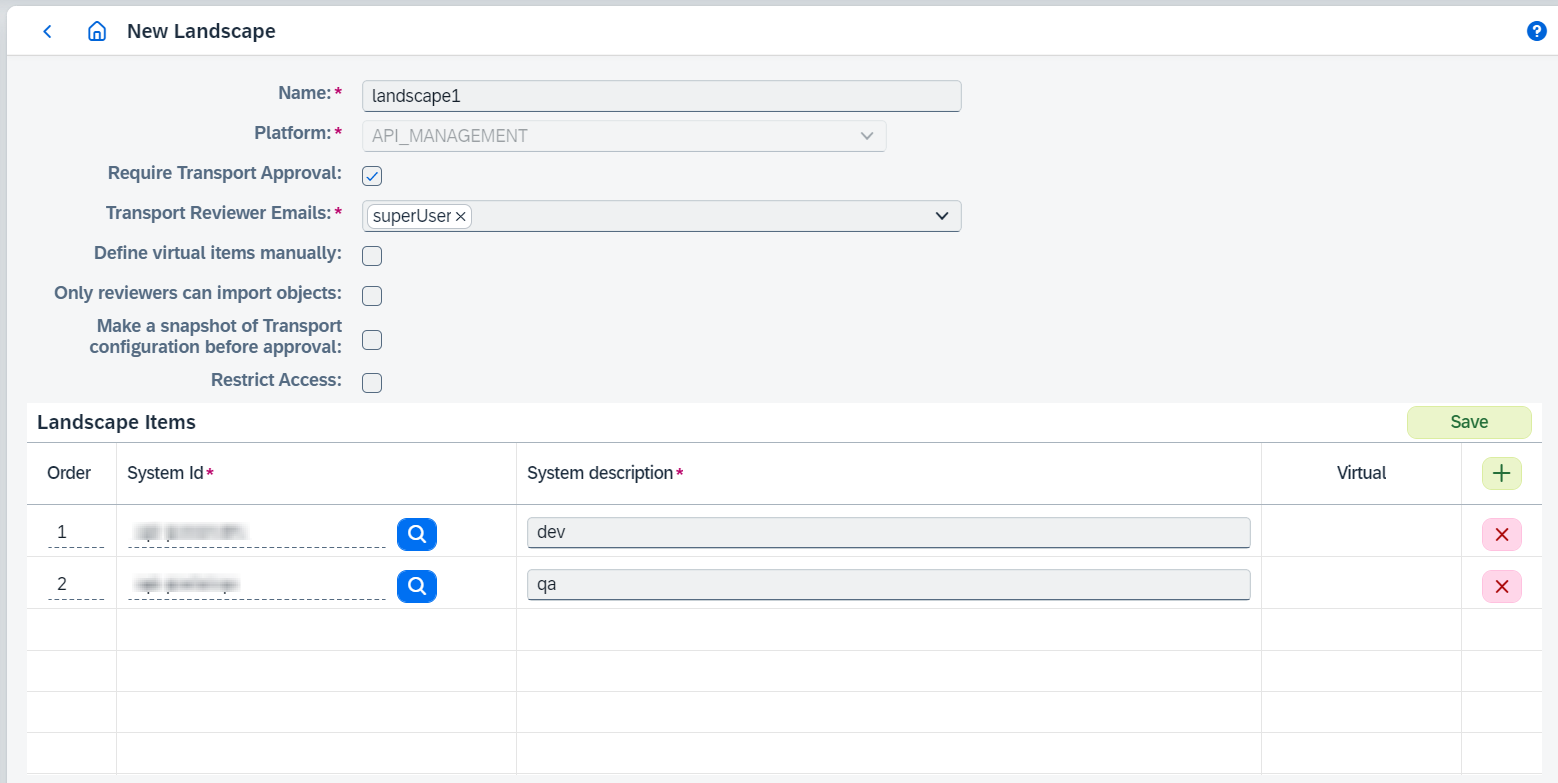
-
Configure the following properties:
-
Nameof new landscape. Should be unique within the organization. -
Platform- select the type of your landscape - Api Management. -
Define virtual items manuallyenables possibility to define virtual landscape items manually. Enable this option if you need landscape configuration similar toSystem A → System B (virtual) → System B → System C.If this option is disabled, agent system is marked as virtual for the 2nd and subsequent inclusions (see Landscape configurations examples).
-
Require Transport Approvalenables review step between transport creation and import. -
Transport Reviewersdefines reviewers. This option is available only ifRequire Transport Approvalis true.If Restrict Accessis configured, all reviewers should also be landscape developers. -
Make a snapshot of Transport configuration before approval- if true, transport configuration is cached once transport is sent to approval. The option is visible ifRequire Transport Approvaloption is enabled for at least one landscape item. -
Restrict Executionenables transport executors configuration. -
Transport Executorsdefines executors. This option is available only ifRestrict Executionis true.If Restrict Accessis configured, all executors should also be landscape developers. -
Landscape Developersdefines users who are allowed to work with the landscape. This option is available only ifRestrict Accessis true. -
(Only for binary landscapes)
Scheduled transports execution timeconfigures left bound for import process execution. After configured time global scheduler will have a pulse each 5 minutes. If a lot of transports are scheduled around same period, then target system may be overloaded with transports for some period of time. So that not all transports will be scheduled and executed in time. -
Landscape Itemsdescribes groups of Agents in specific order and assignment. Landscape items can be added by clicking on and deleted by clicking on its .The items have the following configuration:
-
System Idis selected agent. -
System descriptionis description for current system (e.g.qa). -
Virtualdefines whether landscape item is virtual or not. It’s editable only ifDefine virtual items manuallyoption is enabled for current landscape.
-
-
Parameter mapping rulesdefines name mapping rules for technical names, displayed names and base path. -
Parameter values replacementdefines parameter values replacement rules for transport configuration parameters. To enable this feature during landscape creation switchConfigureon. Then for each landscape item you can define rule type (substring or exact match) and parameter values which will be used in transport configuration parameters.Only parameters inherited from source will be replaced according to defined strategy. Example: let’s define a landscape with 3 landscape items:
Dev,Qa,Prodand configureParameter values replacement (substring criteria):Rule Type Dev Qa Prod Substring
dev.system.com
qa.system.com
prod.system.com
Exact Match
sapdev
sapqa
sapprod
Exact Match
dev.system.com:2222
qa.system.com:3333
prod.system.com:4444
Substring
dev.system.ondemand.com
qa.system.ondemand.com
So all parameters inherited from source in all objects transported through the landscape will be replaced by corresponding value in the table. If value isn’t defined, empty string will be used in transport configuration parameters.
-
Transport validation tagsconfigures tags either technical or not-technical. If a tag is detected in an object during the creation of transport, it will be displayed as a warning. This functionality allows for easily tracking of non-blocking issues resulting from transport validation. -
Email integrationenables or disables emails sending for approval and import operations. Configure the settings:-
Notify about approval actions- if enabled, notification about sending for approval and execution of approval (approve, decline, soft decline) will be sent. By default, it’sdisabled. -
Notify about transport process completion- if enabled, notification about transport process completion (import, complete import, rollback, etc.) will be sent. By default, it’sdisabled. -
Additional recipients to inform about transport process completion- list of user emails that should be added to CC list in the transport process completion notification email.
-
-
5. Landscape configuration examples
-
If development and debugging process is executed on the following systems: D74 (dev system) → D75 (qa system) → T75 (prod system), then landscape configuration is:
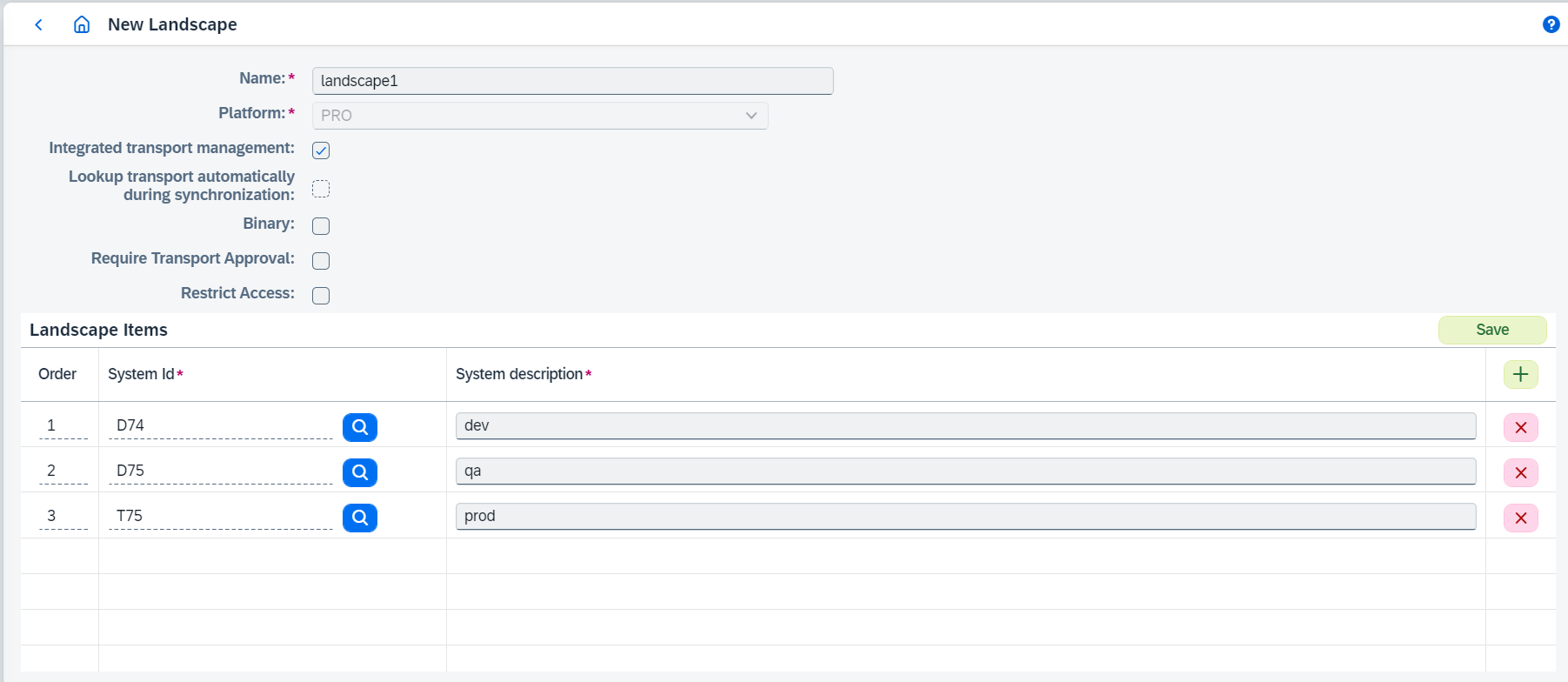
-
If development and debugging process is executed on the following systems: D74 (dev and qa system) → D75 (prod system), then landscape configuration is:
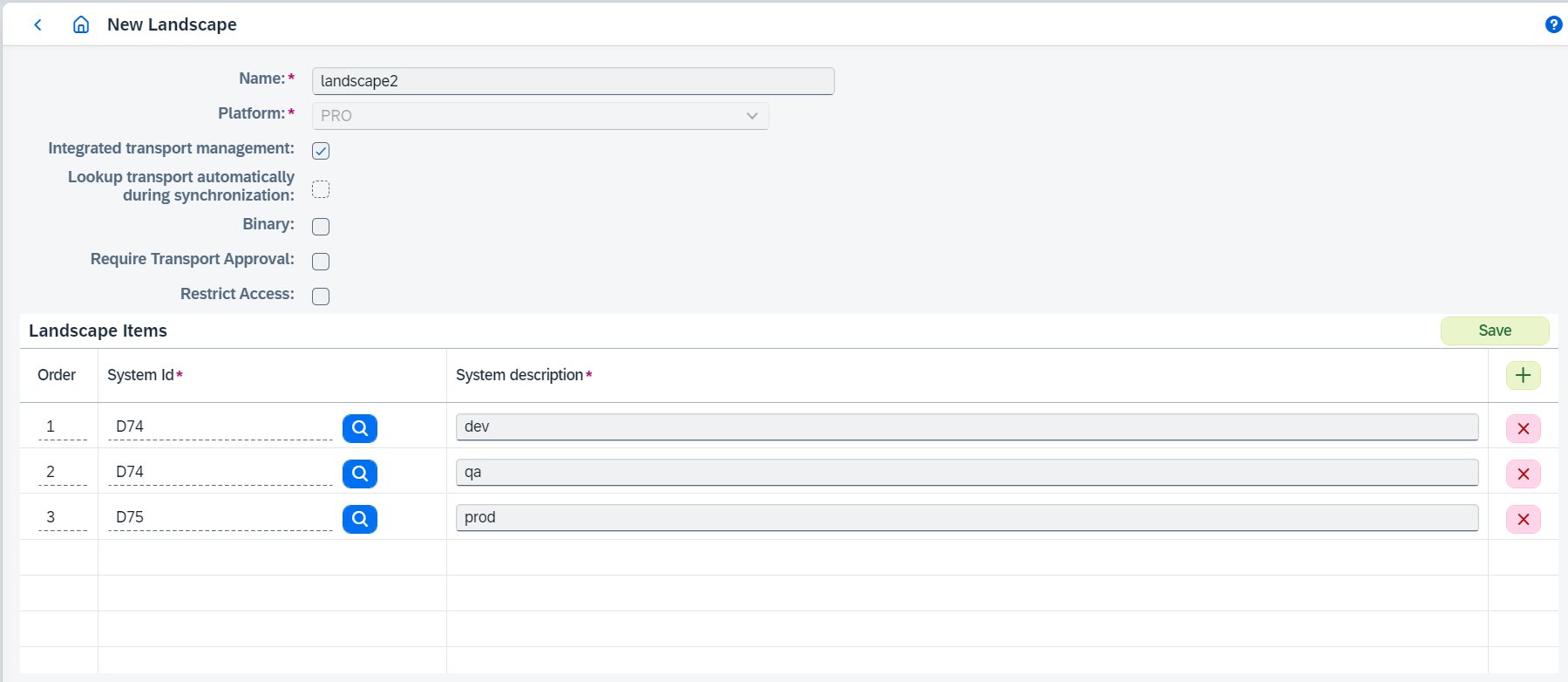
In this case Agent system C73 will be marked as virtual for the 2nd inclusion.
Agent system is marked as virtual for the 2nd and subsequent inclusions. You need to use Agent system twice to define configurations like DP1 (dev and qa system) → DP2 (prod system).